


 Yay! DAP is the ONE for YOU!



The BEST FREE Course on Membership Sites!
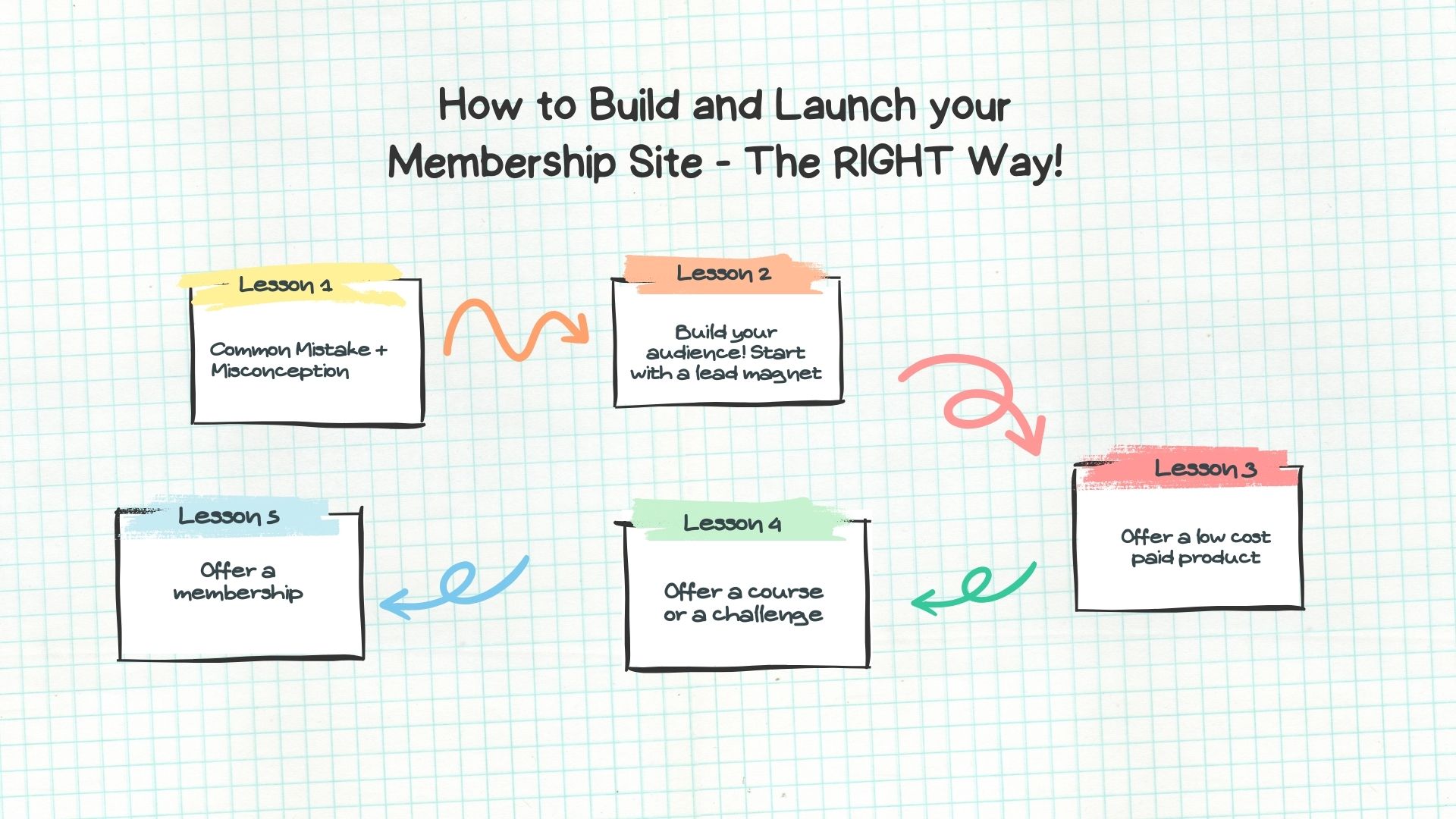

From idea to a fully built out online course or PDF report, our new AI add-on will help you create both FREE and PAID content within minutes!
1
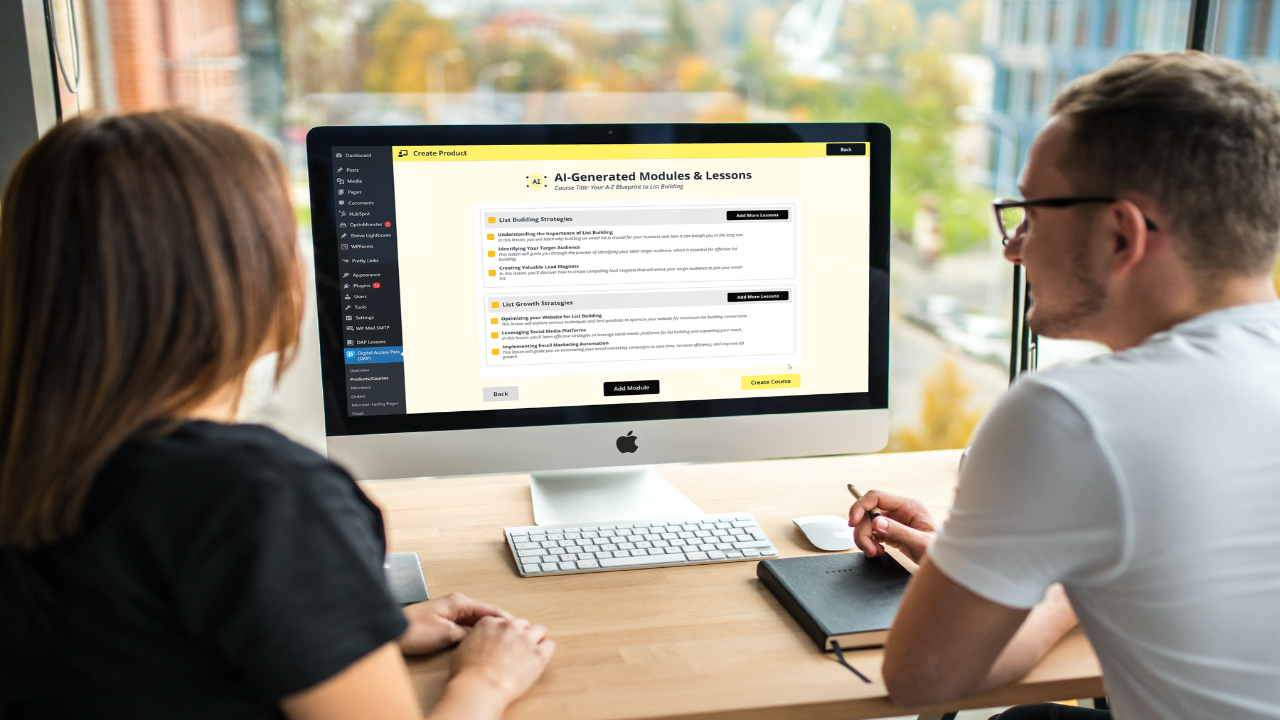
From course idea to course outline, modules, lesson content - DAP's AI will build out your entire course for you in minutes!
2

From idea to challenge outline, day-by-day breakdown of challenge lessons - DAP's AI will build it all for you within a few minutes!
3
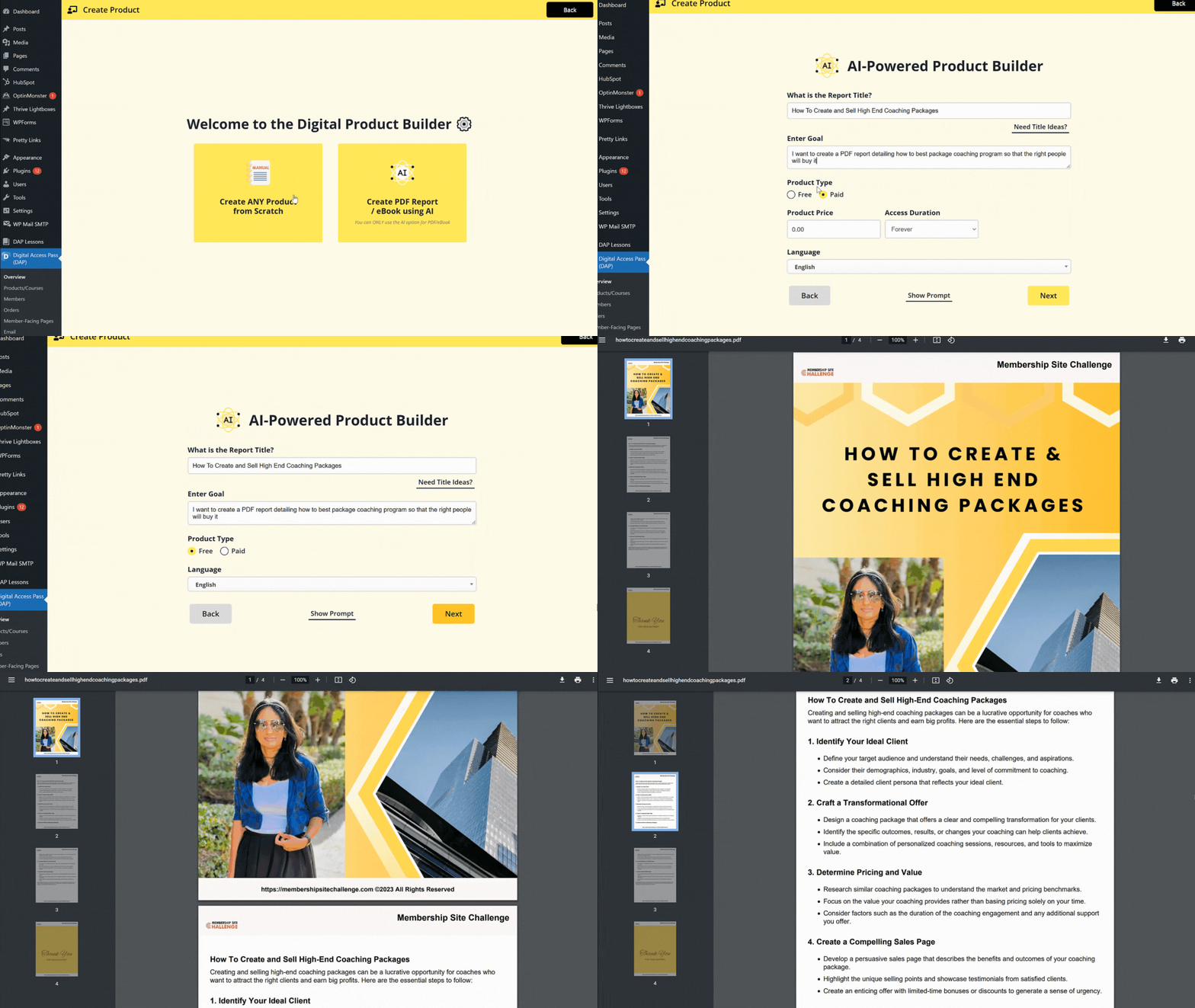
Enter the topic name and your goal. DAP's AI will create the entire PDF / eBook within a few minutes!
It Looks Like We Will Just Miss Hitting The 1 Million In Gross Revenue!
I've doubled my business this year and it looks like we will just miss hitting the 1 Million in gross revenue! DAP, SPC and of course, you Veena has been a part of our success.
Next year, we will plan on using your GameOfPoints (GoP) and the SmartQuizBuilder (SQB) plugins to continue to build. You are a force and I feel fortunate to have found you.

MasterTrader.com
The Most Robust Membership System The World Has Ever Seen!
I just have to give a shout-out to Veena for her dedication to continually develop the most robust membership system the world has ever seen. I’ve been using DAP for many years and have been amazed on almost a daily basis by Veena’s total dedication and service.
Today I finally used the new LMS aspect of the DAP platform and was once again blown away. I love the flexibility and ease of implementation.

MetaDomainer.com
Despite Dealing With Covid, Our Membership Site Is Still On Track And Bringing In Recurring Income!
We are now into our 10th year with Digital Access Pass (DAP)! I was just thinking though, what a blessing it has been to have my website using DAP for Membership. It's quite a neat feeling of security that even in the midst of being a bit out of "commission" that our membership site is still on track and bringing in recurring income despite all that.
Thanks Veena again for DAP & SPC!

ChurchLetters.org
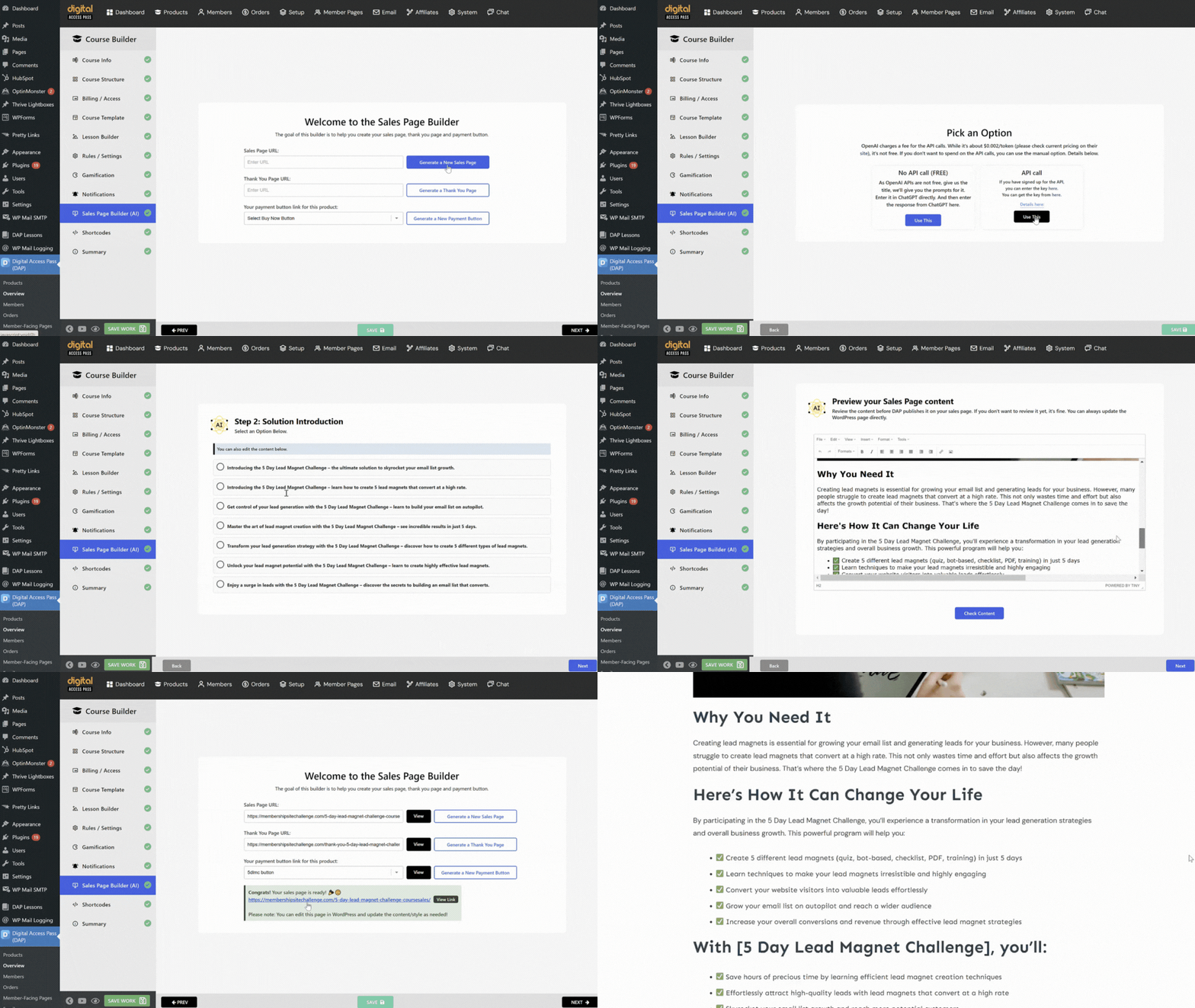
DAP can automatically generate your sales copy, thank you page and payment buttons for your paid products - using AI!
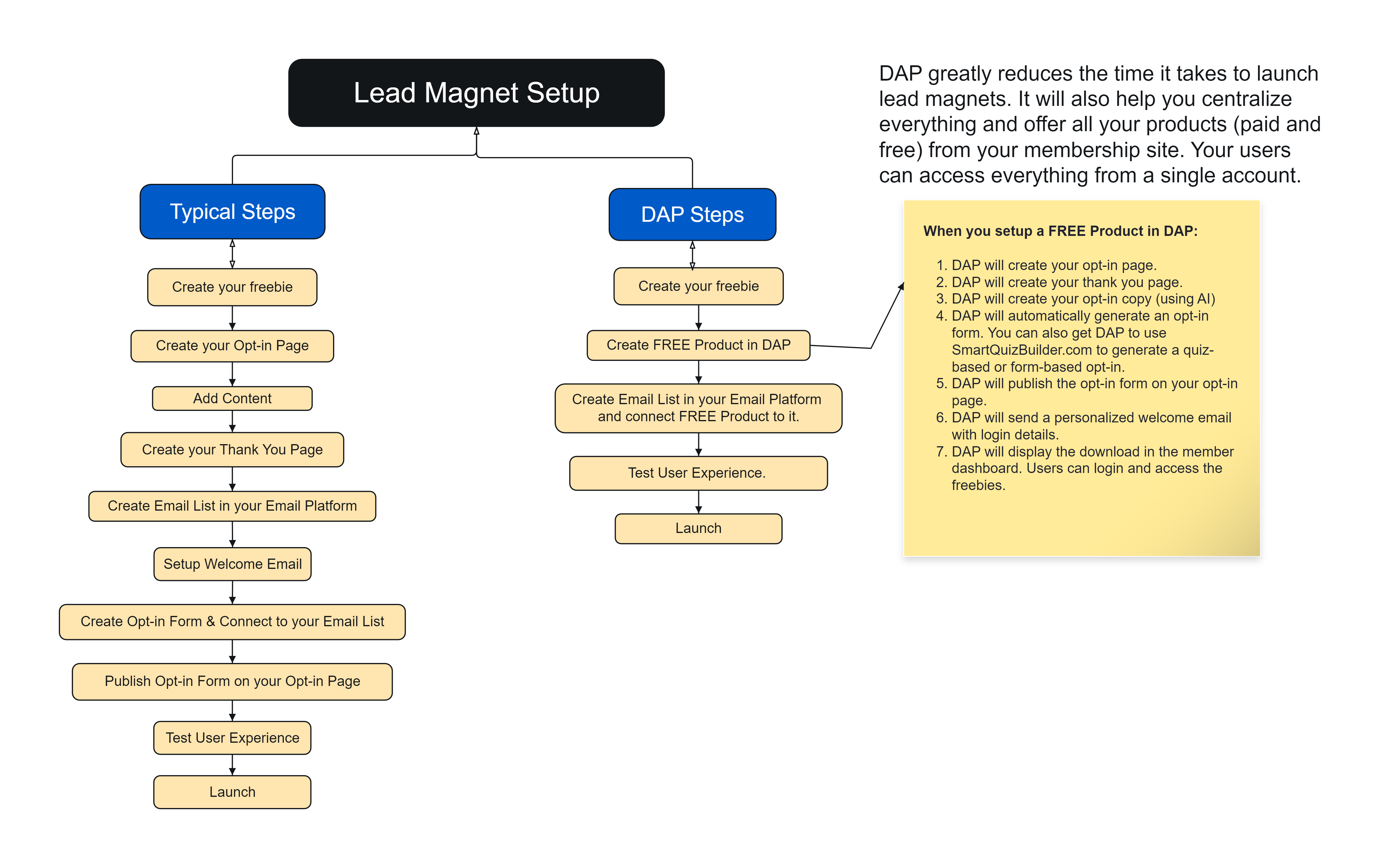
DAP is not just a plugin! It's a full-fledged, all-in-one Membership and LMS Platform. You can use DAP to create, protect and deliver all types of Products & Services! DAP supports all of these membership models:
1
Release content based on a set schedule. Billing can be monthly/yearly etc. Access is based on payment. Users will lose access if they cancel. Use day-based dripping (access released X days after joining), or date-based dripping (available on a specific date).
2
You can offer basic or limited features to users at no cost. For e.g., free trial (full access during the trial period), or a free plan with limited access. Use this to give users a taste of your premium membership and lower the bar to entry for new users to your product.
3
Users get access for a specific period of time. After that period ends, typically members lose access but if you still want them to keep access, you can do that! Also, billing can be however you want - one-time, or recurring until membership ends.
4
DAP comes with several options for course creators! You can break down your course into modules and lessons, or just lessons. Sell it individually (for a one-time fee or payment plan) and/or with membership.
5
Give members instant access to everything you have (courses, trainings. etc.), and ongoing access to new content you add. Release new content every month to keep members from downloading and cancelling.
6
Offer different types of digital products /downloads for a one-time fee. After the purchase, users will receive access to the protected content. You can give users limited or lifetime access to the product.
7
The service model is based on delivery of a service. For e.g. you can offer a done-for-you service where you can help clients with actual implementation / setup and/or offer one-on-one or group coaching service.
8
Every tier has distinct benefits and values. We use the tiered membership model to sell DAP licenses (basic, platinum, elite) where each tier has different benefits but all have the same core features.
9
You can offer your membership program to small businesses, groups or corporations. This will allow group owners to control who gets access to the membership program under them and manage those accounts.
10
Add a FREE tier that does NOT require users to enter their credit card details. Use it to offer all of your freebies. Users can access all freebies under one account. It'll increase the perceived value of your membership. Upsell paid products in your member dashboard under "you might be interested in" section.
11
Bring your members together in one online community. You can charge a fee for access to private groups and forums, or make it free for all members. You can also allow access to different group/forums based on membership levels and use it as an incentive to get people to join your highest tier.
12
This is the most popular membership model - a combination of different membership models. For e.g., a membership site that includes online courses, weekly coaching calls, and a community component. Combine different membership models to offer a great membership experience.
13
Want to deliver content as if it were a monthly magazine where members who were in for a specific month can access that month’s content but those that joined later (say the next month) can't access previous month's content? DAP has the BEST magazine model implementation!
14
Sell individual pieces of content such as audio, video, PDF files, WordPress content, without creating a product! You can allow users to buy or rent your content, or signup for a membership. You can also create an instant content store with a buy, rent or membership purchase option!
15
You can use our cart plugin - SmartPayCart (SPC) to create all types of funnels - lead magnet funnel, sales funnel, member funnel, product-launch funnel, etc. Charge for content in many different ways - one-time, recurring, free, trial, payment plans, credits, etc.
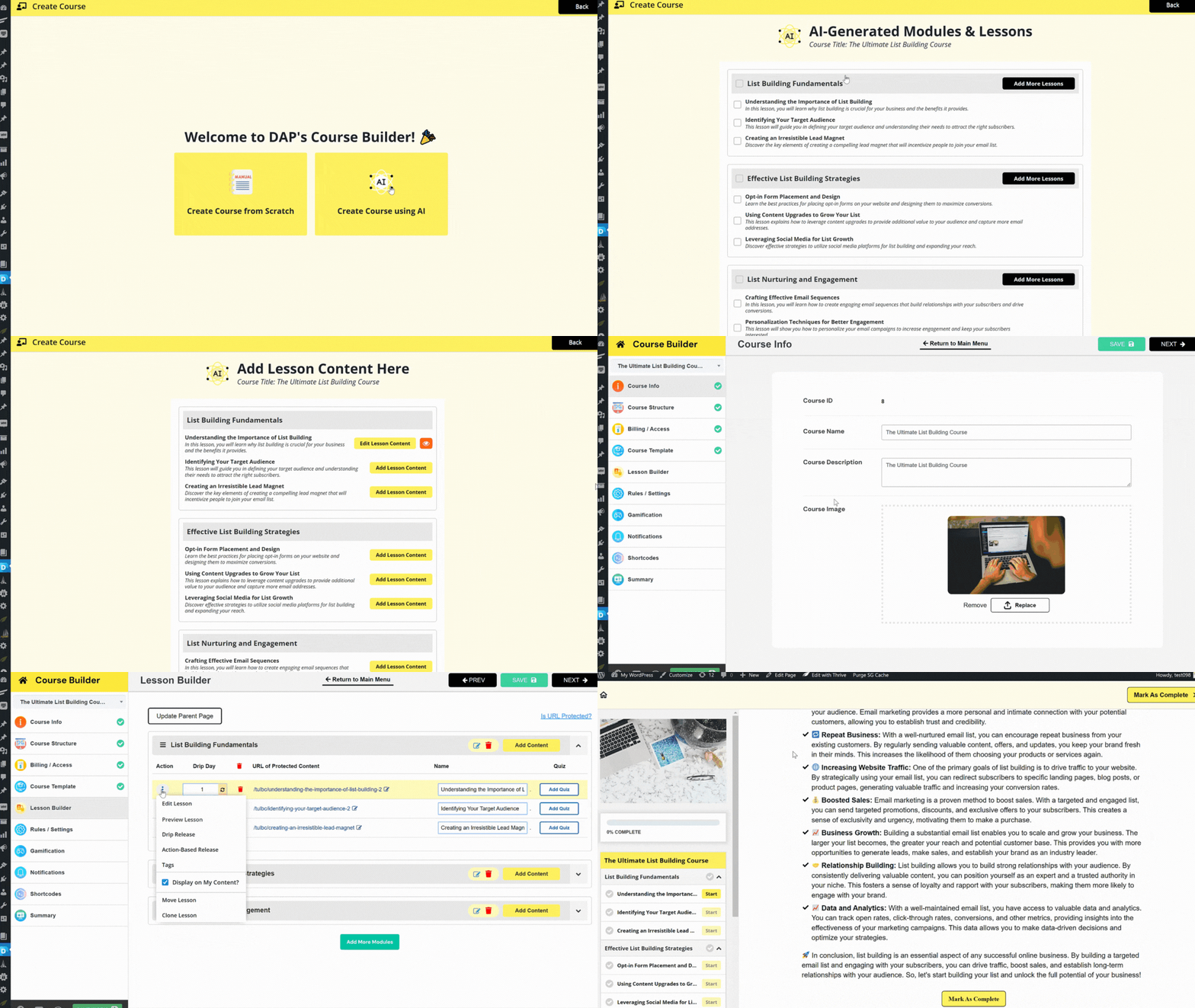
DAP comes with an advanced course and challenge builder with a tons of options. Create strikingly beautiful courses effortlessly! No coding required. DAP's courses look AMAZING even without customizations but all our templates are fully customizable.
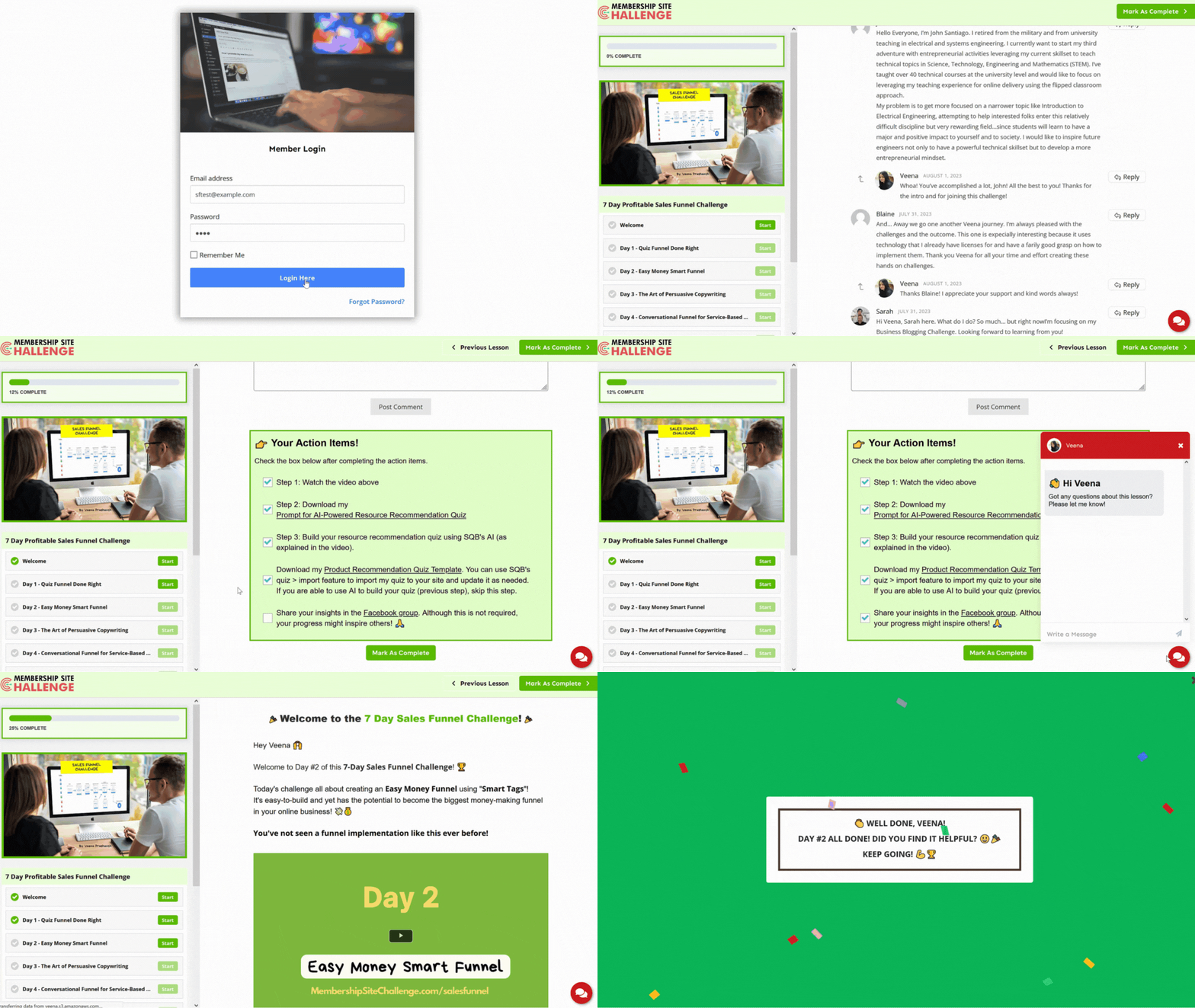
Use DAP's advanced course builder to quickly and easily build your courses.
Your courses will look amazing! Wow your students and create a memorable and fun course experience for them.
 You can use WordPress for your lesson content. You can design lessons however you want (using your own page builder), and make it part of your DAP course.
Use DAP's built-in course template! Create your lesson content in DAP using DAP's powerful built-in editor.
Use DAP's built-in course template for the overall layout but use your own page builder to create / edit your lesson content.
You can charge for your course however you want and give users limited-time or lifetime access to the course.
One-time fee with limited-time access One-time fee with lifetime-time access Payment Plan (fixed number of payments) with limited or lifetime access. Offer it as part of your membership (recurring). They'll keep access as long as their membership is active
Award points when users complete your course and/or lessons in your course. Build excitement by displaying inspiring messages and fun animations when users complete lessons. Collect testimonials on autopilot. Give points for reviews. Give users points for promoting your course on social. Increase your opt-in conversion. Award registration points for free courses. Create an instant "credit" store where users can redeem access to products using their points/credits.
Add blocking quizzes to your lessons! Setup rules to prevent users from accessing the next lesson until a student achieves a minimum grade for a quiz.
Automate course reminders!
If students enroll but don't start the course, or start but don't complete it, you can setup course reminder rules to automatically send email reminders to these users. The content of this email is fully customizable. You can configure the total number of times you want the reminder to be sent.
You can add 3 different types of "smart" timers to your courses.Countdown Timer - Show a countdown timer to remind users how much time is left to complete the course. This is for courses where you give users limited-time access such as 7 days or 14 days to add a sense of urgency. It'll be displayed on each lesson page.Course Timer - Show time they have already spent on the course. It'll be displayed on each lesson page. Lesson Timer - Show time they have already spent on the lesson they are on. It'll be displayed on each lesson page.
Display products and services that the logged-in member has signed up for. Display badges and certificates. Display completed courses. Display in-progress courses. Display enrolled but not started courses. Display not-yet-enrolled courses (upsell courses). Display "might be interested courses" (upsell products)
see what others have to say
In Today's "New Way Of Doing Business", DAP Provides Many Of The Online Tools You Need To Do Business.
I came back to DAP after pivoting in my business because there is really no better membership platform out there in my opinion! Veena is proactive with constant upgrades and I’m thrilled DAP now includes an LMS with gamification! Their customer support is amazing and I recommend them highly. I LOVE all you're doing in DAP where both ingenuity and customer service are absolutely incredible and amazing!
Deborah Johnson // GoalsForYourLife.com
If You Want A Membership Plugin Which Is Easy To Use, With Great Support, A Lots Of Features, At A Low Cost, I Can`t Think Of Anything Better!
Digital Access Pass is a product I have used since 2015 when I set up my first membership site. Back then I just wanted a product that would allow me to host my online course. I was tempted to use Udemy but didn’t like the lack of control I had on that site. Avoiding Udemy and going with DAP was one of the best decisions I could have made. I have more faith in Veena and her team than any other software creator I work with and am 100% confident DAP will keep current, up to date and evolving as the net changes.
Daniel Thorpe// Guitar Domination
Nothing Can Compete Or Compare With The Features DAP Provides For Delivering Online Courses!
I have used a few LMS software products, even tried Thrive Apprentice, but there is nothing that can compete or compare with the features DAP provides for delivering online courses. As the users keep asking, DAP keeps delivering and improving with new features all the time in its upgrades.
Frances Piggott // FranPiggott.com
DAP comes with a built-in affiliate feature. From 2 tier payments, affiliate coupons, full-fledged reports, custom affiliate links, referral bonus (where you can affiliates free month of subscription), credits, download builder - you can do it all!
Assign tags when any of these events happen: Purchase Tags, Lead Magnet Tags, Course & Lesson Completion Tags, Recurring Payment Tags,
Cart Abandonment Tags. Assign tag (add or remove tag) when users abandon your cart.
DAP comes with a built-in email autoresponder for pre-scheduled emails, email broadcast system to send email to your lists, and support for email SMTP if you want to connect to external SMTP servers such as Amazon SES.
Protect all types of content - pages, posts, custom posts, categories, pdf files, audio, video, mp3, zip, pdf, etc. You can use DAP to deliver your content in MANY different ways - instant, ongoing, dripped, timed, action-based, task-based, etc.
Your community could be the main component or a key benefit of your membership. You can use any free WP forum plugins, BuddyBoss or use Invision Community for your forum and integrate with DAP for a seamless single signup experience.
DAP integrates with all leading email platforms -such as ActiveCampaign, ConvertKit, Aweber, Mailchimp, MailerLite, SendInBlue, etc. Connect with automation platforms such as Zapier, Pabbly Connect, KonnectzIT, Integrately, Integromat, etc.
NO limits with your DAP license.
Unlimited Products
Unlimited Membership Levels
Unlimited Members
Unlimited Email Autoresponders
Unlimited Upsells, Downsells, etc.
DAP offers the most comprehensive group membership feature. The # of members (seats) that group owners can manage can be configured in the backend. The group account owners can fully manage the subaccounts under them.
DAP comes with several options for course creators! You can break down your course into modules and lessons, or just lessons. Sell it individually (for a one-time fee or payment plan) and/or with membership.
You can quickly and easily create a free or paid challenge. Add a to-do list under each challenge. Users can check a box to indicate completion. Gamify your challenge using points, fun animation, certificate, badges, etc. Drip out the challenge lessons.
Use DAP's user-friendly product builder to create, protect and deliver all kinds of products - free or paid. . Assign content, setup billing and a delivery schedule. Customize your welcome email. Your product will be ready in less than 10 minutes!
Use DAP's form builder to generate a beautiful signup form for your freebies! Publish it on your opt-in page. You can configure it to auto-login users when they signup. Deliver all of your freebies from your membership site.
Use our game of points plugin to award points when users complete lessons, display inspiring message when users accomplish a goal, collect testimonials on autopilot. Award points for sharing your content on social. And so much more!
DAP comes with a fully customizable certificate and badge builder. Use it to upload a certificate image, design your certificate, customize it and award it automatically when users complete your course or challenge.
SmartQuizBuilder.com is our quiz plugin and it integrates beautifully and seamlessly with DAP. Whether you want to create a lead magnet quiz or a blocking quiz, you can do it all using SQB and DAP.
DAP comes with a powerful & fully-customizable member page builder! Create beautiful member-facing pages such as login page, dashboard, profile, my content, cancellation page, invoice and affiliate page.
DAP integrates seamlessly with SmartPayCart.com, which is our own cart platform for DAP. It also integrates with WooCommerce, ClickBank, PayPal, JVZoo, WarriorPlus, ThriveCart, PayKickStart, SamCart, 1ShoppingCart, 2Checkout, Zaxaa, Ontraport, WP eStore, eJunkie, etc.
DAP's one-of-a-kind Visual Automation Engine will allow you to supercharge your membership site automations and create a truly incredible experience for your members. Easily connect DAP with your, send membership password.
assign & send tags.
You can setup rules in DAP to automatically give access to additional products when users signup for a specific membership or product. No need to duplicate content. Use chaining to automatically give access and also remove access upon cancellation.
You can create many different types of buttons - buy now, add-to-cart, donation, Netflix-style-pay-per-post, pay-using-credits and pay-what-you-want. You can also create an instant storefront for your products. Select the products you want to showcase in the store.
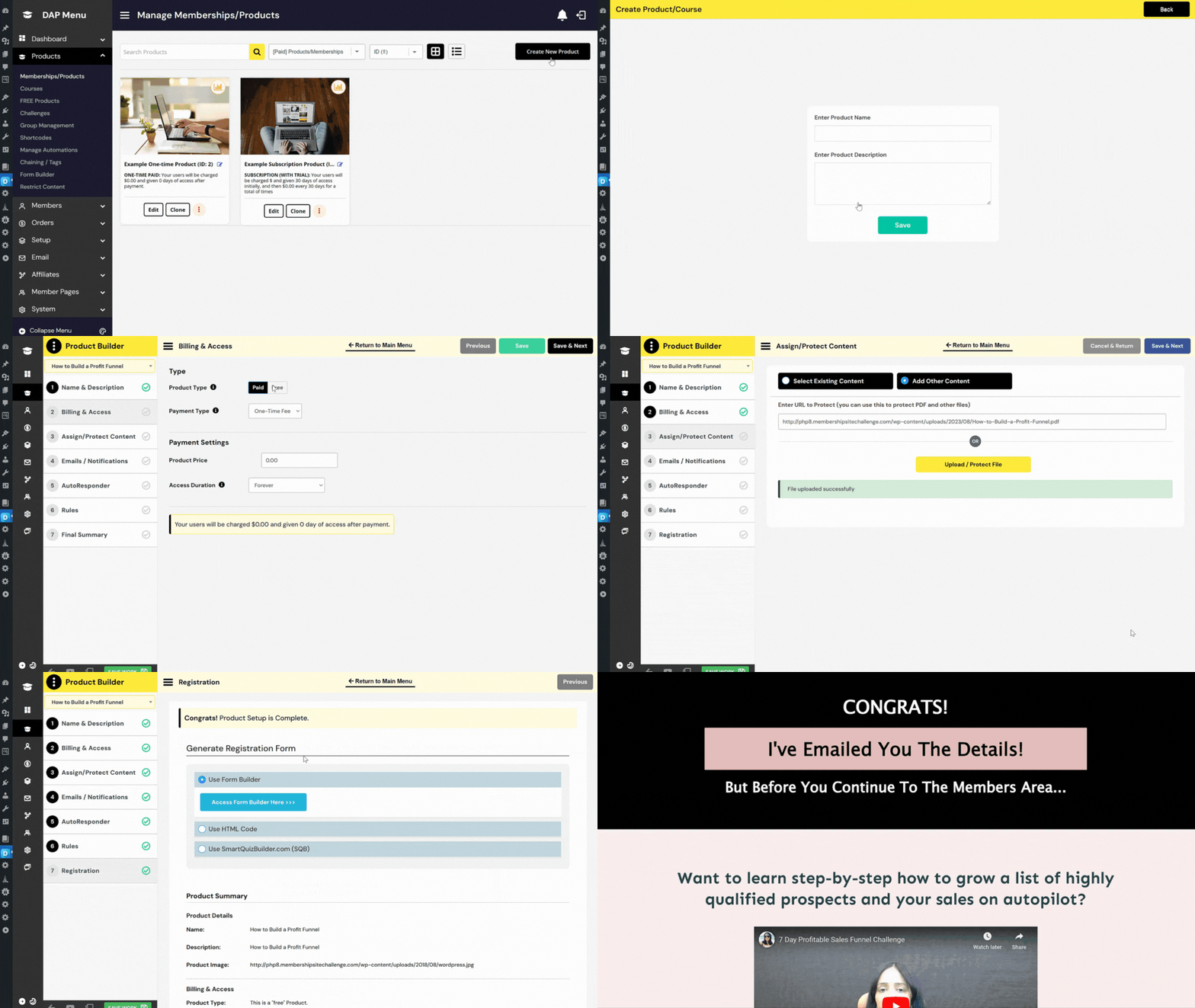
If you have content, resources, or services that your audience would find valuable enough to pay for or subscribe to, you can use DAP to productize and sell it.
Tried of selling one-off products? Want to establish a consistent and recurring revenue stream for your business? DAP is exactly what you need!
You can offer your expertise, insights, or resources that can continually provide value - keeping your target audience engaged over time.
Concerned about safeguarding your valuable resources from unauthorized access or distribution? DAP's content protection features offers the security you need to protect your exclusive content.
Want to expand and grow your membership site over time? DAP is equipped to handle scalability, accommodating increasing user numbers, content additions, and enhanced functionality.
Tailor your membership offerings with different access levels, granting members the choice of basic, premium, or exclusive content tiers.
Keep your members engaged by delivering content gradually using DAP's content dripping feature. This ensures a steady stream of value over time.
Seamlessly integrate DAP with your existing website, email marketing tools, payment gateways, and more, making setup and management straightforward.
DAP offers versatile monetization options, including one-time payments, subscription models, trial periods, and tiered membership levels.
DAP's intuitive dashboard and user interface make it easy to users of all technical levels, greatly reducing the learning curve.
Monitor your membership site's performance with comprehensive reporting tools, helping you make informed decisions for growth.
Tailor the look and feel of your membership site to match your brand's identity, offering a cohesive experience to your members.
Keep members informed and engaged with automated email notifications, welcome messages, and updates about new content.
Easily manage and incentivize affiliates to promote your membership site, expanding your reach and attracting new members.
Ensure secure payment processing with our shopping cart plugin's integration with Stripe, PayPal and Authorize.net. Our cart plugin - SmartPayCart,com (SPC) is easy-to-setup and is made for DAP. It works seamlessly with DAP!
"DAP Offers A Service Where You Can Get Their Experts To Configure Things For You For Pretty Cheap"
I have long told LMS and membership plugin vendors they should offer a white-glove service. After all, just because I want a new couch or bookshelf, doesn't mean I also want to build it.
The best news? If you buy DAP's Elite plan (which I recommend), it comes with 3 hours of their concierge service. You can get their experts to configure things for you for pretty cheap! It's a white glove service that changes the name of the game. Because as long as the power is available, I don't necessarily need to know how to configure every switch that's available to me. I want the benefit of the power. Not necessarily the know-how on how to do everything myself.

"My First Concierge Call Was Outstanding..."
My first concierge call was outstanding. Not only did Veena answer all of my questions, including a question I didn't even know to ask, she offered motivation and confirmation that I can set up my membership site properly and effectively. Look forward to the second call.

Need help planning your membership site, or the right membership strategy, or with just DAP setup/implementation? Just signup for the DAP elite license and you'll get FREE 3 hours of one-on-one concierge calls with us! We share our screen on the call so you can actually see and learn with us.
The 3 hours of time can be used for membership site planning, brainstorming ideas, strategy and implementation. You can use the time however you want. If you want us to split the 3 hours into 6, 1/2 hour calls, you can do that too!
So if you need a little extra help and don't have the time to figure it all out, signup for the DAP Elite Package. You will be glad you did!
01
 Create online courses and challenges.
Make it free or paid.
Sell it for a one-time fee, payment plan or offer with membership.
Use AI or build it from scratch.
Select pre-built templates and customize as needed!
Gamify your course, add quizzes, drip out the lessons and more!
02
Create digital products and downloads.
Make it free (lead magnet) or paid.
Sell it for a one-time fee, payment plan or offer with membership.
Use AI or build it from scratch.
Upload files and instantly protect it using DAP.
Drip it out or make it available instantly.
Generate a signup for freebies or payment button for paid products.
03
Create membership tiers / plans.
Offer free or paid trial.
Offer monthly or annual memberships, or setup custom billing.
Use day-based dripping or date-based dripping.
Offer one or more pieces of content with each membership.
Protect all kinds of content - WordPress pages, posts, categories, custom posts, zip files, pdf files, etc.
Offer bonus products or courses with memberships.
04
Create a lead magnet funnel
Build a 1-click upsell funnel using our shopping cart plugin (SPC) or use a shopping cart platform that integrates with DAP.
Create coupon codes. Offer % or $ discount.
Offer multiple order bumps.
Full-fledged dunning management - self-cancellation, refunds, card update, etc.
Offer a referral program using DAP's built-in affiliate program. Use it to promote your products, courses or memberships.
Connect DAP with your email platform.
Maximize Your Savings: Choose Annual Billing!
Want just a 2-site license of ELITE (includes all plugins)? You can purchase it here.
* ALL Plugins included in Elite Membership - DAP license, DAP AI Add-on, SmartPayCart.com, SmartQuizBuilder.com, ListBuildingBot.com (NEW), SmartQuizBuilder AI Add-on, S3MediaVault.com Elite, GameOfPoints.com, ShowSalesProof.com, SpinToWinReward.com, DAP2DAP, DAPConnect, CoolCastPlayer.com, FBLeadMachine.com, FBShareToUnlock.com & more! You get 5-site license with Elite Monthly and Elite Annual. This is not an agency license.
* AI Add-on: Don't want to signup for Elite License but want access to the AI option? You can signup for the AI Add-On here.
* Plugins included in Platinum Membership - DAP license, SmartPayCart.com & S3MediaVault Pro. You get 5-site license with platinum membership. You can use it on up to 5 sites that you own. This is not an agency license.
* Plugin updates and support are only provided until your current subscription is active. All purchases are subject to our terms of use.
* DAP license can only be used on the sites you "own". It cannot be used on other client or partner sites. If you want to use it on a client site, you'll have to purchase a separate license for each client.
money back
100%
30 day guarantee
If, for any reason, you don't like DAP, you can get a full refund anytime within 30 days after your purchase. If you have any issues, just get in touch with our friendly support team and they'll either help you out until you get the results you need or give you a swift refund.