Subscriber Flow
The flow of subscriber in this model, is “FROM DAP TO Aweber“. User signs up at DAP first, then DAP adds her to Aweber.
If you are looking for the other way, i.e, “FROM Aweber TO DAP”, then click here.
Please Note
When DAP adds a subscriber to your Aweber list, it can currently “send” only the user’s Name and Email address to Aweber. DAP cannot (and does not) send the user’s unique password in DAP, or their affiliate id, etc. If you want Aweber to send out the password, at this time, there’s only one workaround. We have this on our to-do list, and we will be implementing this feature in a future release.
How it works
With the “DigitalAccessPass.com” Aweber Email Parser, integrating DAP with Aweber is a total breeze.
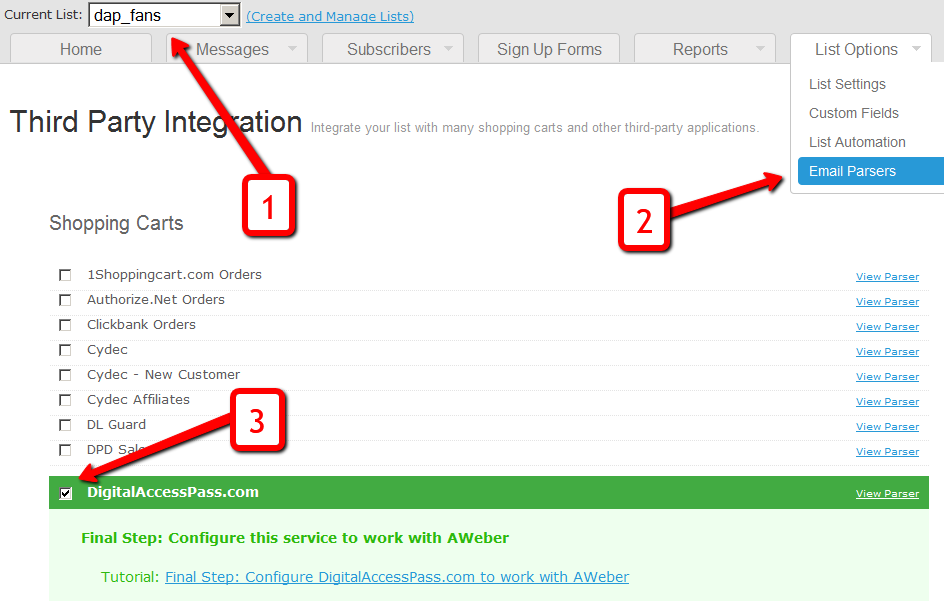
1. Login to your account at Aweber.com and from the drop-down, pick the list for which you want to add DAP users to (see Image 1. below)
Image 1:

2. Click on “My Lists” and within that, select “Email Parser” (see Image 1 above)
3. On the Email Parsers page, check the check-box next to the parser named “DigitalAccessPass.com” (see Image 1 above)
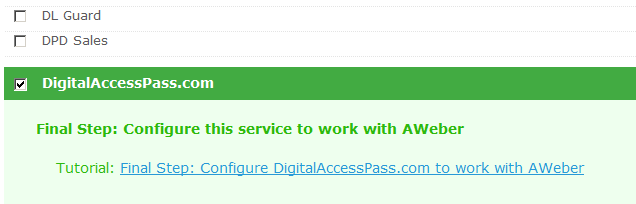
You will then see something like this.

That’s it for the Email Parser activation at Aweber. Just a couple of more things to be done within your DAP Admin Dashboard.
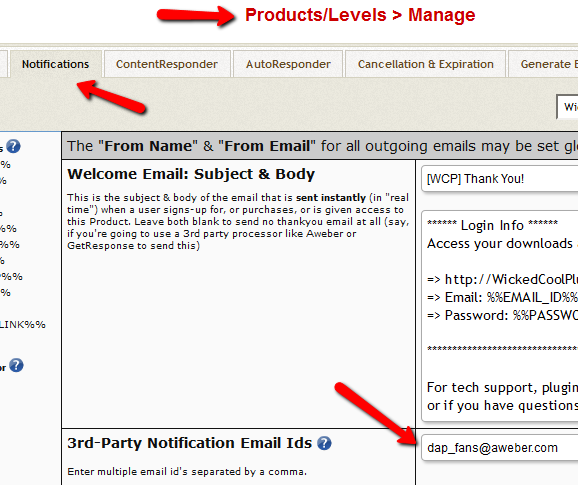
4. Log in to your DAP Admin Dashboard and pick the product (whose members you wish to add automatically to your Aweber list from step 1 above)
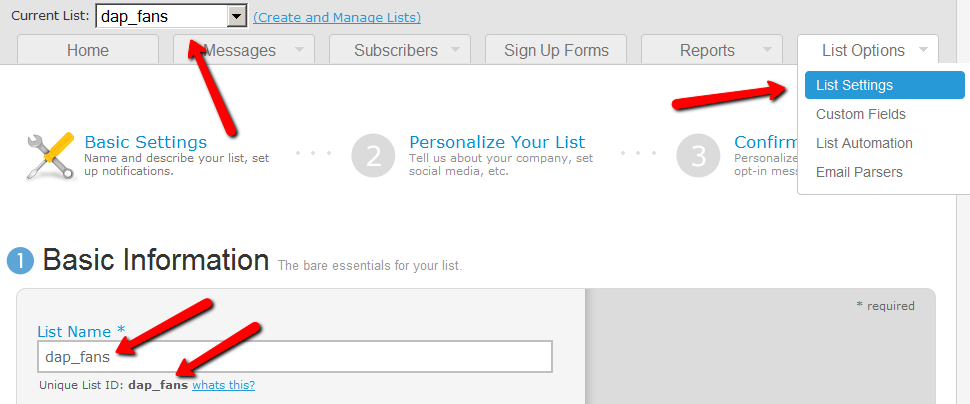
5. If your Aweber list, is called “dap_fans”, then your Aweber “list email id” is “dap_fans@aweber.com”. Just add this Aweber list email id to the “3rd Party Notification” field of the above product, and save.

That’s it!
How This Works
So let’s say you picked the list “dap_fans” in your Aweber account, and the DAP Product “Example Subscription Product” (as shown in the screenshots above).
So once you add “dap_fans@aweber.com” to the product’s “3rd Party Notification Email Ids” field and save it, every time someone gets access to the “Example Subscription Product” product (regardless of whether they buy it, or you give them access on the backend), an email is sent out to the email id dap_fans@aweber.com , which looks like this:
From: Joe Subscriber <joe@subscriber.com>
Subject: New User Signup (3rd Party Notification)
Body:
Name: Joe Subscriber
Email: Joe@Subscriber.com
Product: Example Subscription Product
And because you have already activated the DigitalAccessPass.com parser in your “dap_fans” list, Aweber automatically adds “Joe Subscriber” with the email id (Joe@Subscriber.com) to your dap_fans list. And the parser has been written in such a way, that the product name will be used as your “Ad Tracking” field for the subscriber. So you will be able to group them and run reports on them in your Aweber account.
Frequently Asked Questions
Q: If I integrate DAP with Aweber and someone signs up to my membership site and then later on cancels or stops paying, can DAP automatically remove people from Aweber?
A: Short answer: No. Aweber doesn’t have a “Remove” parser, only an “Add” parser. So if someone who DAP automatically added to your Aweber list when they purchased a product, cancels or asks for a refund, you will have to manually remove them from the Aweber list. But wait, this may not be such a bad thing after all.
ExtraTip: As soon as someone cancels their subscription (or just doesn’t pay, or their credit card is declined), then their membership account in DAP automatically expires. Which means they can no longer access any content (unless you have specifically set DAP Config to deliberately give ex-members access to content that they paid for previously when they were a member).
So that means, their access in DAP has expired, but they are still on your Aweber list.
This may not be bad, because if you keep sending them emails (through Aweber) about new content and new videos and new stuff you are adding to your membership site even after they’ve cancelled, when they come back to your site through the link in your email, they won’t be able to access the actual content.
So it’s a great way of continuing to keep even ex-members curious and coming back to the site, only to be presented with a “Sorry, you don’t have access to this”, which may be a great incentive for them to come back and join your web site.
Of course, for this to work, you must put all the key content on your web site, and use the emails just to get them curious about the content, and eventually bring them back to the site to deliver the content. However, if you are going to send out all the good stuff in your emails (which doesn’t make sense anyway) then this may be an issue for you.
Q) Will DAP add only paid customers to Aweber? Or both Paid and Free members?
The link is really between the DAP Product and your Aweber List. So regardless of who gets access to that product – for free, by paying, or admin added – they will automatically be added to your Aweber list. So if you don’t want your free members to be added to your Aweber list, then keep your “Free” products and your “Paid’ products separate, and don’t set up this integration for the Free products.
Q) I have a question about how Aweber integrates with DAP. In this instance i am selling a monthly and yearly membership. The reader clicks on the subscribe button on my sales page and gets taken to Paypal. Assuming i have integrated Aweber properly, does the person get added to my Aweber List as well as the DAP list? Or is the only way they get added to Aweber is through a webform? I would like to be able to email the subscribers from time to time through Aweber but i am not using a Web form on my sales page, only a subscribe paypal button.
For paid products, here’s the flow:
Payment Processor (For ex – Paypal) == > DAP ==> Aweber
1) User pays via Paypal.
2) Paypal notifies DAP (ofcourse you need to integrate Paypal with DAP first either using Paypal hosted buttons (http://www.digitalaccesspass.com/doc/setting-up-your-paypal-button-and-paypal-ipn/) or using DAP generated button for paypal (http://www.digitalaccesspass.com/blog/2010/12/dap-v4-0/).
3) If the Paypal payment was successful, DAP creates the membership account and sends out the thankyou email to user with their membership login info (you can configure thankyou/welcome in the DAP products page).
4) In the DAP products page, you can select the product and set the Aweber list name in the 3rd party notification Ids field. In this field, you can specify a comma-separated list of email Ids.. one of the email ids can be your Aweber list email i.e. mylist@aweber.com
5) After DAP adds the user to purchased product, it sends out notifications to all email Ids listed in the 3rd party notification id field for that product.
Here’s more info on how to integrate DAP -> Aweber for paid products. Make sure to login to your Aweber account, Click on “My Lists” and within that, select “Email Parser”. On the Email Parsers page, check the check-box next to the parser named “DigitalAccessPass.com” as described above in this post.
First Name: Veena Last Name: Prashanth Email: veena@digitalaccesspass.com Product: Digital Access Pass with WP LiveLinks
59 comments ↓
Does this only work with Aweber or can it be used for other autoresponder services as well?
Ben,
This can be configured with “almost all” autoresponder services.
The only reason I say “almost all” and not just “all” is because there simply might be a service out there that is impossible to work with, you never know
In fact it is stupidly-simple if your autoresponder allows a “subscribable” email address that you can use for people to signup directly (instead of having to signup ONLY through a form, like Aweber forces you to).
If your autoresponder has a subscribable email address like “your-autoresponder@autoresponderservice.com”, then all you have to do is to enter this email id into the “3rd Party Notification” field on the Products page.
Hope this helps.
- Ravi Jayagopal
Ravi,
Aweber doesn’t force a form, they have email addresses for every signup, however they do require a double-opt-in with email address signup, is that a problem for DAP?
Also, I use a white label version of Aweber (XMailPro), will it work the same with that?
Thanks,
-Brett
Brett,
Are you sure about that? Because I remember reading on many occasions that they don’t allow script-based signups.
But if you are certain about that, then that’s perfect! Aweber integration becomes as simple as entering the Autoresponder Email Id in the “3rd Party Notification Emails” field on the Products page.
Aweber integration: Done in 2 seconds
- Ravi
Is there anything else I need to do to get both Paypal and 1Shopping cart buyers added to my aweber customer list? Do I also need to setup the email parsers in aweber?
Ken,
See the Aweber integration documentation at:
http://www.digitalaccesspass.com/doc/aweber-integration/
- Ravi
Ravi, Why don’t you setup an email parser for DAP in aweber. See it here.
https://www.aweber.com/users/parser/index
Here’s the page where you can set it up.
https://www.aweber.com/users/parser/create
you can direct subscribe to any list in aweber by using the list name followed by @aweber.com
you have to have an email parser setup to make it in aweber to make it work.
Ravi,
I LOVE the way you automate integration with Aweber (something that another popular script doesn’t accommodate)!
However, the other issue I have with product delivery (pointed out to me by Aweber) is that the customer is immediately entitled to their product… BEFORE jumping through hoops (ie. another optin form).
So-o… while this may keep me koshur with Aweber’s policy on list-building, can you please confirm who’s policy I’m side-stepping by not providing immediate product delivery..??
thx in advance…
Kenny,
Ravi’s already done all that…this very post is an explanation of exactly that integration and how it all works… scroll up above to see ^^^
Vicky,
The new email parser at Aweber makes the double-optin in DAP no longer necessary.
- Ravi Jayagopal
Mark,
This post is an old, existing Aweber integration post which previously explained a different way to integrate DAP with Aweber. Kenny’s comment was referring to the old version.
With the new version, Kenny gets exactly what he asked about.
Thanks for participating.
- Ravi Jayagopal
I just got the old way up and running yesterday. It works fine so should I leave it alone or switch over to the new way?
Thanks again for a STELLAR product!
Thank you Ravi, and a quick question…
If the double opt-in option is no longer required then within which Member email in the sign up sequence, do I place the %%ACTIVATION_LINK%% text code?
Or is that now no longer necessary?
I thought the activation code was for their DAP acc. not for Aweber reg.
Cheers, Thea
Thea, great question. Double-optin no longer necessary “just for the sake of” the Aweber integration. Don’t just remove the “Activation Link” from the Double-optin email. That would mean that user still needs to activate account, but now there is no link for her to do so.
Instead, if all users getting access to your product are only paid users, you should completely remove the double-optin email body and subject, and make it blank.
>>.I thought the activation code was for their DAP acc. not for Aweber reg.
That is correct. But you needed to have the product as double-optin earlier just for the Aweber form to show up. You no longer need that now.
Does that help?
- Ravi
Thank you Ravi.
I take it then that the “Activation Link” is not required ANYWHERE during their sign up process, at all.
I should remove the entire double opt-in email body & subject, though never only the “Activation Link” from any email.
You also wrote:
[quote]…”if all users getting access to your product are only paid users, you should completely remove the double-optin email body and subject, and make it blank….”[end quote]
My Members ARE paying Members (Paypal) however, sometimes I may use the “Direct Signup HTML” during times of gift giving e.g. free bonus that comes with my book.
Does that then change, what I need to have in place (re. the latter)? Or does removing the double opt-in email cater OK, to both?
Cheers, Thea
Thea,
>>I take it then that the “Activation Link” is not required ANYWHERE during their sign up process, at all.< <
Correct, it is not required "just for Aweber" any more.
>>I should remove the entire double opt-in email body & subject, though never only the “Activation Link” from any email.< <
Correct again.
If you don't care about making your direct-signup users double-optin, then just remove the whole thing, and your DAP product becomes single-optin for both direct-signup as well as paid users.
And if you really want them to double-optin for the email, and you're using Aweber, you can make your Aweber list double-optin, instead of DAP being double-optin.
So it would be...
DAP => Single Optin for both direct-signup & paid users
Aweber => Double-option for all users
- Ravi
Hi Ravi,
I followed the instructions above and also turned off “Double Opt-in” for my list in aweber but for some reason Aweber still sends the double opt-in confirmation email.
Ben (re. message above)…
You may like to read: http://www.aweber.com/faq/questions/66/Can+I+Disable+Confirmed+Opt-In%3F
Cheers, Thea
Thanks. I read that post. As my members have to “double opt-in” on the site there is no need for them to have to use “Confirmed Opt-In” provided by Aweber.
I created a new list and instantly disabled Confirmed Opt-in but when I signed up on my site I still got a confirmation request email from Aweber. It should just automatically add them to the Aweber list with no confirmation request. Has anyone got this working without the need for Aweber Confirmed Opt-in?
Ben,
At that Aweber link I posted [above] it says, “…once you begin to use Confirmed Opt-In with your web form signups you’ll need to continue to use it. ”
If you want that changed, it looks like you may need to write to Aweber about that or, choose to have the single opt-in for Dap and keep the double opt-in for Aweber.
That’s what I’ve done and it’s now very much simpler for my new subscribers. They are automatically added to the Aweber list, they only need to confirm.
I tell my new Members to look for the Aweber confirm email, at my thank you page.
They get taken to this page after sign up http://www.myforwardsteps.com/2009/09/03/welcome-to-my-forward-steps
Hope that helps a bit.
Cheers, Thea
P.S. I don’t work for Ravi (thought I’d best add that). I’m a user of DAP, like you are.
Thea,
Thank you so much for helping out. It is really appreciated
- Ravi Jayagopal
A rising tide raises all boats!
Hey all, great post.
I’d like to ride that tide…
Ravi, how do I add to Aweber my current members (i.e.: affiliates)?
Do they need to sign up again or is there a way for me to add them to Aweber without annoying them with another signup?
Tx all for this great thread.
Rgds,
It’s me again…
i just configured everything and it works great, except that Aweber keeps sending confirmation emails even though I disabled it as soon as i created that list.
is there a way to avoid this?
Tx again!
Manuel,
>>how do I add to Aweber my current members (i.e.: affiliates)?
Sorry, the only way to do it is to import them into Aweber – make sure you read up their policy in importing. The users will be sent a double-optin again if you do that. No way out of that.
>>Aweber keeps sending confirmation emails
Only new lists can be made to be single-optin. Existing double-optin lists cannot be switched to single-optin.
- Ravi Jayagopal
Hey Ravi,
Part of this appears to have to do with the way aweber set up the email parser.
My aweber account IS set to single optin – but I continue to get sent confirmation emails added via DAP.
The reason: Even for single optin lists, Aweber requires that the IP address be recorded. Since DAP’s Aweber parser subscribes users by email, the ip address is not recorded and Aweber forces the double optin.
Does the older way (3rdPartyForm.php) – still work?
[...] For example, click here to see how DAP can automatically add members to your Aweber list. [...]
About the Aweber confirmation email issue…
If I understand correctly, the email parser is sending a notification email to your list address which is triggering a response that sets the “subscription mojo” in action over at Aweber. A parser is a type of “importer” if you will, and Aweber handles imports in a particular way.
For instance:
If you try to manually add an email address to your list, that person WILL get a confirmation email, regardless of your settings.
If you turn off “confirmed opt-in”, any user who subscribes via a FORM will not have to confirm, because that is obviously a choice the subscriber makes.
However, any other method of subscription will require a “confirmed opt-in”, such as manual imports. This is to protect from mass imports of purchased lists for unsolicited mailing.
See this page: http://bit.ly/15IW9A
At least that’s how I understand it.
Josh Thomas,
Yes, you got that exactly right
- Ravi Jayagopal
Hi Ravi,
I have Aweber / PayPal working.
You pay, you receive an email from Aweber and are added into the product, but somewhere along the way I missed how/when the purchaser receives their login information when you’re using Aweber.
Doug
Doug,
Have you setup the Paypal/DAP integration? Once you do that, DAP will automatically setup and email the login info to the buyer. Do remember that when you’re testing, use a totally fresh email id to do your test purchase, as if it’s an existing id, then DAP will simply keep extending the end date of the existing email id, thinking each test payment is an incoming subscription payment.
- Ravi Jayagopal
Ravi,
Just an observation… I use GetResponse and simply adding the subscribe email address to the third party notifications and then marking the campaign in GR as single opt-in (remove the checkmark for double opt-in) gets the job done nicely.
Subscribers get the first scheduled email from GR without having to opt-in.
GetResponse allows you to select single or double opt-in on email, web form, and panel subscriptions at will. You can switch back and forth if desired even on existing campaigns. Imports and web API contact additions are always double opt-in.
The third party email notification works perfectly with GetResponse.
Very nice! Thanks!
Ken
Hi Ravi,
I was wondering if it is possible to give a product away, but not show it to members, until they confirm their subscription to Aweber.
Thanks,
Vali.
Is it possible to enter 2 Aweber list ID’s into the “3rd Party Notification Email Ids” section? I have a product with a partner so I would like for the subscriber to be added to both our list? Like… my_list@aweber.com, his_list@aweber.com
Alan,
Absolutely! That is a great feature that even we didn’t have the sense to highlight here!
I’m just going to name it “DAP Co-registration Manager” – very cool
You can add any number of email id’s there separated by a comma (no spaces after comma) and it will send out an email to all of the email id’s listed. And those email id’s can very much be my_list@awber.com,his_list@aweber.com,her_list@aweber.com …. etc.
Just make sure all of the Aweber accounts have the DAP Aweber Email Parser activated.
- Ravi Jayagopal
Ravi,
If I want DAP to send the emails thru AWeber instead of its own autoresponder, is that possible? Or should I configure the autoresponder in AWeber instead and not in DAP?
If I configure the autoresponder in AWeber, will it sync properly with the content dripping in DAP? My goal is to set up a free membership site where I give access to “new” content every day and I send the subscribers an email to let them know about it. I wish to use a 3rd party email provider though, since it will be high volume and I would like to have a good deliverability rate.
Thanks,
Sorin
Sorin,
>>If I want DAP to send the emails thru AWeber instead of its own autoresponder, is that possible?< <
Aweber doesn't allow 3rd party apps to send emails using their email service. So DAP cannot "technically" send out emails "through Aweber".
Instead, what DAP can do is automatically add your members to your Aweber list, and then you use Aweber as usual to send out emails to your list.
>>If I configure the autoresponder in AWeber, will it sync properly with the content dripping in DAP?<<
Sure, as long as you set up both DAP and Aweber to drip on the same day. Something you have to be conscious of when setting them up.
So you set up a blog post in DAP to drip on Day #21, then you go into Aweber, write an email, and set it to go out on Day #21.
Hope this helps.
- Ravi Jayagopal
If I use 2 Aweber ID’s (as Alan asked above), will the subscriber get 2 confirmation requests from Aweber?
Thanks,
Lon
Lon,
Yes, AWeber will send out separate confirmation email per list.
Having a slight issue with aweber….
Do I need to set up the email for aweber for members to get access to the site?
And if I do, do I use the same syntax as in the autoresponder for dap that is preset?
Do I need to use %%firstname%% in aweber?
I have looked all over and can not seem to find out how to set up the email after someone has purchased
HELP
DR NET
>> Do I need to set up the email for aweber for members to get access to the site? <<
1. You can configure a thankyou email (with the right merge tag for Id/Password) in DAP products page. When a new user signs up, DAP will send out the welcome email with the Id/Password to the user.
2. You can configure DAP to generate a default password for all users and notify Aweber (via 3rd party notification in Products page) whenever some one signs up for DAP. You can configure the thankyou/welcome email in Aweber and let the user know that they can login to the site using the emailId with which they just signed up and list the default DAP password with instructions on how-to-change-password when they login for the first time.
Answer from above:The link is really between the DAP Product and your Aweber List. So regardless of who gets access to that product – for free, by paying, or admin added – they will automatically be added to your Aweber list. So if you don’t want your free members to be added to your Aweber list, then keep your “Free” products and your “Paid’ products separate, and don’t set up this integration for the Free products. – NEW QUESTION; what do you mean “keep your free products and your paid products separate”? How – setting them up in DAP as separate products or something different? For the free products, will members be able to access the website without requiring a login id and password?
Every member of your site will require a login id and password to access content – free content or paid content.
The users of free product also need to access website using id/password. If you want the content to be open and allow anyone to have access to it, then just dont protect it in DAP. This way anyone can access it without having to login.
[...] You must have also set up DAP/Aweber integration first before you attempt to do [...]
Has anyone been successful with doing this through iContact? I have tried, but have not been able to figure it out. I’d hate to have to switch to Aweber, just to make this work.
[...] If you are looking for the other way, i.e, “FROM DAP TO Aweber”, then click here. [...]
How can I implement this for mailchimp? or the other way round?
If mailchimp has a subscribable email address like “your-autoresponder@autoresponderservice.com”, then all you have to do is to enter this email id into the “3rd Party Notification” field on the Products page.
[...] this documentation on how to integrate DAP -> [...]
I integrate DAP 4.2 to Aweber and I use HTML free signup form. But it didn’t seem to recognize from which affiliate that the user signup from?
Pls see: http://www.digitalaccesspass.com/doc/affiliates-faq/
I am creating a site with several “one off” products – NOT a membership site.
I do NOT have a need to create a different list for each product. What I want to do is simply create a “Customer List” by integrating DAP with Aweber.
The concern I have is that if Person A buys Product A they will get on the Aweber list without a problem. However, what happens if Person A buy Product B and the Aweber list is the same?
I know if someone tries to sign up for the same Aweber list more than once it gives them that error message. Will that effect DAP at all? Or will DAP still send the ‘Thank You’ email and since they are already on the Aweber list they will simply remain there?
Does that make any sense?
Thanks!
Drew
Drew,
It will not effect dap. DAP will send the thank-you email for product B even if the user already has product A and is already part of the aweber list.
Can you please summarise the process of DAP-Aweber integration, so that user doesn’t have to confirm to Aweber list?
Is this possible and how?
1. User registers for DAP product and gets access to membership/product in DAP.
2. User is at the same time added to Aweber list WITHOUT needing to confirm the subscription to Aweber list.
How to do that?
Almin
Almin,
Pls see :
http://www.digitalaccesspass.com/doc/aweber-integration-summary/
Thanks,
Veena
How can I get DAP or 1SC to pass the transaction value on so Aweber/Google can plot conversion% & earnings accurately?
Not possible currently. It will require custom code.
Leave a Comment