[DAPUserSubscriptions showalltransactions="Y" showcancel="Y" template="template1" bgcolor="#f9f9f9" productId="ALL" upgradelink="/mysalespagewithupgradebuttons"][/DAPUserSubscriptions]This feature is not supported currently. It will be available in DAP 5.0 (upcoming release of dap).
Use this shortcode to allow your members to see a list of their latest payment transactions (the latest transaction per product). You can configure this shortcode to show your users a ‘Cancel My Subscription‘ link and an ‘Upgrade link‘ (to allow automated upgrade from one membership level to another). In this new release, we have also added support for automated upgrades from one level to another. We will cover more on automated upgrades in a different document.
If the user clicks on ‘Cancel‘, dap will automatically cancel their current subscription with Paypal Standard or Authorize.net. The ‘Cancel’ feature will ONLY work with dap-generated-button-for-paypal-standard AND dap-shopping-cart that integrates with Authorize.net or Paypal Payments PRO. It will not work with any other payment processors or shopping carts.
If the user clicks on ‘Upgrade‘ link, dap will automatically open the upgrade page (you can configure the url of the upgrade page in the shortcode). The upgrade page is simply a sales page where you have the ‘upgrade button’ that allows the users to upgrade from their current membership level to the next level. You can generate upgrade button in DAP admin dashboard -> Payment -> Generate Payment Button page. To generate the upgrade button, you just have to select the ‘upgradeTo’ product, specify the ‘upgradeFrom’ product and generate the upgrade button that will automatically signup users to new membership level (upgradeTo) and cancel their old membership level (upgradeFrom). More on this covered in a different document. The automated upgrade feature will ONLY work with dap-generated-button-for-paypal-standard AND dap-shopping-cart that integrates with Authorize.net or Paypal Payments PRO.
Attributes:
a) showalltransactions=”N”
If set to “Y”, the DAPUserSubscriptions shortcode will show the latest transactions (one transaction per product) and not just the Paypal / Authnet ones.
If set to “N”, the DAPUserSubscriptions shortcode will show the latest ‘Paypal / Authnet subscription’ transactions only.
b) showcancel=”Y”
If set to “Y”, a user-facing-cancel link will show up next to cancel-able transactions (authnet / paypal subscription). This will allow users to cancel their own subscription. Only authnet / paypal transactions can be cancelled by users using this feature. The cancel link/button will ONLY show up for Paypal / Authnet Subscription transactions.c) template=”template1″ OR template=”template2″
You can use template1 or template2 depending on your preferred display style. The template1 uses a horizontal layout. The template2 uses vertical layout.
Template1 layout:Template2 layout: d) bgcolor=”#f9f9f9″ (Only applicable to template 2)
You can change the black background of template2 to any other color.
e) productId=”ALL”
If you want to display all the latest transactions of all the products the logged-in user has, then user ALL. Otherwise, it can be the actual product Id of the product (for ex – productId=1) or a comma separated list of product Ids (for ex – productId=1,3 )
f) upgradelink=”/newupgradebutton”
This should point to your sales page. If you set productId=ALL above, then the upgrade link should be a generic sales page where you can have multiple upgrade buttons to allows users to upgrade from one level to another. So if you have 3 products – A,B and C, and you set productID=ALL in the shortcode, then on the upgrade page, you can have 2 upgrade buttons – one to allow upgrade from A->B and another to allow upgrade from B->C. You can also have an upgrade button that allows upgrade from A->C. No restriction.
If you set productId to a specific product (for ex productId=1), then you can point the upgradelink to a more product specific upgrade offer. And on that upgrade page, you can have buttons that would allow users to upgrade from current product to next level (for ex – productId=1 TO productId=2 and another that allows upgrade from productId=1 to say productId=3).
g) cancelimage=“http://yoursite.com/wp-content/plugins/DAP-WP-LiveLinks/includes/images/CancelButtonUp.gif”
If you want to use an image for cancel button instead of cancel link, then cancelimage attribute to point to the url of the cancel button image.
Please note: replace yoursite.com in the cancelimage url with the name of your site.
USECASES1) Show All latest transactions on file to the logged-in user along with cancel link for cancel-able subscriptions. Do not show upgrade link. [DAPUserSubscriptions showalltransactions="Y" showcancel="Y" template="template1" bgcolor="#f9f9f9" productId="ALL" upgradelink=""][/DAPUserSubscriptions]
If you use the above shortcode in a WP page, it will show all active transactions and if it’s a paypal or authnet subscription, it will show cancel button. Your customers can cancel their authnet / paypal active subscriptions by clicking on the cancel button. The Upgrade Link will only show up if upgradelink is set in the shortcode. Cancel button will only show for :
- Transactions that are cancellation eligble (for ex – it will show for active subscriptions but not for one-time-purchases)
- And only if the cancel-eligible transactions are from Paypal or Authnet. It will NOT show for other payment processors like Clickbank, Infusionsoft etc.
You can customize the table header names and the cancel button image. The template1 files are under /wp-content/plugins/DAP-WP-LiveLinks/includes/cancel/template1 folder.
The template2 files are under /wp-content/plugins/DAP-WP-LiveLinks/includes/cancel/template2 folder.
If you want to customize the table layout, copy autocanceltemplate.html to customautocanceltemplate.html and make the updates to customautocanceltemplate.html.
If you want to customize the template1 css, copy /wp-content/plugins/DAP-WP-LiveLinks/includes/cancel/template1/css/autocanceltemplate.css to /wp-content/plugins/DAP-WP-LiveLinks/includes/cancel/template1/css/customautocanceltemplate.css and make updates to customautocanceltemplate.css. If you want to customize the template2 css, copy /wp-content/plugins/DAP-WP-LiveLinks/includes/cancel/template2/css/autocanceltemplate.css to /wp-content/plugins/DAP-WP-LiveLinks/includes/cancel/template2/css/customautocanceltemplate.css and make updates to customautocanceltemplate.css.
Here’s how it works: DAP picks up all the active products the user has.For each active product, it checks if there is a purchase transaction (transaction Id > 0) associated with that user->product row in Manage Users page.- if yes, the row is displayed with a cancel option.- if no, the script will move on to the next product
2) Show just cancel-able transactions on file to the logged-in user along with cancel link for cancel-able subscriptions[DAPUserSubscriptions showalltransactions="N" showcancel="Y" template="template1" bgcolor="#f9f9f9" productId="ALL" upgradelink="/mysalespagewithupgradebuttons"][/DAPUserSubscriptions]
If you use the above shortcode in a WP page, it will show only cancel eligible transactions (paypal / authnet subscriptions). Your customers can cancel their authnet / paypal active subscriptions by clicking on the cancel button/link. Here’s how it works: Pick all the active products the user has.For each active product, check if there is a purchase transaction (transaction Id > 0) associated with that user->product row in Manage Users page.- if yes, check if it’s a subscription purchase (IPN received by dap from the payment processor contains recurring_payment_id, or sub_id or subscr_id) and if yes, show it with a cancel button.Note:
- The cancel button will only show for authnet / paypal purchases. Auto-cancel not supported for other payment processors like Clickbank or Infusionsoft.
- Only cancel eligible (or already cancelled) transactions will show (i.e. one-time purchases will not show)
You can customize the ‘cancel success msg’, ‘cancel failure message’ and the ‘cancel image’ as shown below:
[DAPUserSubscriptions showalltransactions="Y" showcancel="Y" cancelsuccess="Subscription Cancellation Completed Successfully!" cancelfailed="Sorry, could not cancel the subscription!" cancelimage="http://yoursite.com/wp-content/plugins/DAP-WP-LiveLinks/includes/images/CancelButtonUp.gif" template="template1"][/DAPUserSubscriptions]
You can send an email broadcast to expired users of a product/level, on the DAP Admin > Email > Broadcasts page, by selecting Group #4.
The same feature works for sending emails to those who have “Cancelled” their subscription or trial.
Go toDAP Admin > Email > Broadcasts
Select Group #4.
1st drop-down: Select Product Name 2nd drop-down: Select “Have Already Expired” 3rd text field: Enter within how many days the users should’ve expired – as in, expired in the “Last X Days”
Once you’ve scheduled the broadcast, the emails will be sent out at the top of the hour when the DAP hourly cron runs.
Upsells, Downsells and OTO’s are now extremely simple to implement using the “Upsell Tree” plugin for DAP.
And this particular plugin works with Paypal Standard! Which means you don’t need a merchant account any more. All you need is a regular Paypal Standard / Business Account.
IMPORTANT: What you need before you can use this plugin
You need a Paypal (Standard) Business or Premier account
You must have SSL (secure server) enabled on your web site. Ask your web host to enable SSL for your site.
You must have a working version of DAP 4.4.3+
You cannot sell a “Recurring” product as an Upsell – recurring products have to be the first product in the flow.
Here’s what you CAN do: You can have a recurring product as the very FIRST product that they purchase (when they first click on the “Buy” button on your main sales page, and then you can offer any number of “One-Time” Products as upsells or downsells.
Here’s what you CANNOT do: Offer a “One-Time” product as your first product that they buy, and then try to upsell them to a “Recurring” Product. Unfortunately, this is a Paypal problem at this time.
Installation & Setup of UpsellTree For Paypal Standard
You need to be running at least DAP v4.4.3 for this plugin to work
Purchase the UpsellTree plugin if you haven’t already done so, login to your WickedCoolPlugins account and download the PaypalStandardUpsellzip file, PaypalStandardUpsell.zip from http://wickedcoolplugins.com/my-account/downloads/ page.
Install and activate this plugin in WordPress (just like any other WP plugin).
Download the WCP License plugin from your WickedCoolPlugins.com downloads area (http://wickedcoolplugins.com/my-account/downloads/ )
Install and activate the WCP License plugin in WordPress (just like any other WP plugin).
Make a note of your WCP license key (you will find it in your WickedCoolPlugins.com downloads area).
Go to WP admin – > settings -> WCP license and enter the WCP license key (that you noted in step# 6 above).
Also, unzip the paypalstandardupsell zip file to your desktop (the one you downloaded in step #2), and you will find this script paypalStandardUpsellConfirm.inc.php in the paypalstandardupsell folder. Just upload this file (via FTP) to /dap/inc/content folder on your site.
Installation of Paypal Upsell-Tree Plugin is now complete.
Next, log in to your Paypal account.
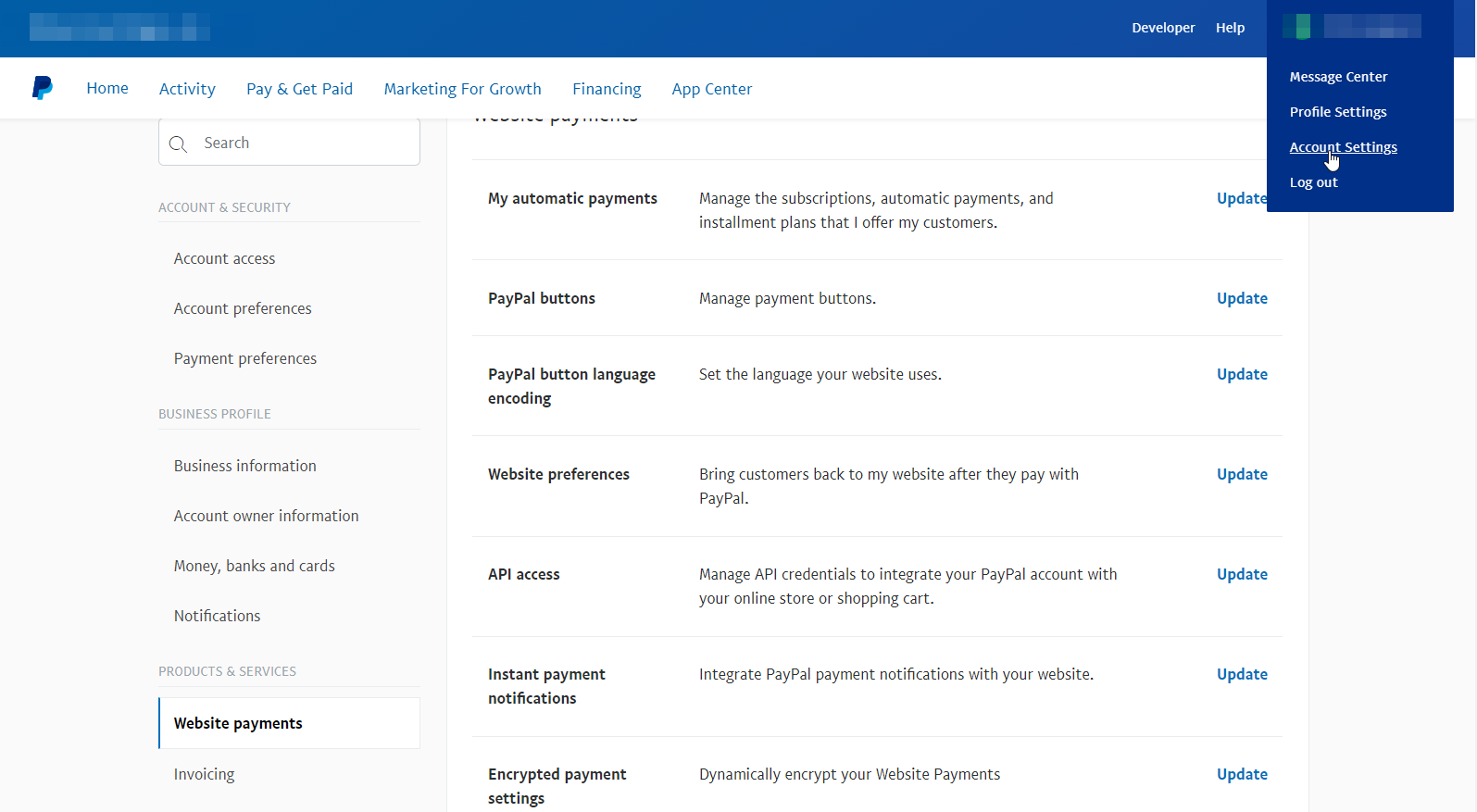
Click on “Profile”
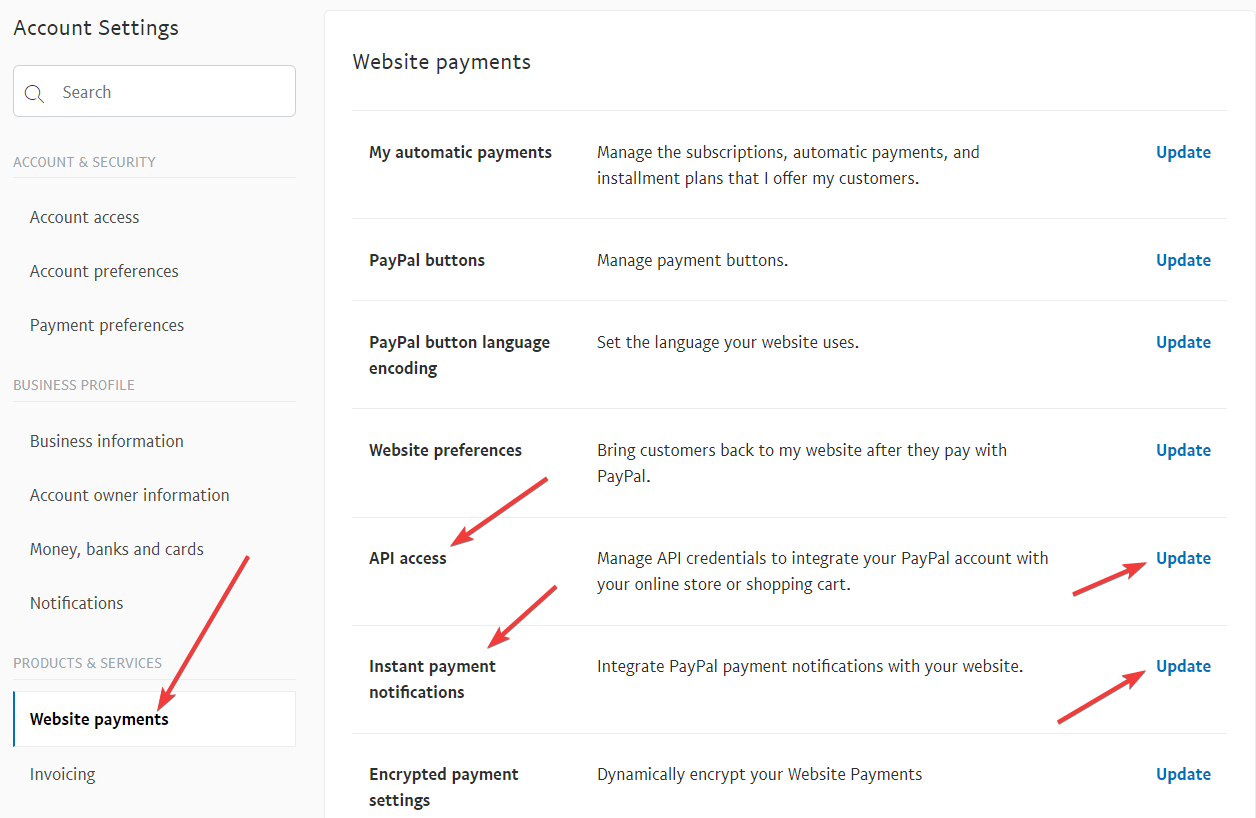
Click on “Request API Credentials” (under ‘Account Information’ section). It will bring you to the API access page.
Under Option 2, click on “Request API credentials” to create your own API username and password.
Click on “Request API signature”
Click on “Agree & Submit”
Note down the following pieces of information:
* API Username
* API Password
* API Signature
That’s it as far as your Paypal account is concerned. Now back to DAP on your site.
Log in to your DAP Dashboard
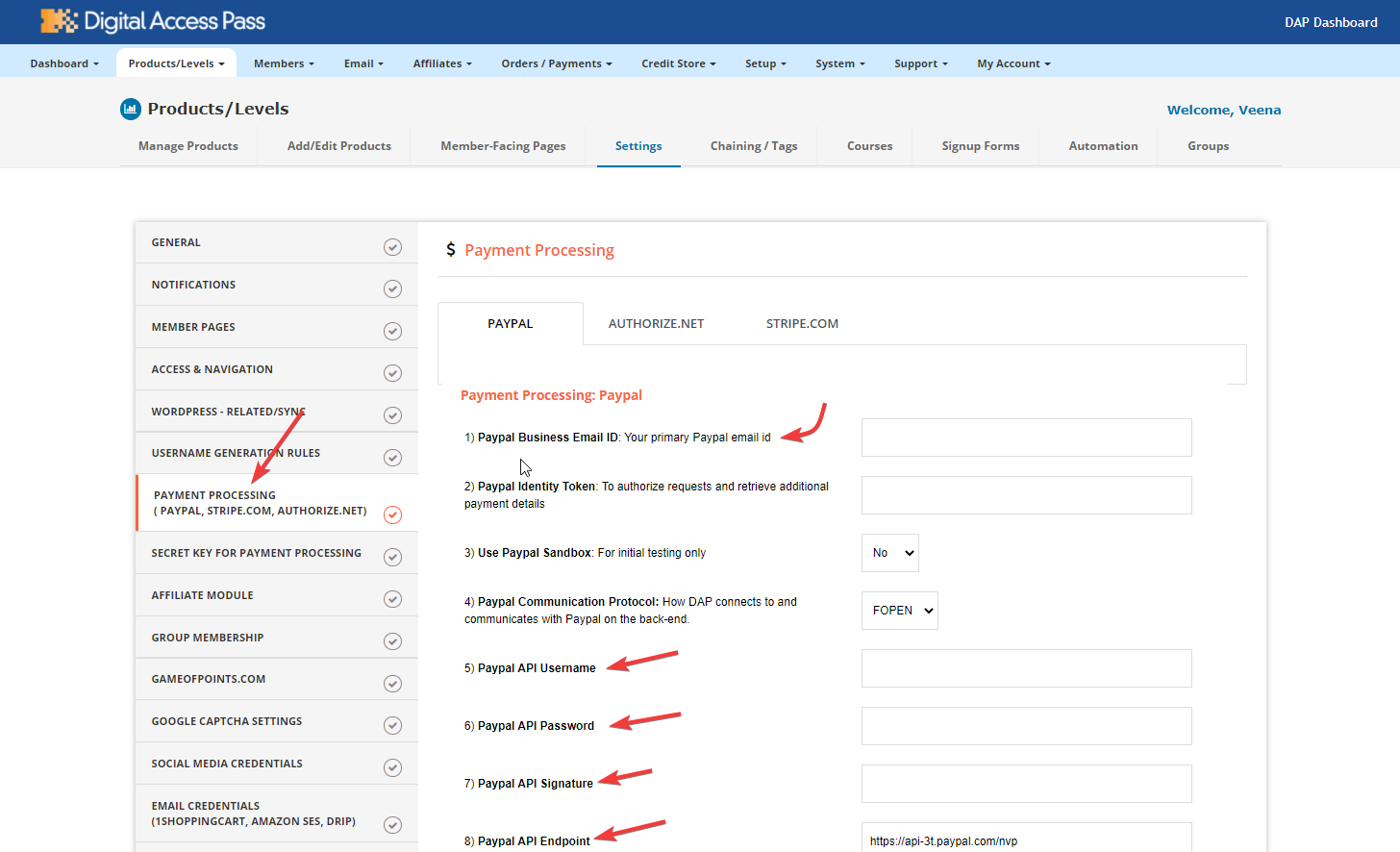
Go to “Setup > Config“. On that page, click on the “Paypal” link in the links towards the very top of that page (or scroll down to the “Payment Processing: Paypal” section).
Enter the 3 pieces of information (from Step #13 above) into the Config fields 7, 8 & 9 on that screen: Paypal API Username, Paypal API Password, and Paypal API Signature. Cick “Update” and save the changes.
Generating the Paypal Upsell Buy Buttons:
In the DAP Dashboard menu, go to Payment Processing > Generate Buy Button
You will now see that you’re on the default tab “Paypal Standard”.
So now select the DAP Product for which you’re trying to generate the buy button, from the Product list.
Now, once the page has refreshed, scroll down to the bottom of this page, and you’ll see an expandable section with the heading “Paypal Standard 1-Click Upsells”
Expand that section by clicking on the “+” image.
You will see the following two links in that section…Generate Paypal Standard 1-Click Primary Button Generate Paypal Standard 1-Click Upsell ButtonThe first one is for generating the buy-button code for your primary product (the very first product in the flow). The second one is for all upsells.So if this is the first time you’re doing this, and for your main product, click on the first link.
If all of your Product’s settings are correct, then you’ll see a small popup that contains the buy-button HTML code. Paste this code into a blank notepad (or text editor) window.
So let’s say this is what the code you got looks like…<form name=”generate_paypal” method=”post” action=”/dap/PaypalSetExpressCheckout.php”>
<input type=”hidden” name=”item_name” value=”Facebook Secrets Subscription”/>
<input type=”hidden” name=”description” value=”This is a Subscription Product with a monthly subscription – payments every 30 days.” />
<input type=”hidden” name=”amount” value=”10.00″ />
<input type=”hidden” name=”trial_amount” value=”0.00″ />
<input type=”hidden” name=”total_occurrences” value=”9999″ />
<input type=”hidden” name=”is_recurring” value=”Y” />
<input type=”hidden” name=”recurring_cycle_1″ value=”365″ />
<input type=”hidden” name=”recurring_cycle_2″ value=”365″ />
<input type=”hidden” name=”recurring_cycle_3″ value=”365″ />
<input type=”hidden” name=”payment_succ_page” value=”https://YourSite.com/dap/continue.php?url=/dap/upsell1-paypalstandard-sample.html” />
<input type=”hidden” name=”payment_err_page” value=”https://YourSite.com/dap/paymentError.php” />
<input type=”hidden” name=”payment_cancel_page” value=”https://YourSite.com/dap/cancel.php” />
<input type=”hidden” name=”payment_gateway” value=”paypal” />
<input type=”hidden” name=”is_submitted” value=”Y” />
<input type=”image” src=”/dap/images/btn_xpressCheckout.gif” align=”left” width=”200″ height=”50″ style=”margin-right:7px;” value=”Submit” alt=”Submit”>
Look at the payment_succ_page tag in the generated button code and have it point to your sales page for your upsell.In the above example, the upsell page is called upsell1-paypalstandard-sample.html and it’s under the dap folder. Put this HTML code on the primary product’s sales page. This is the first product in the flow.
Say your upsell page is a static html page called upsell1-paypalstandard-sample.html and it’s under the dap folder.
Then set the payment_succ_page tag as shown below:
<input type=”hidden” name=”payment_succ_page” value=”https://YOURSITE.com/dap/continue.php?url=/dap/upsell1-paypalstandard-sample.html” />If you want to use a WP page/post as your upsell page and the URL of the page is say /upsell1-paypalstandard, then use this in the payment_succ_page tag:
<input type=”hidden” name=”payment_succ_page” value=”https://YOURSITE.com/upsell1-paypalstandard” />
Now, you need to generate a button for your upsell product. So go back to Payment Processing > Generate Buy Button . This time, pick the Upsell product from the list.
Now scroll down to the bottom of this page, expand the section “Paypal Standard 1-Click Upsells” , and this time, click on the second link there, because you’re now generating a buy-button for the Upsell product.Generate Paypal Standard 1-Click Primary Button Generate Paypal Standard 1-Click Upsell Button
Say this is the button code you get this time…<form name=”generate_paypal” method=”post” action=”/dap/PaypalAddToCart.php”>
<input type=”hidden” name=”item_name” value=”Upsell 1″/>
<input type=”hidden” name=”description” value=”This is a dummy Subscription Product with a monthly subscription – payments every 30 days.” />
<input type=”hidden” name=”amount” value=”10.00″ />
<input type=”hidden” name=”trial_amount” value=”0.00″ />
<input type=”hidden” name=”total_occurrences” value=”9999″ />
<input type=”hidden” name=”is_recurring” value=”Y” />
<input type=”hidden” name=”recurring_cycle_1″ value=”365″ />
<input type=”hidden” name=”recurring_cycle_2″ value=”365″ />
<input type=”hidden” name=”recurring_cycle_3″ value=”365″ />
<input type=”hidden” name=”payment_succ_page” value=”/dap/PaypalCheckoutConfirm.php” />
<input type=”hidden” name=”payment_gateway” value=”paypal” />
<input type=”hidden” name=”is_submitted” value=”Y” />
<input type=”submit” value=”AddToCart” />
</form>
Now again, notice the payment_succ_page in the generated button code. You will see its pointing to /dap/PaypalCheckoutConfirm.php.
a) If this is NOT the last upsell, then update it to point to the url of the 2nd Upsell page (like we did for the primary product to point to the first Upsell sales page) and repeat the process above for the next upsell page.Bottom-line: Make sure that both the buy-button code as well as “No Thank You” link on the last upsell or downsell page, points to /dap/PaypalCheckoutConfirm.php
b) If this is the last upsell, then for the default / static FINAL confirmation page, leave it pointed to /dap/PaypalCheckoutConfirm.php. But if you want the final confirmation page to be a WP based page (so it has the look&feel of your WP theme), then do step 32.If you want to use the default, go to step 33.
WordPress Based FINAL Confirmation Page for Paypal upsell:
Create a NEW WP page.
Click on the PU Editor button in the WP admin – > Add New page -> Visual Tab. pick the options and complete the creation of this WP page.
Lets say you call this page – Confirmation.
Publish this page.
Instead of using the default /dap/PaypalCheckoutConfirm.php in the payment_succ_page tag (for the LAST UPSELL BUTTON or NO THANKS BUTTON), use /Confirmation.
When your buyer reaches the final checkout confirmation page (/Confirmation or /dap/PaypalCheckoutConfirm.php) then they can review all of the products in their “Upsell Cart”, and buy them all instantly and all together, without having to go back to Paypal ever again.
Make sure that both the buy-button code as well as “No Thank You” link on the last upsell or downsell page, points to /Confirmation (for WP based confirmation page) OR points to the default /dap/PaypalCheckoutConfirm.php
“No, Thank You” Buttons & Links
On every upsell page, you must also include a “No, Thank You” button or link that will allow your buyer to skip your upsell or downsell, and go to the next part of the sale.
For all upsells that are not the last upsell, you can link this button or link to the next upsell in the chain. So basically, on Upsell 1, they can either take the upsell1 (whatever your offer is) by clicking on the buy button, or click on the “No, Thank You” button/link, and you could then either taken them to the URL of Upsell2, or Downsell 1, or if this is the last upsell in the flow, then you could send them directly to the Paypal Upsell Summary Page /ConfirmationPage (WP-based confirmation page created in step 29) OR /dap/PaypalCheckoutConfirm.php
Creating a “No, Thank You” button
Button to take them to next Upsell/Downsell:
<form name=”nothankyou”>
<input type=”button” name=”nothankyoubutton” value=”No, thank you, I wish to skip this incredible offer” onClick=”location.href=’https://YourSite.com/dap/continue.php?url=/dap/upsell2.html‘;”>
</form>
Feel free to copy the above HTML button code for the no-thankyou button. However, paste it into a text editor and be careful and don’t delete any of the HTML code, and only change actual URL’s or the button’s value (which is the text your buyer will see on the button).
Button to take them to final Checkout Summary page (Default confirmation page)
<a href=”https://YourSite.com/dap/continue.php?url=/dap/upsell2.html“>No, thank you, I wish to skip this incredible offer</a>
Link to take them to final Checkout Summary page:
<a href=”/dap/PaypalCheckoutConfirm.php“>No, thank you, please complete my order</a>
Link to take them to final WP based Checkout Summary page:
<a href=”/ConfirmationPage“>No, thank you, please complete my order</a>
That’s it.
While it looks like a LOT of steps, that is only because we have to explain the steps in detail so they are clear. In reality, it is very simple to set up, and starting from scratch, if you have DAP & SSL already installed, it shouldn’t take you more than 1/2 hour to set up your 1-Click Upsells/Downsells/OTO’s. And if you’re not using Upsells/Downsells, then it can be done even faster.
If you have any further questions, feel free to open a support ticket, and we will assist you in getting this going.
When you integrate CB with DAP using this feature, the user will get auto-logged-in to dap upon purchase, and you can redirect users wherever you want after they are auto-logged-in. The users will get auto-logged when they hit the ‘Complete My Purchase’ button on the CB page after they complete purchase. But even if the users decide to abort and do not hit the ‘Complete My Purchase’ button, the great thing about this new feature is… DAP has a backdoor to make sure the user account gets created automatically (for successful purchase) and you do NOT have to handle the user creation manually.
So you are fully covered regardless of what the user/buyer does after the purchase as far as membership account creation is concerned.
Pls NOTE: DAP does not have this feature currently but we will make this feature available in DAP 4.5 (upcoming release of dap).
======================================
Users will get auto-logged-in to membership upon CB purchase.
1. Login to your ClickBank account
2. Go to the “Account Settings” tab at the top
3. Click on “My Site” from the sub-menu at the top.
4. Under Advanced Tools, update the Instant Notification Service URL (accept the terms of service etc), and make sure the URL points to:
Replace YourSite.com above with your actual domain name.
NOTE: The INS URL is required for recurring transaction. The initial transaction is handled by the thankyou URL (points to the new /dap/dap-cbautologin.php script) but the subsequent recurring/subscription payment is handled by /dap/dap-clickbank-2.1.php script. CB will send recurring payment notification to /dap/dap-clickbank-2.1.php and dap will automatically extend user’s access to product upon each payment.
6. Whatever value you put in the Secret Key field in ClickBank (see image above), put the same value (must be ALL UPPERCASE) in to your DAP Admin Dashboard on your web site, at:
DAP Admin -> Setup > Config > Payment Processing > Secret Authorization Key used when interfacing with external systems
7. Create product in your CB account. Say the product name is ‘facebook secrets’. Say the product price is $47 (one-time).
8. Create same name (facebook secrets) product in DAP.
IMPORTANT: The Product Title in CB must match the Product Name in DAP.
The corderamount should be set to your product price in the thankyou url querystring.
The cproditem needs to be set to your CB product name (replace space with “+” in the name, for ex- “facebook secrets” will be “facebook+secrets”).
Set the redirect tag to tell dap where to send the user after they are logged-in automatically. If you want to redirect to http://YOURSITE.com/thankyou.html, then set the CB thankyou URL to:
10. Go to Clickbank -> Account Settings -> ‘My Site’ tab (https://CLICKBANKUSER.accounts.clickbank.com/account/site.htm)
Here you can generate test CC for test the auto-login.
11. For testing, visit the CB payment page (for ex : 1.pay.clickbank.net if your CB productID=1) and test using the test CC generated in step #10 above.
Upsells, Downsells and OTO’s are now extremely simple to implement using the “Upsell Tree” plugin for DAP.
And this particular plugin works with Paypal Standard! Which means you don’t need a merchant account any more. All you need is a regular Paypal Standard / Business Account.
IMPORTANT: What you need before you can use this plugin
You need a Paypal (Standard) Business or Premier account
You must have SSL (secure server) enabled on your web site. Ask your web host to enable SSL for your site.
You must have a working version of DAP 4.4.3+
You cannot sell a “Recurring” product as an Upsell – recurring products have to be the first product in the flow.
Here’s what you CAN do: You can have a recurring product as the very FIRST product that they purchase (when they first click on the “Buy” button on your main sales page, and then you can offer any number of “One-Time” Products as upsells or downsells.
Here’s what you CANNOT do: Offer a “One-Time” product as your first product that they buy, and then try to upsell them to a “Recurring” Product. Unfortunately, this is a Paypal problem at this time.
Installation & Setup of UpsellTree For Paypal Standard
You need to be running at least DAP v4.4.3 for this plugin to work
Purchase the UpsellTree plugin if you haven’t already done so, login to your WickedCoolPlugins account and download the PaypalStandardUpsellzip file, PaypalStandardUpsell.zip .
Unzip the file to your desktop. That will create a new folder on your desktop, called “PaypalStandardUpsellTree” which will have all of the files inside.
Upload all the files inside, directly to your “dap” folder on your web site.
DO NOTupload the folder itself. Just the files inside.
Installation of Paypal Upsell-Tree Plugin is complete.
Next, log in to your Paypal account.
Click on “Profile”
Click on “Request API Credentials” (under ‘Account Information’ section). It will bring you to the API access page.
Under Option 2, click on “Request API credentials” to create your own API username and password.
Click on “Request API signature”
Click on “Agree & Submit”
Note down the following pieces of information:
* API Username
* API Password
* API Signature
That’s it as far as your Paypal account is concerned. Now back to DAP on your site.
Log in to your DAP Dashboard
Go to “Setup > Config“. On that page, click on the “Paypal” link in the links towards the very top of that page (or scroll down to the “Payment Processing: Paypal” section).
Enter the 3 pieces of information (from Step #13 above) into the Config fields 7, 8 & 9 on that screen: Paypal API Username, Paypal API Password, and Paypal API Signature. Cick “Update” and save the changes.
Generating the Paypal Upsell Buy Buttons:
In the DAP Dashboard menu, go to Payment Processing > Generate Buy Button
You will now see that you’re on the default tab “Paypal Standard”.
So now select the DAP Product for which you’re trying to generate the buy button, from the Product list.
Now, once the page has refreshed, scroll down to the bottom of this page, and you’ll see an expandable section with the heading “Paypal Standard 1-Click Upsells”
Expand that section by clicking on the “+” image.
You will see the following two links in that section…Generate Paypal Standard 1-Click Primary Button Generate Paypal Standard 1-Click Upsell ButtonThe first one is for generating the buy-button code for your primary product (the very first product in the flow). The second one is for all upsells.So if this is the first time you’re doing this, and for your main product, click on the first link.
If all of your Product’s settings are correct, then you’ll see a small popup that contains the buy-button HTML code. Paste this code into a blank notepad (or text editor) window.
So let’s say this is what the code you got looks like…<form name=”generate_paypal” method=”post” action=”/dap/PaypalSetExpressCheckout.php”>
<input type=”hidden” name=”item_name” value=”Facebook Secrets Subscription”/>
<input type=”hidden” name=”description” value=”This is a Subscription Product with a monthly subscription – payments every 30 days.” />
<input type=”hidden” name=”amount” value=”10.00″ />
<input type=”hidden” name=”trial_amount” value=”0.00″ />
<input type=”hidden” name=”total_occurrences” value=”9999″ />
<input type=”hidden” name=”is_recurring” value=”Y” />
<input type=”hidden” name=”recurring_cycle_1″ value=”365″ />
<input type=”hidden” name=”recurring_cycle_2″ value=”365″ />
<input type=”hidden” name=”recurring_cycle_3″ value=”365″ />
<input type=”hidden” name=”payment_succ_page” value=”https://YourSite.com/dap/continue.php?url=/dap/upsell1-paypalstandard-sample.html” />
<input type=”hidden” name=”payment_err_page” value=”https://YourSite.com/dap/paymentError.php” />
<input type=”hidden” name=”payment_cancel_page” value=”https://YourSite.com/dap/cancel.php” />
<input type=”hidden” name=”payment_gateway” value=”paypal” />
<input type=”hidden” name=”is_submitted” value=”Y” />
<input type=”image” src=”/dap/images/btn_xpressCheckout.gif” align=”left” width=”200″ height=”50″ style=”margin-right:7px;” value=”Submit” alt=”Submit”>
Look at the payment_succ_page tag in the generated button code and have it point to your sales page for your upsell.In the above example, the upsell page is called upsell1-paypalstandard-sample.html and it’s under the dap folder. Put this HTML code on the primary product’s sales page. This is the first product in the flow.
Say your upsell page is a static html page called upsell1-paypalstandard-sample.html and it’s under the dap folder.
Then set the payment_succ_page tag as shown below:
<input type=”hidden” name=”payment_succ_page” value=”https://YOURSITE.com/dap/continue.php?url=/dap/upsell1-paypalstandard-sample.html” />If you want to use a WP page/post as your upsell page and the URL of the page is say /upsell1-paypalstandard, then use this in the payment_succ_page tag:
<input type=”hidden” name=”payment_succ_page” value=”https://YOURSITE.com/upsell1-paypalstandard” />
Now, you need to generate a button for your upsell product. So go back to Payment Processing > Generate Buy Button . This time, pick the Upsell product from the list.
Now scroll down to the bottom of this page, expand the section “Paypal Standard 1-Click Upsells” , and this time, click on the second link there, because you’re now generating a buy-button for the Upsell product.Generate Paypal Standard 1-Click Primary Button Generate Paypal Standard 1-Click Upsell Button
Say this is the button code you get this time…<form name=”generate_paypal” method=”post” action=”/dap/PaypalAddToCart.php”>
<input type=”hidden” name=”item_name” value=”Upsell 1″/>
<input type=”hidden” name=”description” value=”This is a dummy Subscription Product with a monthly subscription – payments every 30 days.” />
<input type=”hidden” name=”amount” value=”10.00″ />
<input type=”hidden” name=”trial_amount” value=”0.00″ />
<input type=”hidden” name=”total_occurrences” value=”9999″ />
<input type=”hidden” name=”is_recurring” value=”Y” />
<input type=”hidden” name=”recurring_cycle_1″ value=”365″ />
<input type=”hidden” name=”recurring_cycle_2″ value=”365″ />
<input type=”hidden” name=”recurring_cycle_3″ value=”365″ />
<input type=”hidden” name=”payment_succ_page” value=”/dap/PaypalCheckoutConfirm.php” />
<input type=”hidden” name=”payment_gateway” value=”paypal” />
<input type=”hidden” name=”is_submitted” value=”Y” />
<input type=”submit” value=”AddToCart” />
</form>
Now again, notice the payment_succ_page in the generated button code. You will see its pointing to /dap/PaypalCheckoutConfirm.php.
a) If this is NOT the last upsell, then update it to point to the url of the 2nd Upsell page (like we did for the primary product to point to the first Upsell sales page) and repeat the process above for the next upsell page.Bottom-line: Make sure that both the buy-button code as well as “No Thank You” link on the last upsell or downsell page, points to /dap/PaypalCheckoutConfirm.php
b) If this is the last upsell, then for the default / static FINAL confirmation page, leave it pointed to /dap/PaypalCheckoutConfirm.php. But if you want the confirmation page to be a WP based page (so it has the look&feel of your WP theme), then do step 29. If you want to use the default, go to step 30.
WordPress Based FINAL Confirmation Page for Paypal upsell:
Create a NEW WP page. Lets say its called ConfirmationPage.
Click on the PU Editor button as shown below, pick the options and complete the creation of this WP page.
Publish this page.
Instead of using the default /dap/PaypalCheckoutConfirm.php in the payment_succ_page tag, use /ConfirmationPage.
When your buyer reaches the final checkout confirmation page (/ConfirmationPage. or./dap/PaypalCheckoutConfirm.php) then they can review all of the products in their “Upsell Cart”, and buy them all instantly and all together, without having to go back to Paypal ever again.
Make sure that both the buy-button code as well as “No Thank You” link on the last upsell or downsell page, points to /ConfirmationPage (for WP based confirmation page) OR points to the default /dap/PaypalCheckoutConfirm.php
“No, Thank You” Buttons & Links
On every upsell page, you must also include a “No, Thank You” button or link that will allow your buyer to skip your upsell or downsell, and go to the next part of the sale.
For all upsells that are not the last upsell, you can link this button or link to the next upsell in the chain. So basically, on Upsell 1, they can either take the upsell1 (whatever your offer is) by clicking on the buy button, or click on the “No, Thank You” button/link, and you could then either taken them to the URL of Upsell2, or Downsell 1, or if this is the last upsell in the flow, then you could send them directly to the Paypal Upsell Summary Page /ConfirmationPage (WP-based confirmation page created in step 29) OR /dap/PaypalCheckoutConfirm.php
Creating a “No, Thank You” button
Button to take them to next Upsell/Downsell:
<form name=”nothankyou”>
<input type=”button” name=”nothankyoubutton” value=”No, thank you, I wish to skip this incredible offer” onClick=”location.href=’https://YourSite.com/dap/continue.php?url=/dap/upsell2.html‘;”>
</form>
Feel free to copy the above HTML button code for the no-thankyou button. However, paste it into a text editor and be careful and don’t delete any of the HTML code, and only change actual URL’s or the button’s value (which is the text your buyer will see on the button).
Button to take them to final Checkout Summary page (Default confirmation page)
<a href=”https://YourSite.com/dap/continue.php?url=/dap/upsell2.html“>No, thank you, I wish to skip this incredible offer</a>
Link to take them to final Checkout Summary page:
<a href=”/dap/PaypalCheckoutConfirm.php“>No, thank you, please complete my order</a>
Link to take them to final WP based Checkout Summary page:
<a href=”/ConfirmationPage“>No, thank you, please complete my order</a>
That’s it.
While it looks like a LOT of steps, that is only because we have to explain the steps in detail so they are clear. In reality, it is very simple to set up, and starting from scratch, if you have DAP & SSL already installed, it shouldn’t take you more than 1/2 hour to set up your 1-Click Upsells/Downsells/OTO’s. And if you’re not using Upsells/Downsells, then it can be done even faster.
If you have any further questions, feel free to open a support ticket, and we will assist you in getting this going.
We have a new feature starting DAP v4.4: “Reverse Dripping”
This is where you can drip emails “X” days (where “X” is a number of your choice) before the access to a product ends for a member. So this is what you would use to send expiration notification / renewal reminder emails to your members.
To setup a renewal reminder email, you would set up the email as usual, and drip it as a negative day. So if you set up the email to drip on Day “-1″, then it means the email will be sent out 1 day prior to product expiry (for that product).
If you set it up to drip on “-3″, it will be sent out 3 days prior to access end date.
If you set it up to drip on “-7″, it will be sent out 1 week prior to access end date.
Renewal Reminder Email Setup
Warning: This is something you should set up only for recurring products that require manual renewal. Do not set up these emails to go out for automated subscription products, because the members will be charged automatically on the designated day every month, and asking them to renew will only confuse them.
Create a new Autoresponder email with the product expiration notice, at Email > Autoresponders. In this email, you would say something like “Hey, your subscription is expiring in 1 week, so click on this link to renew… (followed by link to renewal page)”.
Create another email that says “Hey, your subscription is expiring tomorrow…”.
Go to Products > Manage and choose product for which you wish to set up renewal reminder.
Switch to “Autoresponder” tab.
Select the 7-day renewal reminder email from step 1 and add it to the product.
Then click on the “Edit” link and set the drip day as -7
Do the same for the 1-day reminder email as well, and this time set the dripping to be “-1″.
Starting DAP v4.4, all passwords are encrypted. Previously, one of the main reasons that we had made it open, was because of many DAP admins asking for it to be that way so that they could log in “as” one fo their members to see what they’re seeing, for troubleshooting, etc.
But since the passwords are now encrypted, we have provided an alternate way for DAP admin to log in as a regular user/member.
Log In As Member (LIAM)
If your primary browser is say Firefox where you’re normally logged in as WP admin and DAP admin, then open a separate browser window (like in Chrome or Safari)
Go to http://YourSite.com/dap/loginAs.php
On that page, you will see 3 form fields as shown in the image below:
1) Email address of user/member that you wish to log in as
2) DAP Admin Email
3) DAP Admin Password
So once DAP verifies that it is indeed the DAP Admin trying to log in as someone else, DAP will log you into the site as that member whose email id you entered in (1) above.
NOTE: The Log In As Member (LIAM) feature does NOT mean that you can use just one browser to log in as both DAP Admin and regular member. You still need to use two separate browsers – one for DAP admin (like Chrome) another for regular member (Firefox). All LIAM does is to give you a workaround for logging in as someone else, because starting 4.4, the DAP Admin can no longer see what the member’s password is in order to log in as them.
This plugin will allow you to create an Instant Credit Storefront page where
1) You (Site Owner) can display your products that can be redeemed for credits and also
2) Your users can come to this page to Redeem their Earned Credits/Points.
The document below explains how to setup this plugin after you have installed it using these instructions.
Note: The prerequisite for using this plugin is you must be on DAP 4.4.x. It is not supported by older versions of DAP. If you are not on dap 4.4.x, then please make sure to first upgrade to the very latest version of dap 4.4.x and then follow the steps below to install the credit store plugin. Please do not upgrade to dap 4.4.x if you are already using self-service-stor (SSS) and have active SSS users because CreditStore is not backward compatible with SSS.
1. Enable Credit Store
Set DAP admin -> setup -> config – > Self-Service Store -> Enable Self-service to “Y”.
2. Setup Product Category
Go to DAP products/Levels -> Add/Edit Product Category page
Create a product category. Say you called it ‘Internet Marketing’.
Note: product category is only used for display purpose in the storefront.
3. Create Master Product
Go to DAP products/Levels and create the product that you can use to ‘sell’ credits to your users. The product that the users buy to earn credits is what we refer to as MASTER product.
You can give any name to the product (does not have to be called ‘master’).
- This master product can be a regular subscription product with dripping or it can be a subscription product with no dripping, created just to allow users to earn credits.
Users can earn initial credits followed by monthly recurring credits.
So you can have say your gold membership product result in users getting 5 monthly recurring credits and you can have say platinum membership result in users getting 10 monthly recurring credits.
- The mater product can also be a free product or a non-subscription paid product (one-time purchase product) with or without dripping. The buyers get the credits right away upon purchase or upon signup. No recurring credits assigned to free or one-time paid products.
4. Enable self-service for the master.
After you create the master product, go to DAP products/Levels -> Credit Store page. Select the master product you created above and set the following values:
- Self-Service allowed? Set to “Yes”.
- Is this the “Master” product? Set to “Yes”.
- # of Credits assigned to this product (set it to whatever number of credits you want the users to earn when they signup or purchase this product.
- # of Recurring/Subscription Credits assigned to this product
5. Create Child Product
Go to DAP products/Levels and create the product(s) that you can allow users to purchase via credits in the credit storefront. The product that the users can get access to in the store by redeeming their credits is what we refer to as CHILD product. Now go to the contentresponder tab of this product and set the content that you want to make available under this product and credits for each content. If you dont want to allow your users to redeem their credits at ‘content level’ (pay-per-post), then you can leave the credits per post set to 0 but still add the content thats part of this product. The content level credits even if set to a non-zero value, wont be used as the users will redeem credits against entire product as content-level-credits is not enabled.
If you have setup a child product with ‘content-level credits disabled’, then the ‘content level credits’ set in contentresponder section does not matter. Wont get used.
If you have setup a child product with ‘content-level credits enabled’ or if you switch from content-level-credits disabled to enabled mode, then the ‘content level credits’ set in contentresponder section does matter. DAP will add up each individual content level credit to derive the total number of credits needed to buy the product. So remember to set the ‘required credits per content’ correctly if you use content-leve credits (pay-per-post).
6. Enable self-service for the child product(s).
After you create the child product, go to DAP products/Levels -> Credit Store page. Select the child product you created above (step #5) and set the following values:
- Self-Service allowed? Set to “Yes”.
- Is this the “Master” product? Set to “No”.
- Self Service Availability Start Date and End date (you can leave the default value for the start date (set to today/current date) and end date of 9999-12-31.).
- Allow credits to be redeemed at content level - set to Y if you want to allow users to redeem credits for individual content instead of purchasing the entire product.
- Resell Product: Allow users to redeem already redeemed products ?You CANNOT resell product if you allow ‘credits to be redeemed at content level’.
After a user redeems their credits against the product or against individual content, these products will disappear from store.
If resell product is “Y”, users will still see the product in credit storefront even after they have redeemed their credits towards the purchase of the product.
If resell product is “N”, users will NOT see the product in credit storefront after they have redeemed their credits towards the purchase of the product.
- Product Image URL – must start with ‘http://’. If no images are set, the product will appear with no-image in the storefront page.
- Product Image URL Hyperlinked To: what page do you want to take the user to when the users click on the product image.
- # of Credits assigned to this product: this is calculated dynamically by adding up credits assigned to individual content if ‘allow content level credits’ is enabled.
If allow content level credits’ is “N”. the # of Credits assigned to this product is used.
7. Associate child product(s) to the category
Go to DAP products/Levels -> Credit Store page. Associate child product(s) to any of the product category(s) created in step # 2.
You will find the option to associate child to master below the self-service-store options (under Add Products to Category).
NOTE:A credit store child product cannot participate in regular content dripping. You cannot sell the same child product for $ as well as allow it to be redeemed using credits. You will have to use 2 separate products (one for regular dripping and the other for credits).
8. Create Credit StoreFront page
Login to WP admin -> Add New page -> Visual Editor -> You will find a new CS Editor button.
9. Configure Credit StoreFront page using CS editor
- Pick a store category for the storefront page: If you select the “ALL” option, then all the child products associated with the categories (step # 7) will be displayed in the storefront page.
- Enter payment link or sales page link to allow users to purchase additional credits: Enter the link to your sales page url or the buy button LINK for the master product.
When a user clicks on the payment link, they can complete payment and accumulate more credits.
OR
You can ENTER sales page URL to send users to a page where they can find multiple payment buttons/links for credits purchase (for ex – 10-credits, 100-credits etc).
The ‘buy credits’ image will automatically appear on the store page. When a user clicks on the image, they will get redirected to the sales page to purchase additional credits
You can use replace the Purchase Credits Button with your own image URL.
For ex (assuming purchaseMoreCredits is the sales page for users to purchase more credits)
Users need to be logged in to their membership to access the credit storefront page. Otherwise dap will not know who the user is.
- If you allow content level credits for any products in the display category, then you cannot use multiple products per row layout. You will have to user 1 product per row.
10. Testing
Now login to dap admin, go to dap admin -> add users page, give the admin user access to master product. Say the master product is assigned 10 credits.
Go to dap users -> manage page=> click on the ‘Credits’ field and it will show how many credits the user has.
Now go to the credit storefront page created in step #9. You should see all the child products available for redeem (only child products that are associated to category will show up in the store).
You can redeem the entire child product, and go back and check dap users -> manage page=> click on the ‘Credits’ field and it will show how many credits the user is left with.