
5
Customizing vBulletin Login For Single-Signon
Here’s what you need to do to disable the standard vB login form at the top-right corner of your forum pages, and customize it so that you force your members to log in via the DAP login form, so that they’re logged in to your membership site as well as DAP.
- Log in to VB Admin control panel at http://yoursite.com/forums/admincp/
- Go to Styles & Templates > Style Manager > Default (or whatever style you’re currently using)
- From the big list on the left, select the “header” template. Then on the right, under the “Controls” section, click on Edit
- On the resulting page, copy the full code from this text file and paste into the main “Template” body, and click on “Save”
- Next, download the file forums/register.php from your server, to your desktop and save the original copy somewhere safe.
- Replace the contents of that file with the contents of this text file.
That’s it!
11
vBulletin Integration
Click Here for detailed vBulletin -> DAP setup instructions.
Click Here for DAP->vBulletin integration FAQ/Usecases
Video 1: DAP/vBulletin Integration
[s3mv]vbintro.mp4,800,600,false,false[/s3mv]Video 2: Demo of vBulletin Integration
[s3mv]vbintro2.mp4,800,600,false,false[/s3mv]Product/Forum Chaining
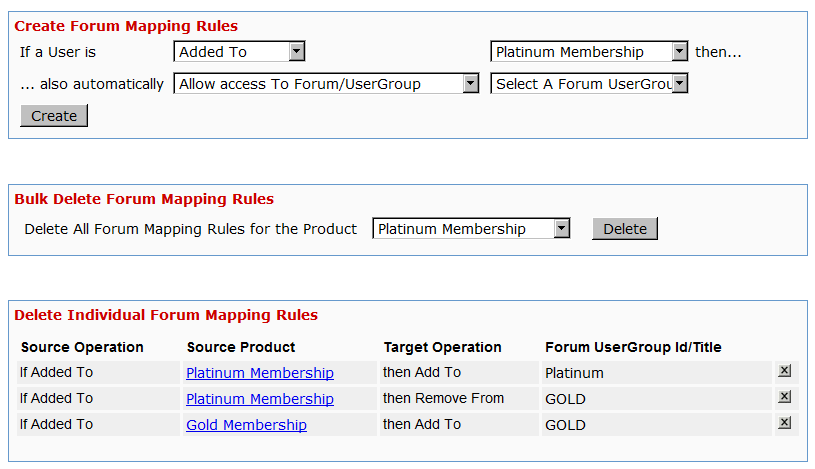
This is by far the most exciting feature in 3.9. I don’t think even we, the developers of DAP, have been this excited about a new feature.
Now, with just a few clicks of the mouse, you can completely automate your Forum management, and do some really slick stuff like…
* “Silver” Members get posting access only to the following vB forums…
– Introductions
– General Discussions
* “Gold” members get access to all above, plus the forum “Puppy Potty Training Tips”. So they get access to the following vB forums…
– Introductions
– General Discussions
– Puppy Potty Training Tips
* “Platinum” members get access to ALL of the forums above, PLUS some premium forums, like “Joint Ventures”, “Starting Your Own Dog Business”, “Premium Support”, and more. So they get access to…
– Introductions
– General Discussions
– Puppy Potty Training Tips
– Joint Ventures
– Platinum Mastermind
– Starting Your Own Dog Business
– Premium Support
And then you can add some more rules like…
Both Gold & Silver can just VIEW the “Premium Support” forums, but cannot POST anything.
And Gold & Silver CANNOT even VIEW the “Joint Ventures”, “Platinum Mastermind”, “Starting Your Own Dog Business”.
See how insanely powerful this can get?
Sure, you could have a forum with WP-based forum plugins like bbPress and Simple:Press too.
But comparing those WP forums to vBulletin? That’s like putting a kid who’s just completed one month of boxing lessons, in a ring with Mike Tyson right after someone said something mean about his mother!
And can you imagine what it would do to your “retention rate”, when you tell your members that if they cancel their subscription, they will lose access to the entire community of like minded people?
And to think that we’re just scratching the surface of monetizing forums here.
The vBulletin forum software is so rich in rules and user roles, and the DAP integration with vB is so tight that you could start just a “Forums Only” membership site and charge just for access to your forums!
Imagine creating a one-time product where for $10, they get to post in a “Special Offers” forum where they can advertise their product or service?
Or how about charging $10 to post in a forum called “Outsourcing”, where they can advertise their need to hire someone either for both long-term and short-term projects? It would be free to view for everyone, but you have to pay-to-post]
– Veena Prashanth
Co-Founder & Co-Developer, DAP
29
Coming Soon: DAP v3.9
[Updated: 09/27/2010]
Video 1: DAP/vBulletin Integration
[s3mv]vbintro.mp4,800,600,false,false[/s3mv]Video 2: Demo of vBulletin Integration
[s3mv]vbintro2.mp4,800,600,false,false[/s3mv]We’re about to launch DAP v3.9 which has some really cool new features packed into it! Here’s what is coming in 3.9…
vBulletin integration
This is by far the most exciting feature in 3.9. I don’t think even we, the developers of DAP, have been this excited about a new feature in the longest time! 🙂
This is going to completely ROCK your membership world.
Now, with just a few clicks of the mouse, you can completely automate your Forum management, and do some really slick stuff like…
* “Silver” Members get posting access only to the following vB forums…
– Introductions
– General Discussions
* “Gold” members get access to all above, plus the forum “Puppy Potty Training Tips”. So they get access to the following vB forums…
– Introductions
– General Discussions
– Puppy Potty Training Tips
* “Platinum” members get access to ALL of the forums above, PLUS some premium forums, like “Joint Ventures”, “Starting Your Own Dog Business”, “Premium Support”, and more. So they get access to…
– Introductions
– General Discussions
– Puppy Potty Training Tips
– Joint Ventures
– Platinum Mastermind
– Starting Your Own Dog Business
– Premium Support
And then you can add some more rules like…
Both Gold & Silver can just VIEW the “Premium Support” forums, but cannot POST anything.
And Gold & Silver CANNOT even VIEW the “Joint Ventures”, “Platinum Mastermind”, “Starting Your Own Dog Business”.
See how insanely powerful this can get?
Sure, you could have a forum with WP-based forum plugins like bbPress and Simple:Press too.
But comparing those WP forums to vBulletin? That’s like putting a kid who’s just completed one month of boxing lessons, in a ring with Mike Tyson right after someone said something mean about his mother!
And can you imagine what it would do to your “retention rate”, when you tell your members that if they cancel their subscription, they will lose access to the entire community of like minded people?
And to think that we’re just scratching the surface of monetizing forums here.
The vBulletin forum software is so rich in rules and user roles, and the DAP integration with vB is so tight that you could start just a “Forums Only” membership site and charge just for access to your forums!
Imagine creating a one-time product where for $10, they get to post in a “Special Offers” forum where they can advertise their product or service?
Or how about charging $10 to post in a forum called “Outsourcing”, where they can advertise their need to hire someone either for both long-term and short-term projects? It would be free to view for everyone, but you have to pay-to-post]
HTML Email
Now you can send out HTML email in your welcome emails, double-optin emails, autoresponder emails and broadcast emails. Of course, you still get to send out a “text” version of that same email, so that those email clients which cannot handle HTML (we really can’t think of any, though) can still show your member the “text” version. Pretty cool stuff.
Manual Transactions
Now if someone sends you a check in the mail, there is a way to directly enter the “payment amount” into the sytem. This is awesome on many levels:
1) Your DAP Dashboard reports now show you your earnings more accurately (previously, it didn’t know about the “offline” payments)
2) Because now there is a “manual” order in the system, DAP knows how much to pay the affiliate who referred the member. So Joe Customer clicks on Jill Affiliate‘s affiliate link, arrives at your web site, calls you up and says he doesn’t have a credit card or Paypal account, and would like to send you a check. Then you get a check in the mail. You add Joe manually through the DAP Dashboard (this is already possible). Then you now add a new transaction into the system manually, that Joe Customer paid you $100. Then when Joe Customer logs into your system, Jill’s affiliate link kicks in, DAP knows now that Joe paid $100, and Jill’s commission is 20% (what you have set as the admin).
So Jill now gets paid $20, which wouldn’t have been possible before!
And what’s EVEN more cool, is that if you really want to be super awesome to your affiliates (which we highly recommend you do :-), then you can even enter transactions retroactively – even from 2 years ago – and all of your affiliates will now suddenly start seeing commissions for customers they referred a long time ago, but never really got paid because you had no way of entering the offline transactions into the system.
Is that awesome? Or is that AWESOME? 🙂
Manual Affiliate Credits
Joe Customer purchased a product. He doesn’t seem to have been referred by any affiliate. Then you get an email from Jill – “Hey guys, I just referred my cousin Joe to your product using my affiliate link. He says he purchased it, but I never got any commissions. Can you please look into this?”
Previously, the only way to make sure Jill got the credit for Joe, was a slightly long-winded (and boring) manual process (which we won’t go into here), which really wasn’t hard to do, but still took you about 5 minutes.
Starting 3.9, it’s going to take you 5 seconds!
And Lots More To Come…
We have features that are even more exciting (something that’s not going to be easy to do, after the vBulletin launch!) planned for DAP 4.0!
* “N” tier affiliate program (psst… you read that right, not “2-tier”, not “3-tier” – but “N” tier- which means as many levels as you want, and each new tier with a different commission percentage!)
* Coupon Codes
And lots more…. (we can’t tell you just yet, because otherwise our competitors may steal our ideas 😉
Ok, now you know why we’re so excited about DAP 3.9.
So do let us know what you think in the comments section below.
And be sure to also subscribe to this post – because we’re going to shortly publish a video right here showing you some of the new features, as well as announce a pre-launch call that you’re not going to want to miss.
Cheers!
– Veena Prashanth & Ravi Jayagopal
66
Forum Integration
DAP currently integrates with all WordPress-based Forum plugins (some of them mentioned below) as well as two non-WP based (vB & XenForo).
- Simple:Press
- BuddyPress
- bbPress
- Mingle
- XenForo (non WP)
- vBulletin (non WP)
So if a member logs in to your membership site via the DAP login form, then they will also automatically be logged in to your forum. That’s called “Single Sign-on” and DAP supports it with all of the above forum software.
Which Forum To Use With DAP?
The WordPress-based forums listed above (Simple:Press, Mingle, etc) are not really full-featured (like XenForo or vBulletin). DAP doesn’t – and cannot – protect individual forum posts or threads if you used the basic WordPress-based forums. But they’re all free, have pretty decent forum features, easy to set up and use, and will work just fine for most people.
However, if you want a more full-featured forum software that will give you greater control over many details, allow you to protect content at a thread or forum level, and want tons of user and admin features, then we highly recommend going with XenForo (XF) or vBulletin (vB). XF and vB are not free, have a slightly bigger learning curve than the simple WP forum plugins, and require more setup and maintenance overall. And if you want the best forum plugin, and are willing to pay the price (dollar-wise as well as effort-wise) and put in the time to set it up, then XF is the way to go, and DAP integrates extremely well with XF.
Now, the rest of this post is about integration of DAP with the WordPress-based forums.
(For XenForo integration details, click here)
(For vB integration details, click here)
Integration with BuddyPress, bbPress, Simple:Press, Mingle, etc
What this essentially achieves, is that once your forum plugin has been integrated with DAP (explained below), anyone who is a member in your DAP-powered membership site, will also be automatically be logged in to your forum when they log in to your membership site.
So they won’t have to log in twice [like, once into DAP and once into your forum].
Here’s how you set up the DAP/forum integration.
- Download the 3rd party WordPress forum plugin
- Install it as per their instructions. We don’t support the installation or setup of the forum plugin itself.
- Log in to your DAP Admin Dashboard and click on “Setup > Config”.
- You have two settings on the page that applies to forum integration:
“Sync DAP User data and WP User data”
“Sync WP data only for PAID users“ - Pick “Y” or “N” for each of them, and you’re all set.
Now, a quick explanation of both settings.
1) Sync DAP User data and WP User data
If you turn this to “Y” (for “Yes”), then every time someone logs into DAP, they’re automatically logged into WordPress too (with a “user” WordPress role). And because they’re logged into WordPress, that means they’re also logged into your forum (because you are using a WordPress-based Forum Plugin which already integrates with your WordPress installation)
2) Sync WP data only for PAID users
This one matters only if you have set (1) above to “Y”.
So once you have decided to turn on the DAP/Forum plugin integration, then if you want only your “PAID” members to have access to the forum, then set this to “Y”.
If you want both FREE and PAID users accessing your forum, then set this to “N”.