
19
Protecting WordPress Posts & Pages
- Log in to DAP Dashboard and go to the “Products/Lists” page.
- Select the product to which you want this blog post/page to be a part of
- Scroll down to the “ContentResponder” section
- On the left, you will see a list of blog posts & pages that have been published (if you scroll down in the window where the list of “posts” show, you will also see list of “pages”)
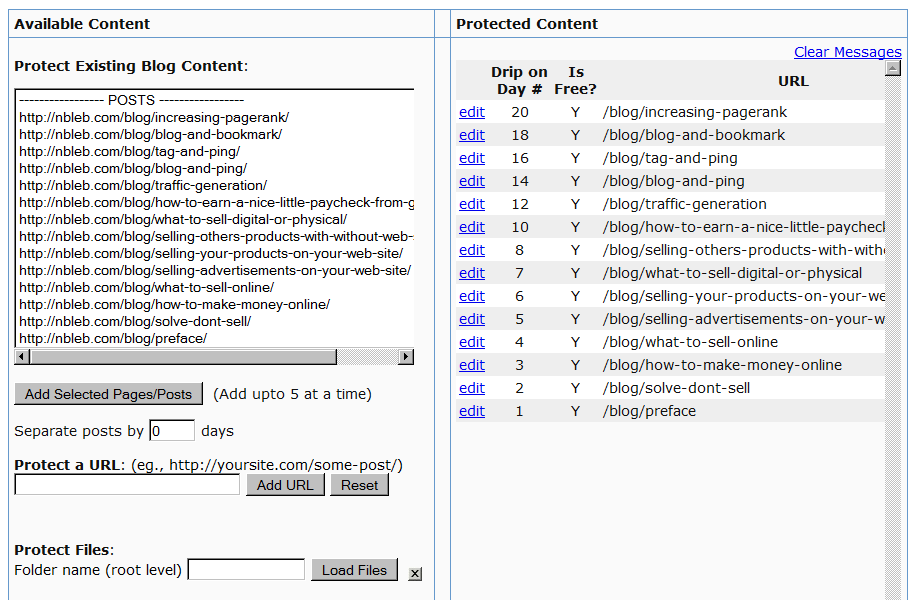
- Select one or more (hold Ctrl + Click to select multiple)
- Click on “Add Selected Posts/Pages” to protect the posts/pages.
- The post(s)/page(s) will now show up on the right-hand side of the box.
- Click on “edit” next to each link to configure dripping for individual posts/pages.
Creating a Product (Quick Start)
- Log in as DAP Admin
- Click on “Products” link (menu at the top)
- Enter “Test Product 123” in “Product Name”
- Enter the same text “Test Product 123” in “Product Description”
- Click “Save”. All other fields are optional.
- You are now in “Edit” mode of product “Test Product 123”.