
3
AuthSMTP Integration
If you’re having email delivery issues on your host, you can connect DAP to 3rd-party email systems like Amazon SES and AuthSMTP.
In this article, you’ll see how to integrate DAP with AuthSMTP.
- Signup for an account at AuthSMTP
- Log in to your AuthSMTP account
- Go to Registered From Address tab
- Take the email id from DAP Admin > Setup > Config > From-Email Id and enter that email here and register it here (basically, you’re whitelisting your DAP Admin email id as a registered sender – if you don’t do this, AuthSMTP will reject and discard all emails sent via DAP). You will need to “Confirm” the registration by clicking on an activation link that they will be sending you.
- In your AuthSMTP account, go to SMTP Details tab.
- Make a note of the SMTP Server (usually mail.authsmtp.com), SMTP Username, SMTP Password.
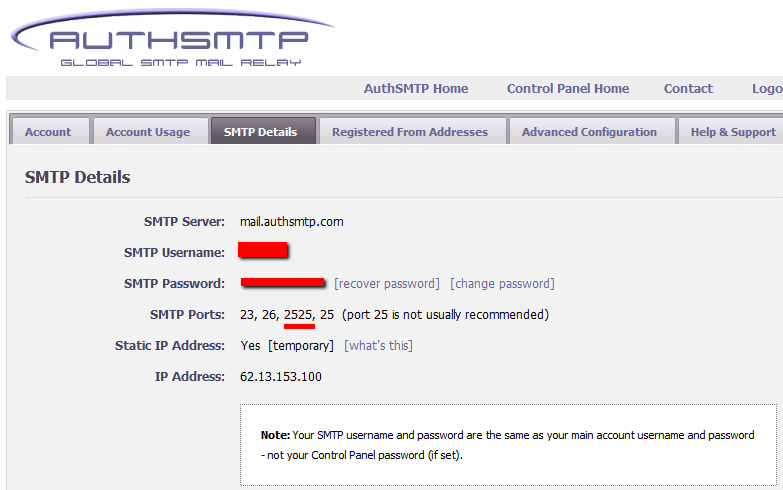
- Now log in to DAP Admin, and go to Email > SMTP
- On this screen, use the section Add a New SMTP Server to create a new SMTP row as follows:
Description: AuthSMTP
Server: mail.authsmtp.com (or from Step 6 above)
Port: 2525 (must be exactly that)
SSL: N (must be exactly that)
User Id: Your AuthSMTP Username (from Step 6 above)
Password: Your AuthSMTP Password (from Step 6 above)
Email Sending Limit Per Hour: 500
(Max 500 if on shared server. Max 2000 if VPS or dedicated server)
Activated: Y - Click on the “Add” button to create and save the new AuthSMTP server setting.
- And now you should see two rows under Manage Existing SMTP Servers: One for “Local Web Host” and another for “AuthSMTP”.
- For the “Local Web Host” row, be sure to set “Active” to “N” – because now that you have set up AuthSMTP, you want all instant welcome emails, autoresponder and broadcast emails to be sent out through AuthSMTP, and not your web host’s email server.
That’s it!
5
Optimizing Your WordPress Blog For Speed
If you want to speed up your web site, you must address the core issue, which is — your web site is getting more traffic than your web server (web hosting account) can handle.
So here are a few ways in which you can speed up your web site:
- The easiest thing you can do is to revisit all of your plugins that you have enabled and see if you still need all of them. Remember that every single additional plugin running on your site, adds some overhead to (basically, “slows down”) your web site or blog. So use only as few plugins as you absolutely must. With so many cool plugins freely available for WordPress, it is very easy to get carried away, and install tens of plugins, most of them adding very little value, but sometimes causing the most overhead in terms of server resources. So keep only a bare minimum of other plugins (some social plugins are a real pain – making calls to third-party web sites to get their information from).
- Using a “cache” plugin for speeding up your site is like putting band-aid on a gaping wound. It’s only a temporary fix, and not a real long-term solution, but every bit helps. We recommend WP Super Cache, and be sure to whitelist all of your member pages from getting cached.
- Make sure you are always using the latest version of WordPress, or at worst, one version behind the very latest and greatest (you definitely want to be sure first that there are no conflicts with other critical plugins that you’re using on your site).
- Make sure you update all of the plugins and themes you’re using to their individual latest versions (get rid of every single plugin and theme that you’re not using).
- If you are hosting on a shared (a.k.a “cheap”) web host paying just a few dollars a month for hosting, then your web site is basically competing for server resources (like memory and bandwidth and database access) with possibly tens (or even hundreds) of other web sites on that same server (many may not belong to you, but to others with whom you are sharing the server – and hence the name “shared hosting”). Search for the keywords “digg effect” or “slashdot effect” on Google, and you’ll see how many WordPress sites crash when a link to the site appears among the top results in popular social sites like Digg.com, Reddit.com or Slashdot.com.If your traffic levels have outgrown your server, then the best thing you can do is to upgrade to a bigger server, or get a Virtual Private Server, or even get a dedicated host, depending on your budget. See our recommended web hosts list.
Your Host Does Not Support Cron Jobs
Question: You ask what to do if your host does not support cron jobs?
Short answer: You may want to switch your hosting company.
The basic idea of a cron jobs is that it allows you to run scheduled tasks, that run automatically, frequently, silently, in the background, without requiring manual intervention.
DAP uses cron jobs to do things like…
- Send out autoresponder emails
- Send out broadcast emails
- Manage your outgoing queue of emails so that you can stay within your cheap web host’s strict hourly email sending limits
- Process and manage affiliate data & commissions , and
- Do some clean up jobs
Any membership plugin that offers email broadcasts, autoresponders and other bulk tasks, will likely ask you to set up cron jobs for sending out emails. You couldn’t possibly send out an email blast to even 500 members in real time as your browser will timeout.
DAP requires you to set up a cron job to do all of the tasks above.
If yours doesn’t, seriously you have only 2 choices…
- Stick to your host but lose the ability to use powerful scripts like DAP.
- Or do the smart thing and move to a better host. There are plenty of good ones out there, and there are a few we recommend highly, and they’re very inexpensive.
6
Data Loading Errors
Progress Bar Never Stops
You’re seeing the green “Loading… Please Wait” progress bar continuosly running – it never stops and comes back with any data.
If this is a new setup, then it’s possible that your web host does not have a library called “JSON” enabled. Just ask them to enable it for your server. It’s rather simple to do, and we’ve never seen a host that won’t do this for their customers.
If it’s an old setup, and it was working previously, then your host made some changes that caused the library to stop working. So you still need their help in resolving the issue.
Error Message: “There was an error returning data'”.
One possibility is that your database or web site is temporarily down, slow, or plain not responding for some reason. So DAP cannot connect to your database, and comes back with this error.
Or it could also be the “Progress Bar Never Stops” issue from above.
35
DAP-Supported Shopping Carts
Last updated: 09/02/2014
Direct Integration with Shopping Carts and Payment Processors
UPDATE: We are now authorized resellers for Authorize.net. If you’re in the US or Canada, click here to apply. If you’re in the UK, then click here.
DAP directly integrates with the following Payment Processors without the need for any additional third-party shopping carts:
- Stripe (new!) – via DAP Shopping Cart
- Authorize.net (US/Canada / UK) – via DAP Shopping Cart
- 2Checkout.com
- CCBill.com
- ClickBank
- ClickBank PitchPlus (1-Click Upsells)
- Digiresults
- DealGuardian
- Google Checkout
- e-Junkie (FYI: e-J does not allow recurring payments)
- JVZoo
- Paypal Standard – direct & via DAP Shopping Cart
- Paypal Express Checkout – direct & via DAP Shopping Cart
- Paypal Website Payments Pro (legacy) – via DAP Shopping Cart
- Plimus
- WorldPay
- WSO Pro (Warrior Plus)
- Zaxaa
DAP also integrates with the following Shopping Carts
- 1SiteAutomation.com (a 1shoppingcart private label)
- InfusionSoft
- Nanacast
- Ontraport (prev. Office Auto Pilot)
- Premium Web Cart
- WooCommerce
- WP eStore
Indirect Integration through 3rd Party Shopping Carts
Since DAP integrates with Shopping carts like WooCommerc, 1SiteAutomation.com (our white label of 1Shoppingcart), e-Junkie, Premium Web Cart and Infusionsoft, that means that it also integrates (albeit indirectly) with all of the Payment processors and gateways that these carts support. So, for example, since DAP works with 1SiteAutomation, it essentially integrates with all payment providers supported by 1SiteAutomation, like:
Bank of America
BluePay
Concord EFSNet
Cybercash
DPI Merchant Services
e-Commerce Exchange
Echo Inc.
ECX QuickCommerce 3.0
Epoch Systems
eProcessing Network
EPS SecureNet
EWAY (Australia)
FastTransact
Firepay
GoRealTime/EPP
GoRealTime
iBill
IntelliPay ExpertLink
IONGate (Costco)
iTransact RediCharge
LinkPoint Secure
MCPS WebLink
MerchantPartners
Moneris
NETbilling
Network Merchants
Paradata
PayCom Processing
Paymentech (direct integration via Authorize.net)
PayPal Payflow Pro (via e-Junkie)
PayReady
Planet Payment
PRIGate
PSiGate
RightConnect
RTWare WebLink
Shift4
SkipJack
StrataPay
Surepay
TrialPay (via e-Junkie)
TrustCommerce
USAEpay
uSight
VeriPayment
VeriSign PayFlow Pro
ViaKlix (Nova Systems)
YourPay
For the full list and more details, click here
1-Click Upsells
If you use the DAP Shopping Cart Plugin, you can do 1-Click Upsells/Downsells like the pros, without the need for any external shopping cart or upsell service provider.
The free DAP shopping cart that comes with your DAP purchase allows you to do unlimited 1-Click Upsells using Stripe, Authorize.net and Paypal Website Payments Pro (legacy).
However, for doing 2-Click Upsells/Downsells with Paypal Standard, you need our Paypal Upsell-Tree plugin that is sold separately. Or you can also get this plugin for free with our Platinum subscription.
Of course, if you need advanced shopping cart features – like ability to calculate shipping, tax, and coupons – then you should consider using 1SiteAutomation.com.
1ShoppingCart & GoDaddy
If you want automated recurring order processing using 1ShoppingCart (1SC) or 1SiteAutomation.com, then DAP needs to be able to process the recurring email notifications sent by 1ShoppingCart, which it does on the back-end when the DAP Cron Job runs every 10 minutes.
However, if you’re using Godaddy as your web host, then because GoDaddy disables a mandatory PHP library (“imap”) on all their servers for some reason, DAP is unable to process the recurring order email notifications from 1ShoppingCart.
This is not an issue if you are using GoDaddy as just your domain name registrar, and using some other service like Liquid Web or Hostgator as your web host.
But if you’re using 1SC & GoDaddy hosting, you will have to end up doing manual cancellations if any member cancels their subscription, or if their credit card fails and their recurring payments don’t get processed.
Please note that 1ShoppingCart order processing works great with all other (non-GoDaddy) hosts.
14
Q1: What’s the difference between storing files on Amazon S3 (and serving it using the S3MediaVault.com plugin), compared to storing the files right on your own web site and having DAP serve them directly to your members?
Q2: Can DAP protect content stored on an external site, like Amazon S3?
Q3: Can S3MediaVault prevent members from downloading the protected videos or audios?
Storing and Protecting Video, Audio and Other File Formats
=> Click here to see a demo of S3MediaVault Streaming video/audio player
Q1: What’s the difference between storing files on Amazon S3 (and serving it using the S3MediaVault.com plugin), compared to storing the files right on your own web site and having DAP serve them directly to your members?
A: See this post How and Why to use Amazon S3 to Deliver Audio, Video and PDF on your WordPress website
If all files are stored right on your web site, and you have a large amount of video, audio and other files, then a lot of people viewing and downloading them from your site will use up a lot of resources on your server – like site loading time, server memory, server bandwidth, etc – and your site could slow down considerably. Plus, on top of that, there may be bandwidth charges that your host will charge you with for all of those downloads, which are usually not very cheap.
And don’t put too much faith in your web host’s “Unlimited Bandwidth” clause, because if you read the fine-print carefully, you’ll see that as per their TOS, if you consume large amounts of bandwidth and use too much of the server resources, this could cause other web sites (belonging to others) on the same server to slow down and have a degrade in performance, especially if you are on a shared hosting account. And they could consider this abuse of their TOS, and could either slap you with huge bandwidth or server utilization fees, or may even ask you to take your web site elsewhere because you’re causing issues for other site owners on the same server.
Instead, if the files are stored on Amazon S3, then you don’t have to worry about your site slowing down, or you using up too much bandwidth and getting slapped with huge bandwidth fees, because the files are being served from Amazon’s huge S3 servers which have tons more resources and speed compared to your web host.
Plus in the long run, bandwidth is cheaper on S3 compared to your web host.
Q2: Can DAP protect content stored on an external site, like Amazon S3?
A: Not directly, not by itself. By default, DAP can only protect files (and any other content) that is on the same web site where DAP is also installed. For large files, we do recommend that you store files on a fast, scalable file server like Amazon S3. Now, the page or post itself (in which you post that Amazon S3 link) can be protected by DAP, and no un-authorized user can even see the content of the page (or the link within that page).
However, once a user has authorized access to a page because they’re a member, now they can see the page where you have that Amazon S3 link.
It’s similar to posting a public YouTube video on a protected DAP page on your web site. Sure, DAP can protect the page from un-authorized users, but authorized users can actually see the page, and see that it’s a YouTube video, and clicking on that video will directly take them to a page on YouTube.com, which DAP has no control over, and cannot protect once they leave your web site.
Similarly, DAP cannot directly protect that external link to your file stored on Amazon S3. And that’s where our Amazon S3 plugin S3MediaVault.com (S3MV) comes into the picture.
S3MV can make sure that your files on Amazon S3 cannot be accessed directly by anyone, even if the link were shared with others via email or on a forum, and can ONLY be accessed through a page or post on your web site (web site where you have installed the S3MV WordPress plugin).
NOTE: The S3MV plugin is included for free with your purchase of any DAP license, starting with the Unlimited-site license and above.
Q3: Can S3MediaVault prevent members from downloading the protected videos or audios?
A: Yes. S3MediaVault offers “true streaming”, as well as standard “Progressive Downloads”. You can choose either option for your videos and audio.
If you want them to be able to download the files, S3MediaVault allows you to do that.
And if you do NOT want them to be able to download the files, S3MediaVault help you prevent downloads as well.
S3MediaVault is the first-ever WordPress plugin that lets you create encrypted Streaming Video and Streaming Audio.
“Impossible to Download” Streaming Videos: We highly recommend allowing paying members to download your content for offline use. And S3MediaVault very much allows you to create secure download links for all of your content – Video, Audio, PDF, etc.
However, for some reason, if you do *not* want anyone to download your videos/audio, then S3MediaVault can do that too.
S3MediaVault allows you to create HLS Videos with industrial-strength AES 128-Bit Encryption for both your videos and audio. This is “True Streaming” at its best, with the strongest security available for streaming videos and audio.
None of your website visitors, subscribers, or members will be able to download your videos from your website. Even software like Internet Download Manager (IDM) or browser extensions like Video Downloader or Video DownloadHelper will not be able to download your streaming video or audio. S3MediaVault is the only WordPress plugin that can create this level of security. Check out our encrypted streaming demo here.
Multi-Resolution Streaming with “Resolution Switcher” and “Video Stream Optimization”: S3MediaVault allows you to create streaming video in multiple resolutions. You can choose the resolutions in the Settings page – 1080p, 720p, 360p, 240p and 144p. And S3MediaVault automatically encodes your video in all of those resolutions with a single click. And when the viewer clicks play on the video, the S3MediaVault video player will automatically choose the lowest-but-best resolution for the viewer based on their internet speed. So, if they’re watching from a device which has slow internet speeds (like 3G, or 4G or maybe they’re using a service that doesn’t offer high-speed internet, or maybe throttles mobile access), the player will serve them the most optimized quality of video. That means, your streaming videos will load quickly for them regardless of their internet speed, saving them on their bandwidth bill, as well as saving you on your AWS bandwidth bill (win/win FTW!).
In addition, just like you can do on YouTube, your viewers will be able to change the resolution to a higher or lower number, and the switch will happen seamlessly without affecting their viewership experience.
S3MediaVault is the most secure plugin that can secure your content and make sure it’s only available on your website.
Combine that with the Page/Post protection of DigitalAccessPass (DAP), which can make sure only certain people (like paid members, or free but registered users) can access the post or page where the S3MediaVault embed code is published.
Combine DAP + S3MediaVault, and you would have now completely locked down your content from any and every kind of unauthorized and illegal access.
21
Moving DAP From One Host (or Domain) To Another
NOTE: We do not provide support for server or domain moves as part of Standard DAP Support that you get with your purchase of DAP. Please see our Terms Of Support which explains why. If you want our help with moving a DAP installation, you may purchase Premium Support slots from http://DigitalAccessPass.com/buynow.php#store (see “Installations & Support” tab)
Moving a DAP installation
DAP does not store the domain name anywhere in the database. So if you want to move an existing installation to a new domain, the only place where you need to change your domain name in the DAP installation (if you’re moving across domains) is in the dap-config.php file.
Moving a DAP installation consists of basically moving the files, and moving the database. Only 2 components.
- Log in to your web hosting control panel, go to “phpMyAdmin”, select your WordPress database (which is where the DAP tables are also installed, by default)
- Do an “Export” of just the DAP tables. Select the “SQL” option and select “Save as File”. All DAP database tables start with the text “dap_”. Save this file on your desktop – let’s say you call it “dapexport.sql” (it could also be “dapexport.txt” – does not matter what the exact extension is – .txt or .sql).
- Make a back up of the dap-config.php file (located in the “dap” directory on your old site/domain) on your desktop
- At your new site, install WordPress (if not already installed)
- Log in to your web hosting control panel of your new site, go to “phpMyAdmin”, select your WordPress database, go to the “SQL” tab, open the export file from above (dapexport.sql), copy the contents, paste into the SQL tab and hit “Go”. All dap data from your old site is now on your new site.
- Copy the database credentials (db name, db username, dp password and db host) from your new blog’s “wp-config.php” to the “dap-config.php” file stored on your desktop.
- If you’re also changing domain names, then open dap-config.php, and modify SITE_URL_DAP to point to your new domain name.
- Upload all dap files to your new site (don’t do full installation – just upload the files).
- Upload the DAP-WP-LiveLinks folder to wp-content/plugins/
- Upload the modified dap-config.php file from your desktop to the “dap” folder on your new site.
- Log in as WP admin, and activate the DAP-WP-LiveLinks plugin. It should give you a warning that DAP is already installed. That’s ok – that’s what we want it to say.
- That’s it. DAP is now moved over from your old site to your new site.
- Log into your DAP Dashboard using your old DAP admin login info, and you’re all set.
10
Troubleshooting Email Delivery
Sending Email Through Your Web Site: The Basics
DAP is not an email service (like, say, Aweber).
DAP is just a script – a tool – like Microsoft Outlook or Thunderbird – that simply sends out email using your web host’s email server.
It is your web host’s mail server that actually sends out the email to the recipient. So once DAP notifies your mail server about a email that is to be sent, it has absolutely no control over what happens next.
It’s like when you put an envelope with a letter (regular mail) into the mailbox (post box). It is up to the Postal Service to actually pick up your letter, and deliver to the destination address. Your web host is like the Postal Service. If it doesn’t pick up and deliver the (e)mail, then DAP doesn’t have any say in it.
So if the emails that DAP sends out are not getting delivered to your recipients (or landing in the spam/junk folder of the recipient), there could be more than one reason for that.
Improving Email Delivery
DAP uses your web host’s email servers to send out emails.
Here are some ways to improve email deliverability and also avoid your email landing in the recipient’s junk/spam folder.
- Check with your web host to make sure they have “Reverse DNS” setup and configured correctly for your domain. If not, then this is most likely the cause of emails not getting delivered.
- Do not use a Gmail or Yahoo or some other web based email as the “From” email id (under DAP Admin > Setup > Config).
- Instead, use a domain-based email id – like You@Yoursite.com or Support@Yoursite.com – as the “From” email id
If you are on a shared host, you may even consider totally by-passing sending emails through your web host, and instead use DAP’s “SMTP” feature to send emails out through an external email system – like Amazon’s SES (Simple Email Service) , Gmail or AuthSMTP.com.
Welcome Emails Not Going Out
If Admin notifications are going out ok, but the welcome email to the buyer/member is not being delivered, then see Troubleshooting Welcome-Email Delivery
Autoresponder Emails Not Going Out
If yours is a new site setup, then this is usually because the hourly cron-job has not been setup.
However, if the emails were going out fine previously, and suddenly stopped going out, then it usually is because…
- Something changed on your host that caused the cron to stop working.
- There is an error in the job queue, because of which DAP is unable to proceed with the remaining non-error emails. This could have happened if you tried to send out a broadcast to a CSV list, and there was an error in one of the emails from the CSV list.
- You’re trying to use a third party “SMTP” server to send out the emails, and your server is unable to connect to that server because the authentication settings you’ve configured on “Email > SMTP” are incorrect.
Steps to troubleshoot
- Make sure that the hourly cron (dap-cron.php) is still running – you need to look at your web hosting control panel for that.
- Go to “System > Job Queue” and scroll through any items there, and see if there are any scheduled messages there with the status “Error”. If yes, then click on the “Delete Jobs In Error” link. That will delete any jobs that can’t be processed because of an error in the email id or in the import process. Also be sure to click on “Delete Successful Jobs (till yesterday)” just to clear up old, sent emails.
- Also go to “System > Logs” and empty the logs.
- Go to “System > Config” and set “DAP Log Level” to “5”. That will start logging all the details you/we may need for troubleshooting.
- Wait for the top of the next hour and then re-visit the queue and see if emails are going out.
- If they still aren’t going out, go back to “System > Logs”, copy paste all text there, and open a new ticket with that info, of course, also giving us more details about the problem, what you have tried, etc, along with your login info for: FTP, WP Admin, DAP Admin, and Web Host Control Panel.
Server Blacklisting
If your inexpensive (read as cheap 🙂 shared web host is hosting a large number of sites on one server, and one of them knowingly sends out spam (or mistakenly gets flagged for spam), that will put the email deliverability of every web site on that server in jeopardy, because your site now shares the same IP address as that of an “alleged” spammer.
So your emails get sent to junk/spam folder by Gmail and Yahoo. Or worse, they just totally disappear into the ether.
Hourly Email-Sending Limits
Almost all shared hosts have hourly email sending limits. For example, DreamHost has an outgoing limit of 300 emails per hour. Which means, a total of only 300 emails can be sent out per hour through any web site hosted on DreamHost. All of the following count towards the 300 limit:
- Emails sent by any scripts on your site – like DAP
- Your WordPress blog notification emails
- Your WordPress admin emails,
- WP forgot password emails,
- WP comment notification emails,
- Forum notification emails,
- Forum emails sent to each other by your users,
- Forum-software Admin notification emails,
- Support software user and admin notification emails
- Tell-a-friend emails
- Viral-inviter type emails
- Emails sent through Outlook or Thunderbird where you have set the outgoing SMTP server to be your web site’s SMTP server
- Emails sent by others using the same SMTP server to send out emails- like your business partners, employees, etc
- DAP User welcome emails, Payment notification emails, Forgot password emails, Autoresponder emails, Broadcast emails, etc
So do you see how quickly you can go over that hourly limit of 300 emails per hour?
But here comes the worst part…
Once you go over that limit, any emails that are actually sent by you or the scripts running on your site, will not actually result in any kind of error. The mail server will respond by saying that the email(s) has been sent successfully, but in reality, on the backend, it quietly “snuffs out” the email. Which means, it doesn’t go anywhere – just gets sent to a “blackhole”. So you keep thinking that you sent out the email. DAP keeps thinking it has sent out the email. But in reality, the emails never actually get sent.
This is the same as you actually putting your letter into the mailbox at the Post Office. But then, imagine this: The postal worker who comes to pick up your mail, quietly goes to the back of the post office and dumps it all into one giant trash can, and destroys all of the mail. So you’re thinking you actually mailed out that important check to pay your utility bill. But the utility company never gets your check, and they slam you with a late fee.
Possible Solutions
1) BEST OPTION: DAP + 3rd party SMTP service provider like Amazon SES, AuthSMTP.com or SMTP.com. (much less expensive than Aweber, and very reliable too)
2) DAP + Aweber (more expensive, very reliable)
3) DAP + Good web host (cheapest option, but can lead to mixed results – depends on your host).
You could always use DAP and external SMTP service provider like Amazon SES, AuthSMTP.com or SMTP.com to send out bulk mail through DAP while totally bypassing your web host’s email system. This is probably the first best option where DAP controls the composition and sending of the email, the 3rd party service controls the deliverability.
Next best option is using a service like Aweber or GetResponse.
And if you can’t afford even that, then simply use DAP on a good web host. We ourselves use just DAP and LiquidWeb’s email servers to send out emails to all of our users.
And DAP also has built-in job queues to schedule outgoing emails while also making sure that you don’t exceed your web host’s hourly email sending limits (dreamhost’s limit is 300 emails/hour, I think). We use multiple SMTP servers from our own other web sites, all combined to be able to send a few thousand emails per hour.
But even with a lot of planning, it is easy to go over the hourly limit.
So the next time you see in your Job Queue that emails were sent out successfully, but the recipient never received it, here are some things to check:
1) It landed in your recipient’s junk/spam folder. Ask them to whitelist or add your email address to their contacts list.
2) You have overshot the limit, so you would have to actually send out the email again.
3) Try to send out broadcasts during a low-traffic time – say like later in the night – when you’re not actively sending out emails, and using up precious email counts from that hourly quota.
http://DigitalAccessPass.com/documentation/?page=/doc/troubleshooting-email-delivery/
22
DAP vs Aweber
(Or… “DAP vs MailChimp”, “DAP vs. GetResponse”, “Amazon vs Web Host”, …. “DAP vs 3rd-Party-List-Service”)
Quick Summary: Here’s what we recommend, in the order listed below:
1) DAP + Amazon SES: Best option – this is what we use ourselves here at DigitalAccessPass.com and WickedCoolPlugins.com.
2) DAP + ActiveCampaign: If you must sign up for a third-party service for their advance analytics, we highly recommend ActiveCampaign, which is a very robust and popular email service, which we recommend over even, say, Aweber. This #2 option is great if you want advanced email analytics – like click-thru rates or open-rates – that DAP itself doesn’t offer yet. You will still be able to add the subscriber/buyer to both DAP and ActiveCampaign, for eg., and you will have the choice of sending out the emails from either system. This offers more flexibility, but comes at a cost of the services like ActiveCampaign or Aweber.
3) DAP + Your Web Host: Very usable and workable option as long as you are hosting with a decent web host.
Now, for some background information…
We often get asked why use Aweber (or other third-party list service) when DAP itself has a built-in Autoresponder system as well as an Email Broadcast system. So here’s a brief overview of when and why it makes sense to use DAP – or ActiveCampaign/Aweber/MailChimp/GetResponse, etc.
Why DAP Rocks
DAP integrates with Amazon SES (Simple Email Service), which allows you to send out tens of thousands of emails a day using DAP. Which means that it will only cost you pennies to send out a large volume of email via DAP (just $0.10 per 1,000 emails). So imagine the power of DAP and the deliverability of Amazon in one sweet, integrated system!
Until quite recently, it used to be that the biggest advantage of using a third-party service like Aweber was their email delivery rate. But with the onslaught of high-powered, high-deliverability but-still-inexpensive services like Amazon SES, the advantage now shifts more towards DAP.
Also, when you use a third-party service, like Aweber, and you send out an email and a number of people mark it as spam (incorrectly or not), your account could get shutdown without notice, and you would lose your entire list (unless of course, you have been maniacally exporting the data every few days and storing it on your computer in the form of a CSV file, the chances of which are highly unlikely).
But when you use DAP with say, Amazon SES, your “list” is still stored within the DAP database on your web site. So you always own the list, and the data is always going to be there on your web site, even if you stopped using DAP. And if the same spam issue happens with SES, then Amazon will probably shut down your SES account too – but in this case, that’s not a bank-breaker, because you can sign up with a different email provider, like AuthSMTP.com, or SMTP.com, or Mandrill, integrate DAP with this new email service, and resume your emails like nothing ever happened. Obviously, we’re not telling you this as a way to spam people. The point is that nowadays, people who don’t want your messages any more, instead of unsubscribing, will sometimes mark your email as spam. And when stuff hits the fan, that’s when it’s nice to have some options (like DAP + SES), instead of losing your entire list.
But first, some basics…
DAP is not an email service like Aweber or ActiveCampaign.
DAP is just a tool – like Outlook or Thunderbird – that simply sends out email using your web host’s email server, but in an automated fashion, of course.
If your inexpensive shared web host is hosting a large number of sites on one server, and one of them sends out spam (or mistakenly gets flagged for spam), that will put the email deliverability of every web site on that server, in jeopardy, because your site now shares the same IP address as that of an “alleged” spammer. So your emails could get sent to junk/spam folder by Gmail and Yahoo. Or worse, they just totally disappear into the ether. Some customers won’t get your emails. This won’t happen with Aweber (for the most part).
Aweber (and other premier email service providers) have staff on hand just for this purpose. Their core business is about email deliverability. They spend a lot of time, money and resources dealing with regular ISP’s (like AOL and SBC) to make sure their lists – and their reputation – remain clean. Which is also probably why they shut down large lists without much of a warning to you, and do other similar crazy stuff.
I guess it works for them – and the other Aweber users, because when you send out an email through your Aweber list, it almost always gets there in your recipient’s inbox. Which is very cool. And which is why they also charge so much for their service.
And that’s where DAP comes in.
You can use DAP’s built-in email autoresponder and broadcast system, and send out emails through your web host. But that normally means that the deliverability of those emails is only as good as your web host’s deliverability. And if you’re not on a Virtual Private Server (VPS) or a Dedicated server, then relying on your cheap, shared web host to safely deliver your email to your members is totally unrealistic and naive – just ain’t gonna happen.
And that’s where the 3rd-Party SMTP feature of DAP comes in real handy – this is one of the un-sung features of DAP that makes it so much more powerful than almost all other competing WordPress membership plugins, and just doesn’t get talked about enough.
You can use DAP as an “Email-Sending Tool” and hook it up to an external SMTP service provider – like Amazon Simple Email Service (Amazon SES), Fusemail.com or AuthSMTP.com – to send out bulk-mail through DAP – while completely bypassing your web host’s email system.
Which means you get high email delivery, thanks to a 3rd party SMTP provider like Amazon SES that practically guarantees you sky-high deliverability rates and rock-bottom rates, and you can host hundreds of thousands of emails in DAP for no charge other than standard hosting fees (it’s after all just disk-space in your database), and send emails through Amazon SES (costs just 10 cents for every 1,000 emails you send).
Don’t wish to pay even those few pennies? Then simply use DAP on a decent web host like Liquid Web.
DAP also has a built-in job queue to schedule outgoing emails, with the ability to throttle the number to make sure that you don’t exceed your web host’s hourly email sending limits (most web hosts limit you to 300 outgoing emails/hour).
You can even use multiple SMTP servers from your own other lesser-used web sites, all combined together in a round-robin fashion, be able to send thousands of emails an hour right from your web host for absolutely free!
So, to summarize, here’s what DAP can and can-not do when compared to more expensive, dedicated email services like Aweber and GetResponse.
Advantage: DAP
- Aweber and similar services cost several hundred dollars a year (see Aweber.com – it could cost you about $794 a year – based on an annual fee of $194/year + another $600/year for maintaining a list size of just 5,000 subscribers). But all emails sent via DAP are essentially FREE! You don’t pay anything to send out thousands of emails and have a list with tens of thousands of members. The Autoresponder & Broadcast features are built right into the core DAP software.
- Don’t trust your web host to deliver the emails? Simply hook up DAP to an external email system like Amazon SES and send thousands of emails for mere pennies! Takes all of 5 minutes to set up!
- Unlimited Autoresponders
- Store Unlimited email id’s for free (no limit on how large your list can grow – so it’s practically free, since you’ve already paid for DAP and your web hosting)
- Full control over your list. You can make the sign-ups single opt-in. You can add your buyers to your list without forcing double opt-in on them. Services like Aweber will force double opt-in even when it’s a paid member who just purchased your product or service. And there’s no way around it. And you have to play by their rules, even if they don’t make sense sometimes. But since you control the DAP software, you get to decide who to send out broadcast or autoresponder emails to. Bring them all in as single-optin if you want. Or move them from one list to another. Or add them to multiple lists. Whatever you want.
- Import any CSV list (just need an email) and broadcast to them or add them to your autoresponder. You don’t even have to add them to your database at all – do on-the-fly mailings without storing any of the emails or subscriber data (imagine sending out a quick email blast to your mastermind group – or soccer team parents!). A very powerful tool – so don’t abuse it (i.e., don’t use it to spam!)
- Add same email to multiple Autoresponders (unique to DAP)
- Email throttling included, so as to not exceed your web host’s hourly email sending limits
- DAP has a stunning-looking “Lightbox” plugin with several built-in templates, to show your DAP signup form as a popup. See List Builder Popup for DAP
- Ability to merge member data – like password or affiliate link or user id – right into the emails (DAP only). Third-party email services won’t know as much about your members as DAP does, and won’t be able to (say) send members their personalized affiliate link (like DAP can).
- International-friendly: Using DAP, you can send out autoresponder and broadcast emails in multiple languages. Not restricted to just English. DAP now supports Chinese, Spanish, Russian, Danish, French, Italian, and Hindi – and that’s just what we know! DAP will surely work with any language that is UTF-8 based. We don’t think any of the big third-party email marketing services – like Aweber or GetResponse – support non-English emails. This in itself is a HUGE plus for DAP.
Advantage: Aweber and the others
- Ability to track open rates and click-through rates (coming in a future version in DAP)
- Ability to automatically send out your newly published blog posts as a broadcast (also coming in a future version in DAP)
So given a choice, here’s what we recommend, in the order listed below:
1) DAP + Amazon SES: Best option – this is what we use ourselves here at DigitalAccessPass.com and WickedCoolPlugins.com.
2) DAP + ActiveCampaign: If you must sign up for a third-party service for their advance analytics, we highly recommend ActiveCampaign, which is a very robust and popular email service, which we recommend over even, say, Aweber. This #2 option is great if you want advanced email analytics – like click-thru rates or open-rates – that DAP itself doesn’t offer yet. You will still be able to add the subscriber/buyer to both DAP and ActiveCampaign, for eg., and you will have the choice of sending out the emails from either system. This offers more flexibility, but comes at a cost of the services like ActiveCampaign or Aweber.
3) DAP + Your Web Host: Very usable and workable option as long as you are hosting with a decent web host.
Feel free to comment below if you have any questions.
1
Minimum Requirements To Run DAP
Minimum Basic Requirements
- Your own domain name (example.com)
- Your own web hosting account
Minimum Web Hosting Requirements
- PHP version 5.6.x+
- MySQL 5+
- PDO for MySQL
- JSON support
- MBSTRING support
- FOPEN/CURL support
- Ability to run CRON JOBS (scheduled jobs – very useful for sending out autoresponder & broadcast emails, managing the affiliate program and processing affiliate commissions)
- Some flavor of Unix server operating system (eg., Linux)
- Apache web server
- Support for PHP Sessions
Just copy/paste the above list, or the link to this page, which is…
http://DigitalAccessPass.com/documentation/?page=/doc/minimum-requirements-to-run-dap/
…into a support ticket with your web host, and ask them to confirm if they support all of the above.
Please note that as a DAP user, you don’t have to know what any of this means. These are commonly available on almost all decent web hosts.
Also, if your current host does not have any of these features, we’ve seen that most web hosts enable these for your web site by request, at no additional cost.
So please check with your web host. If they can’t help, then here are a couple of recommended, DAP-Certified web hosts.
WordPress.com vs. WordPress.org
DAP does not work on WordPress.com. You must install WordPress (downloaded from WordPress.org) on your own domain on your own web hosting account. Most web hosts have a 1-click option in their control panel (or cPanel) to install WordPress on your site. That’s the one DAP will work with. The web site that you get for free at WordPress.com, will not allow installation of 3rd party plugins like DAP. So you must have your own hosting account at a web host like liquid web. See our recommendations for web hosts.
Windows vs. Linux
DAP works right out of the box, flawlessly, on all flavors of Unix/Linux. But when it comes to Windows servers, while DAP has been found to work on some installations, it all depends on the kind of Windows setup. We have spent way too much time troubleshooting Windows installations, so we do not recommend Windows-based servers. If you must use DAP on a Windows-based server, unfortunately, you’re on your own. We’re unable to support such installations.