
2
Customizing Logout Button
If you wish to change the default “Logout” button that shows up in the Login/Logout sidebar widget, then here’s what you need to do…
Rename the file
wp-content/plugin/DAP-WP-LiveLinks/DAP-WP-LogoutHTML.html
To…
wp-content/plugin/DAP-WP-LiveLinks/customDAP-WP-LogoutHTML.html
Open this new file customDAP-WP-LogoutHTML.html and inside you’ll see just this one line…
<input type=’button’ name=’dap-logout-button’ value=’Log Out’ onClick=”javascript:location.href=’/dap/logout.php’;” style=”margin-top:5px” />
Change that to…
<input type=’image’ src=”/path/to/button/image.jpg” name=’dap-logout-button’ value=’Log Out’ onClick=”javascript:location.href=’/dap/logout.php’;” style=”margin-top:5px” />
25
“ProductLinks” Widget: Product-Specific Content
You already know that you can create a “My Content” kind of page within WordPress, that will list all products that a user has access to, and then each product will list the content that they currently have access to (content that has already dripped on them).
But this page is a full-summary of all products, all listed on one page.
Instead, if you wished to create product-specific download pages, where you create a separate page for each product, that lists all the content within just that product alone, then that’s where DAP’s “ProductLinks” Widget comes in handy.
Here’s how you set it up.
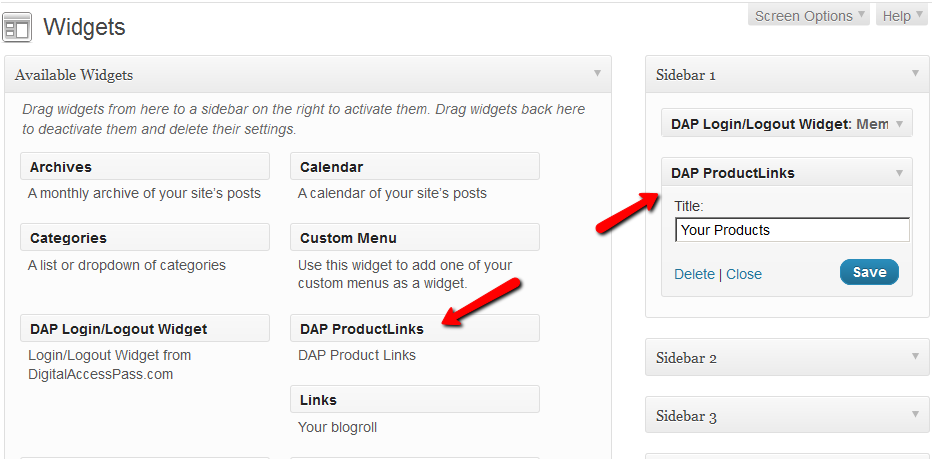
- In WordPress admin, go to “Appearance > Widgets” and enable the “DAP ProductLinks” widget by dragging it onto a widgetized section of your theme’s sidebar.
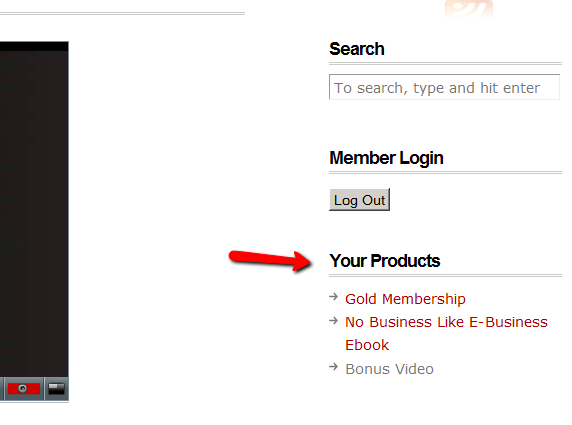
- As soon as you do that, the DAP ProductLinks widget will show up in your blog’s side bar.
- By default, each of the product names – like “Gold Membership” in the above example – will link to whatever URL you put into the “Post-Login URL” for that particular product (DAP Dashboard > Products > Manage). So the next step is to create a separate page for each product, and then enter the permalink for this new page, into the Post-Login URL of that Product within DAP.
- Create a new page in WordPress – call it, “Gold Membership Content” (for example). In the body of the page, enter the following DAP merge tag:%%PRODUCT_DETAILS_<id>%%
Replace the entire text <id> with the actual Product id from DAP (Products > Manage)
So, if the product’s id is 6 in DAP, then the merge code becomes:
%%PRODUCT_DETAILS_6%%
Save the page. And if you gave the page the title “Gold Membership Content”, then the permalink for this page will be:
http://YourSite.com/gold-membership-content/
- Take the above permalink and enter it into the product “Gold Membership” in the “Post-Login URL” field. That’s it!
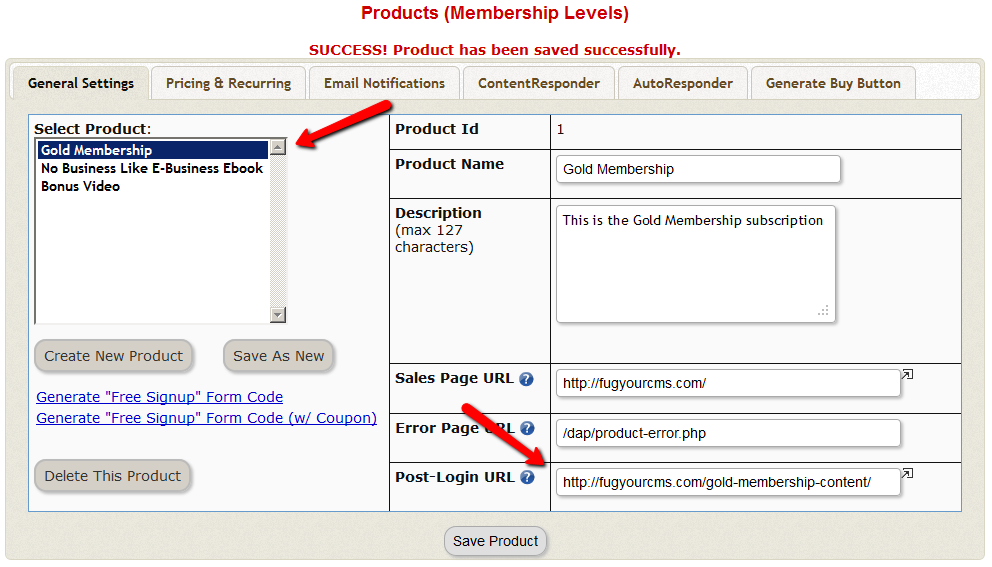
- Do the above for all products and you’re done.
End Result
- For each product that your member buys, the “Your Products” widget will show in the side-bar.
- It will list all of the products that the member has purchased.
- Each of the product names will link to it’s own specific content page
- When member goes to that page, the DAP merge tag you entered for that product will expand into product details and product-specific content links just for that product.
4
Customizing Login Widget
Here’s how you can customize the HTML, look & feel of the DAP Sidebar Login Widget.
There is a file in the following folder…
/wp-content/plugins/DAP-WP-LiveLinks/
by name…
DAP-WP-LoginForm-LoginLogout.html
Make a copy of that file on your desktop, rename it to…
customDAP-WP-LoginForm-LoginLogout.html
(just added the text “custom” at the front of the original file’s name).
You can then modify this new file however you want, including altering spacing, and that’s what will be displayed.
Just be careful what you change – do not modify the field names or the submit URL. Feel free to change other visual elements.
15
Login/Logout Widget
DAP has a Login/Logout Widget that you can use in any widget-ready theme.
Log in as WP admin, and look under “Appearance > Widgets”.
You’ll see the widget. Drag this widget on to any customizable part of your theme.
The widget puts the DAP login form right on your sidebar.
When a user is not logged in, they will see the login form.
When they are logged in, they just see a “Logout” button.