
Logout Link
Login/Logout Widget
If you are using the DAP Login/Logout widget on your sidebar, then the login widget automatically turns in to a “Logout” button once a member has logged in. No separate link needed if you’re using this widget. Click here to read more about the Login/Logout widget.
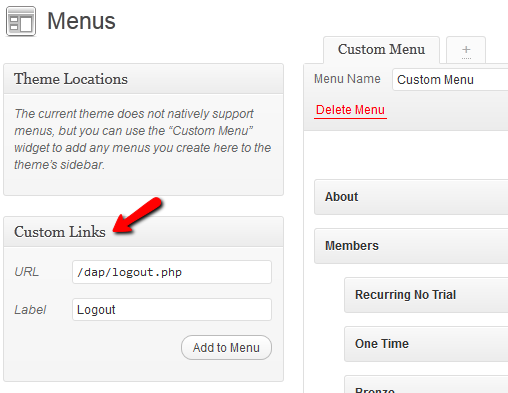
Logout link in your Menu
If you have a custom menu (WP Admin > Appearance > Menus), then you can add a custom link that points to “/dap/logout.php” or “http://YourSite.com/dap/logout.php” to your menu. This link will log your users out of both DAP and WordPress.
Default DAP Member Page
If you use the default member’s area that comes with DAP out of the box – http://YourSite.com/dap/ – then this page already has a “Log out” link at the top.
But if you are putting all of DAP’s member pages within your WordPress blog using our various shortcodes, then you need to publish the DAP logout link in your sidebar (or wherever you choose to).
Here’s the link for logging out of the member’s area:
http://YourSite.com/dap/logout.php
Replace “YourSite.com” with your actual site name, of course. And then publish the above link anywhere on your blog – sidebar, top menu bar, etc.
NOTE: Clicking on the DAP log out link will log you out of both DAP and WordPress.


