
Modify Content Under Padlock

When your visitor encounters a “Sorry, you’re unable to access this content” page that has the DAP Padlock image on it, you can customize the text that shows up below the padlock by doing this:
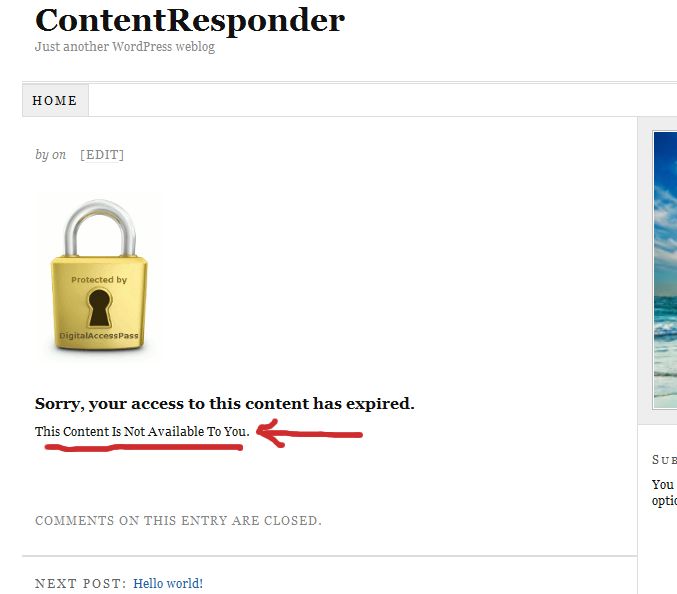
customerror

1) Open the file error.php that is stored in the /dap/inc/ folder.

2) RENAME it as (or COPY it as) customerror.php.

3) You can put ANY kind of HTML content within this. Images, javascript, css,, buttons, text, whatever. Any HTML can be used in this file.

4) Upload this new file customerror.php back to same folder /dap/inc/

5) error.php doesn’t matter any more. Whether you delete it, or just leave it alone, the fact that there is a customerror.php file in the same directory means that DAP won’t even bother about error.php any more.

6) Future updates of DAP will not touch your customerror.php file. So updates or upgrades will not mess with your custom error page copy.

11 comments ↓

#1 jean-jacques on 12.06.09 at 7:33 am

I’m using DAP 3.3 and there’s no error.php that is stored in the /dap/inc/

#2 Ravi Jayagopal on 12.06.09 at 1:53 pm

Jean-Jacques,

You need DAP v3.4 for this feature.

- Ravi

#3 Mark on 12.07.09 at 1:24 am

Can the padlock image be reverted to the smaller, original and more professional-looking gray lock when I update to 3.4? The new lock is almost obnoxious (like mocking someone for trying to access). My site needs the professional look of, say, a bank, not that of a porn site. Perhaps if it were half the size it is, it might be acceptable.

#4 Mark on 12.16.09 at 10:36 pm

Does this mean that Product-specific error pages will no longer work? Previously, when a visitor or member without access (or with improper access) clicked on a protected area, the product-specific error page would appear, telling them they don’t have access to THIS particular product, but that they can gain access by going to the specific product sign-up page, which is what I did: here

So does the new customerror.php site-wide file message over-ride this product-specific error functionality? If so, this would seem to defeat the purpose of livelinks. It would seem this could only be a very generalized message such as “Please go to the product page and sign up” but would not allow a live re-direction. Perhaps I’m missing something here … I usually am ;-)

#5 enlightenmental on 12.30.09 at 10:59 am

I agree with Mark,

that padlock / error page is ugly and unprofessional…

in future releases, the error.php / customerror.php should include the entire “error page”
- padlock w/link
- text
- etc
this is a paid product, and should be fully customizable
- now i am left to edit the core files to remove the padlock

thanks for reading

#6 Ravi Jayagopal on 12.30.09 at 12:12 pm

The padlock is very much customizable even now. Just upload an image by name customlock.jpg or customlock.gif to the same images directory.

- Ravi Jayagopal

#7 enlightenmental on 12.30.09 at 12:14 pm

ahh.. thank you Ravi

i did not realize the image could be customized

if the image itself had a class/id, then i could use CSS to float it, hide it, style it, etc

#8 Ravi Jayagopal on 12.30.09 at 12:28 pm

Thanks for your feedback. Do contact me offline and give me more details.

- Ravi Jayagopal

#9 Tom on 02.02.10 at 3:43 pm

Hi Ravi,

Somehow I missed hearing about these new customization options. Can’t wait to implement.

#10 Jared on 02.03.10 at 11:59 pm

Hi Ravi,

Is it possible to change the image link to point to the sales_page_url instead of going to the login screen (LOGIN_URL)?

Thanks

#11 Ravi Jayagopal on 02.04.10 at 12:03 am

Jared,

Right now, you can’t. But we’re working on some really useful ways to customize all of that content. That’s going to come out soon.

So stay tuned.

- Ravi Jayagopal

Leave a Comment