
Partial Content Protection Using Sneak-Peek
DAP has a feature called “Sneak-Peek” where you can show a part of your blog post or page to casual visitors (as well as to search engines like Google) and then when they click on the “Read more…” link, the protection will kick in for the rest of the post, and DAP will say something to the effect of “Sorry, you must be logged in to access this content. Please login below or click here to get access”.
And that error page will contain both the login form, as well as a link to your sales page. Of course, you can customize this error page to say whatever you want, but that’s another topic altogether.
Advantages of Sneak-Peek
Sneak-Peek allows you to show “teaser” content to potential members, instead of fully locking it up and showing just an error page. Using Sneak-Peek allows you to show some content to casual visitors in order to get them to subscribe to see the rest of the content, as well as keep some content open so that search engines like Google will have some content to index in their search databases, so that the open part of the content can show up in search results for potentially matching keywords, and bring you some free organic search traffic to your site.
How this works
WordPress has a feature called the “more” tag. Basically it is a bunch of text (<!–more–>) that you insert into your posts or pages. And WP will then break up your post right at the point where you inserted the more tag, and replace that tag (and everything that follows) with a “Read more…” link
Fig A: “More” icon in WP. Click to enlarge.
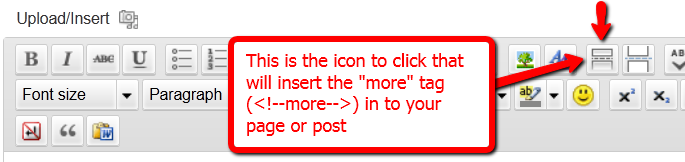
You can also insert the more tag in to your post or page, by clicking on the icon shown in the image above – that looks like two rectangles separated by a dotted line – on the WordPress page/post edit screen.
Of course, exactly what that “Read more” link will say (it could say, for eg., “Click here to read the rest of this post”) is determined by your actual WP theme.
Regardless of what it says, when you have a protected post, by default (when sneak peek is off) that post will completely disappear from your blog for non-members and those who are logged in, but don’t have access to it yet. And even to Google.
But if you insert the “More” tag in to all of your pages and posts, then on your blog’s summary page (which lists all of your posts), all posts with the more tag (protected and un-protected will show up to the more tag, and when someone clicks on the “Read more’ link, that’s when DAP’s security kicks in and if the user has access to that content, it will show her the rest of the post. But if the user is either not logged in, or is logged in and does not have access to that content (either access is yet to come because of the drip, or content has already expired), then it will show the appropriate error message.
Enabling Sneak-Peek
In your DAP Admin Dashboard, go to…
“DAP Admin > Setup > Config > WordPress Sneak Peek: Show snippets of post (upto the `More` break) even for protected posts?“
… and set the above setting to “Y” (for ‘yes’),
Update on 09/07/2014
To protect your content, if you turn on “Sneak-Peek” in DAP, and you inadvertently (or intentionally) don’t insert the “more” tag into a post, then the entire post will get hidden and protected by default, and nothing will be shown except the error message.


