
Product Chaining

Product Bundling

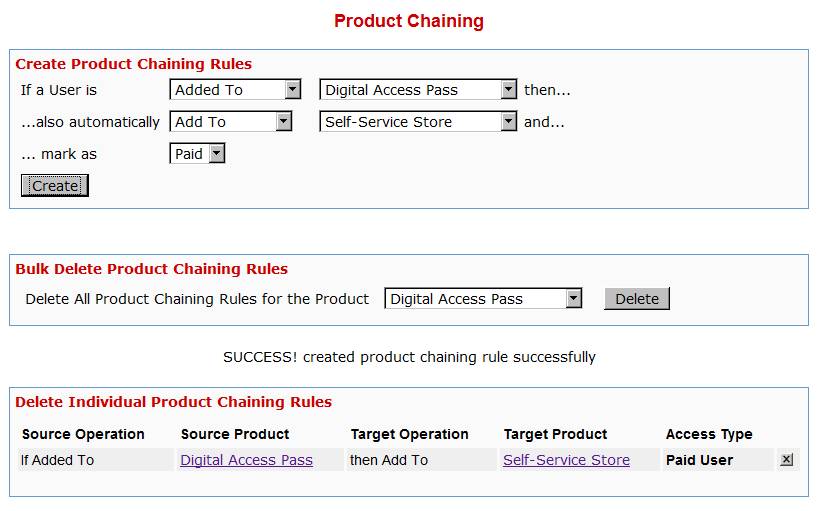
Any time someone gets access to PRODUCT A (either through direct signup, manual admin add, or purchase), then you can automatically give them access to PRODUCT B. And you can select whether they get PAID access to PRODUCT B or not.

Similarly, when someone is removed from PRODUCT A, you can also tell DAP to automatically remove their access to PRODUCT B.

Very useful for bundling products.

Product Access Automation

User signs up as free user to PRODUCT A.

Later on, user buys PRODUCT B (which is, say, paid version of PRODUCT A).

If you set up Product Chaining, then you can automatically remove them from PRODUCT A when they purchase PRODUCT B. So when you send an email to all PRODUCT A users asking them to purchase access to PRODUCT B, then you won’t be sending emails to those who have already purchased PRODUCT B.

Click on image below to open full size in a new window.
13 comments ↓

#1 Scott on 11.18.10 at 5:01 am

Ravi, I really do need product chaining so I’m glad to see you are doing this. However, I have a bundle with Products A, B, C and D. How can I do this? I was hoping to use product chaining when I heard you were coming out with this, but limiting it to 2 products won’t work for me, unless I’m missing something. Thanks!

#2 Veena Prashanth on 11.23.10 at 12:18 pm

Here’s how it will work:

You can have a rule that says if someone buys product A, give them access to product B, another rule that says if someone buys product A, give them access to product C.
One more rule that says if someone buys product A, give them access to product D.

Now if someone buys product A, they will have access to products B, C and D.

The chaining rules are applied to the ‘product that the user is purchasing’.

If you have these rules:
1) if someone buys A, give them access to B
2) if someone buys B, give them access to C
3) if someone buys C, give them access to D

Then if a user buys product A, they will only get access to product B and not to product C and D. It does not recursively apply the rules to the other products in the chain.

Makes sense?

#3 Scott on 11.23.10 at 12:25 pm

Yes, it makes perfect sense now. Thanks for clearing that up. Off to set up my product chains :)

#4 Kirk Ward on 12.01.10 at 6:25 pm

Can I add product chaining and then remove it, then add a different one and remove it.

I have products which are seasonal specials and want to add them to a standard product.

For example, in December I chain tax postcards to my standard product and allow them to drip out on calendar dates until the series is finished.

Then in April, I unchain the tax postcards and chain display ad artwork to my standard product.

Will the existing members have the new product in the chain added to their access, or will it only go to new members?

If it goes to existing memberrs, will drip days be calculated from the day the series is added, or from the members join date? (Meaning, can I use drip days or must they be calendar days?)

If “drip days,” then will the calculation be re-started each year when the specials are added?

#5 Veena Prashanth on 12.02.10 at 2:16 pm

>> Will the existing members have the new product in the chain added to their access, or will it only go to new members <<
It will only go to the new members.

#6 Kirk Ward on 12.02.10 at 2:22 pm

Well piddle.

Any easy suggestions on how to release seasonal products to existing members?

#7 Veena Prashanth on 12.02.10 at 3:04 pm

Would have to be done manually for the existing members. You can select multiple users in the DAP Manage Users page and you can give selected users access to the new product by clicking on the ‘Give Selected User(s) Access to the Product…’ under Operations.

#8 Kirk Ward on 12.02.10 at 3:16 pm

I can do that … until I can figure out an easier way.  LOL
Anyhoo, does I do it for the top level product or the chained seasonal product?

#9 Veena Prashanth on 12.02.10 at 4:59 pm

If the existing users already have access to the top level product, then give them access to the  chained seasonal product. If the existing users do not have access to the top level product and the top level product also has product chaining defined for seasonal product, then you need to just give them access to the top level product and dap will automatically trigger the product chaining rule and give these users access to both top level and chained seasonal product. Hope this helps.

#10 TheNightOwl on 03.04.11 at 4:02 am

Hi Veena & Ravi

How does this feature work with a 3rd-party autoresponder?

For example:

* I have two products, ABC (free) and XYZ (paid).

* I’m using DAP/Aweber integration

* I have a rule set up in Aweber that says “Whenever someone subscribes to List-XYZ (for paid members), remove that lead from List-ABC (for free members)”.

Will DAP handle this?

Thanks,
TheNightOwl

#11 Veena Prashanth on 03.05.11 at 1:36 pm

>>
* I have a rule set up in Aweber that says “Whenever someone subscribes to List-XYZ (for paid members), remove that lead from List-ABC (for free members)”.

Will DAP handle this?
<<

You have to setup a similar rule in DAP Product Chaining that says when someone subscribes to Product XYZ, automatically remove their subscription to Product ABC.

The product chaining rule will take care of removing the user’s access to free product in DAP when the user upgrades.

You need to keep your aweber rule so aweber can automatically remove users access to free list when DAP notifies aweber of user’s subscription to new/paid list.

#12 Just me on 09.14.11 at 2:26 pm

I have a question. If someone subscribes to Product A (one month). Then, after times up, after he have to pay (automatically), he must enter to Product B. But only if he paid for this one, too. I cannot give access to Product B, if he didn’t paid for it.

How can I do this?

#13 Veena Prashanth on 09.14.11 at 6:44 pm

You can try to setup both A and B as subscription products. Set up a subscription button to sell product A.
When you create the subscription pament button for A, set the intial payment (X dollars) to match the product A cost, and the recurring price can be set to match the monthly cost (Y dollars) of product B.

So the user will buy product A, then automatically a recurring profile will be set up to charge the user an initial amount of X dollars and subsequent recurring payment of Y dollars.

Setup a chaining rule that says, when a payment is received for product A, automatically grant access or extend access to product B. You will automatically keep receiving payments (via A) but user’s access to B will automatically keep getting extended via chaining.

Leave a Comment