
Protecting WordPress Posts & Pages

  • Log in to DAP Dashboard and go to the “Products/Lists” page.
  • Select the product to which you want this blog post/page to be a part of
  • Scroll down to the “ContentResponder” section
  • On the left, you will see a list of blog posts & pages that have been published (if you scroll down in the window where the list of “posts” show, you will also see list of “pages”)
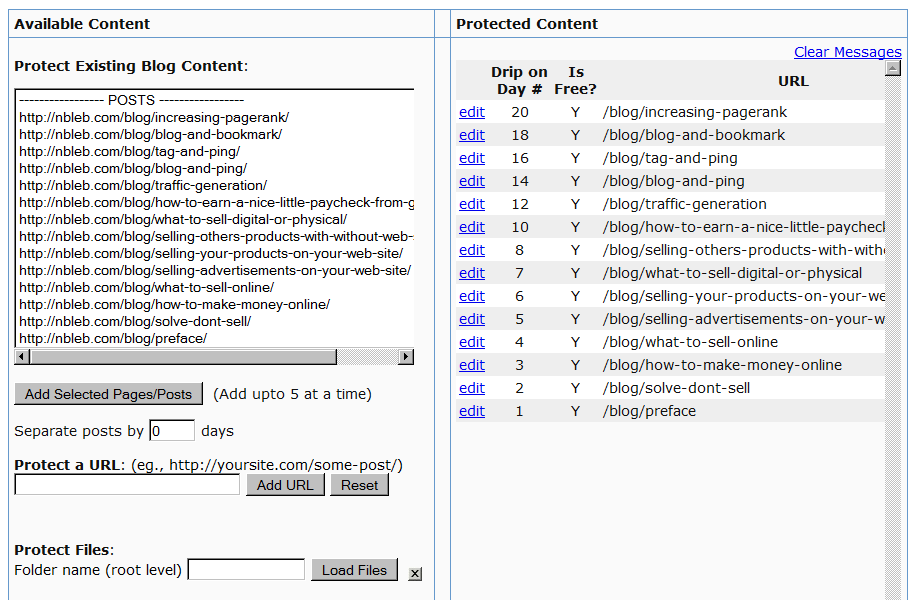
  • Select one or more (hold Ctrl + Click to select multiple)
  • Click on “Add Selected Posts/Pages” to protect the posts/pages.
  • The post(s)/page(s) will now show up on the right-hand side of the box.
  • Click on “edit” next to each link to configure dripping for individual posts/pages.

2 comments ↓

#1 Brian on 11.11.10 at 6:46 pm

I am considering moving over to DAP from amember but there is one small thing DAP must do for this to happen. I need for DAP to use tags so I can protect just a part of a post or page from members that are not allowed.

Example, on my site http://expostop.com if you click on any video you are taken to the post, this single post is split with a more tag, the protect part is at the top and the none protected at the bottom. This is done by using 3 tags [protect=product#] what I want to hide, [else] what is shown if visitor does not have access, [/protect] closes the loop.

Does DAP have the ablity to protect parts of posts or pages this way? If not is it on the list and when could we expect it?

#2 Ravi Jayagopal on 11.13.10 at 1:38 am

Brian,

We’re working on a DAP ShortCode Framework that will allow you to do exactly that. It should be out in a few weeks, as part of v4.0.

Leave a Comment