
Sending HTML Email

DAP allows you to send out HTML content in all of the following:

  1. Double-optin email body
  2. Thank-you email body
  3. Autoresponder email body, and
  4. Broadcast email body

DAP can send out “Multi-part” emails – that is, emails that have both a “text” portion, and an “HTML” portion. If there are any email clients out there that cannot handle HTML email (in the year 2010, there are really no such clients, really), then the “text” portion of the same email will be shown to the recipient.

To send out HTML emails, it is very important that you insert the HTML Email Start Tag – [HTML_START] – into the body of your email before you insert any HTML tags.
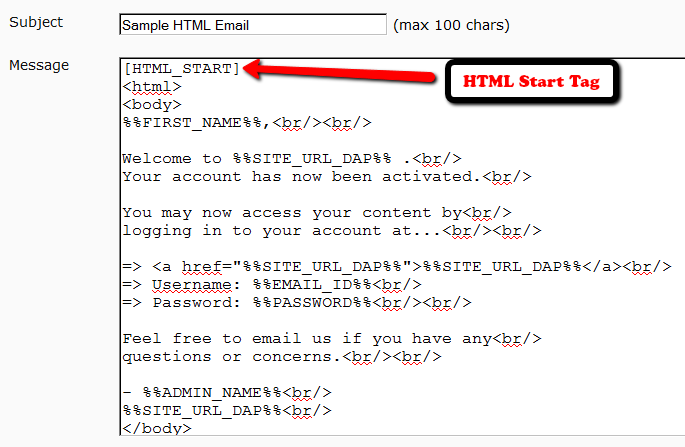
The same goes for any email that you want to send out in HTML format: Just before you insert your HTML code, just be sure to insert the HTML Email Start Tag [HTML_START].

And the HTML you insert should be full-blown HTML, starting with the <html><body>…. and ending with </html></body> tags.

NOTE: DAP does not have a built-in editor to create the HTML yet. So you will have to create the HTML code outside of DAP – either using a HTML editor like Dreamweaver, or you could even compose a draft page in WordPress, and use that as the source of your HTML code that you would then use within DAP to send out HTML email.

20 comments ↓

#1 Eric Bobrow on 11.29.10 at 1:52 pm

Is there an [HTML_END] tag? How does one create a multi-part email?

#2 Veena Prashanth on 11.29.10 at 6:45 pm

If you have both text and html portions in an email, then pure text only email clients will show the text version, and html capable email client will show only the html version. Both text and html will not be shown by any client.

#3 Raygun on 10.07.11 at 8:07 am

I noticed that there is a text after the email content. It says ‘Powered by DAP…’, is there any way to remove that?

#4 Veena Prashanth on 10.07.11 at 4:14 pm

You can remove it in DAP Setup -> Templates -> Email Footer

#5 Jason on 12.28.11 at 12:36 pm

having the same issue as Eric. Still getting both text and html content in my emails.. how am i supposed to distinguish the two?? close html tag? close html end tag??

#6 Veena Prashanth on 01.02.12 at 3:47 pm

Start with the text content.

After the text ends, add the [HTML_START] tag and enter the html content and test.

If you do this but the issue persists, open a support ticket with us and we will troubleshoot it.

#7 Evan on 02.02.12 at 7:33 pm

This is very cool, however when I send an email this way, the default footer gets out of whack because that does not have inherent HTML. Is there a code to end the html email? I guessed [HTML_END] but that didn’t do anything.
Thanks

#8 Ravi Jayagopal on 02.03.12 at 2:49 am

Evan,

There are only 3 options currently…

1) If you’re always going to be sending plain-text emails, then use a plain-text global footer (Setup > Templates > Email:Footer)
2) If you’re always going to be sending HTML emails, then use a HTML global footer (Setup > Templates > Email:Footer)
3) If you’re going to be sending both alternatively, then put the footer within the email itself, and do not use the global footer template.

#9 Deborah Savadra on 04.21.12 at 6:37 pm

Well, I tried this as a “mixed” email, and the only portion of the email that showed up was the portion after [HTML_START] — all of the text portion simply disappeared.

Does this feature work differently (or just not at all) for broadcast emails?

#10 Veena Prashanth on 04.23.12 at 12:37 pm

If your email client support html email, then that’s what you will see.

>>Does this feature work differently (or just not at all) for broadcast emails? <<

It works the same way for broadcast emails.

#11 Deborah Savadra on 04.23.12 at 5:57 pm

“If your email client support html email, then that’s what you will see.”

So, why would anyone do a part text/part html email if all that shows up is the html part? Not sure I understand the purpose of this feature.

#12 Ravi Jayagopal on 04.26.12 at 1:17 am

Deborah,

Back in the days, years ago, not many email clients could handle the rendering of HTML email. There was no Thunderbird, Gmail, Yahoo, Windows Live, etc.

So if you wanted your email to be read by everyone, you would send a multi-part email, so that those with email clients that cannot read HTML, at least got to see the text part of it.

Nowadays, it is not very relevant, as all email clients – including mobile phones – can process HTML emails with ease.

So you don’t have to include a text version of your email in the outgoing email – you can make it just HTML.

#13 Dan on 10.04.12 at 10:44 pm

Can this go in the welcome email… the one that goes to them when they buy something?

#14 Dan on 10.04.12 at 10:45 pm

oops, never mind, I see that it can

#15 Eric on 12.14.12 at 5:53 am

Does the [p] tag work in emails?

#16 Ravi Jayagopal on 12.16.12 at 2:37 pm

As long as you’re sending HTML email, yes, it will work.

#17 Richard on 01.09.13 at 3:31 am

A couple of questions:

1. Can a user unsubscribe from autoresponders but keep membership of the site?

2. “Ability to track open rates and click-through rates (coming in a future version in DAP)” — is this still on the way? Any timeline?

#18 Veena Prashanth on 01.10.13 at 12:24 am

>>1. Can a user unsubscribe from autoresponders but keep membership of the site? < <

Correct. The site membership remains intact when a user unsubscribes. They will only stop receiving dap emails if they unsubscribe.

>> 2. “Ability to track open rates and click-through rates (coming in a future version in DAP)” — is this still on the way? Any timeline? <<

Still on the way. Hopefully within 6-8 months.

#19 Eyyina on 02.11.13 at 8:21 am

Is there a way to use multiple from-email id’s?? I want one set of my autoresponder emails to be sent using email_one@test.com and another set of autoresponder emails to be sent using email_two@test.com

Basically, anyone who receives my first set of autoresponder email will see it coming from the email address email_one@test.com and anyone who receives my second set of autoresponder emails will see it as coming from email_two@test.com

#20 Veena Prashanth on 02.20.13 at 3:11 am

Eyyina,

>>Is there a way to use multiple from-email id’s?? I want one set of my autoresponder emails to be sent using email_one@test.com and another set of autoresponder emails to be sent using email_two@test.com <<

Sorry, it’s not possible. The from-email is a global setting for the auto-responder, not a product level setting.

Thanks,
Veena

Leave a Comment