
DAP can process Paypal payments using Paypal IPN (Instant Payment Notification). All you need to basically do is to enable IPN within your Paypal account and create your Buy button with a few extra parameters. It’s all explained below.
So here’s what you need to do to process orders through Paypal using IPN, and have your buyers automatically added to DAP on your site.
1. Enable IPN within your Paypal account.
a) Log in to your Paypal account
b) Go to Profile > Instant Payment Notification
c) If IPN is already enabled, and you already have a URL in that field, then skip ahead to Step 2.
Else, if IPN is not already enabled, enable it and enter the url…
http://YourSite.com/dap/dap-paypal.php
… in the “Notification URL” field. Of course, don’t forget to change the text “YourSite.com” to your actual web site domain name.
2. Create your “Buy Now” or “Subscribe” or “Add to Cart” button as follows.
- Paypal “Item Name”
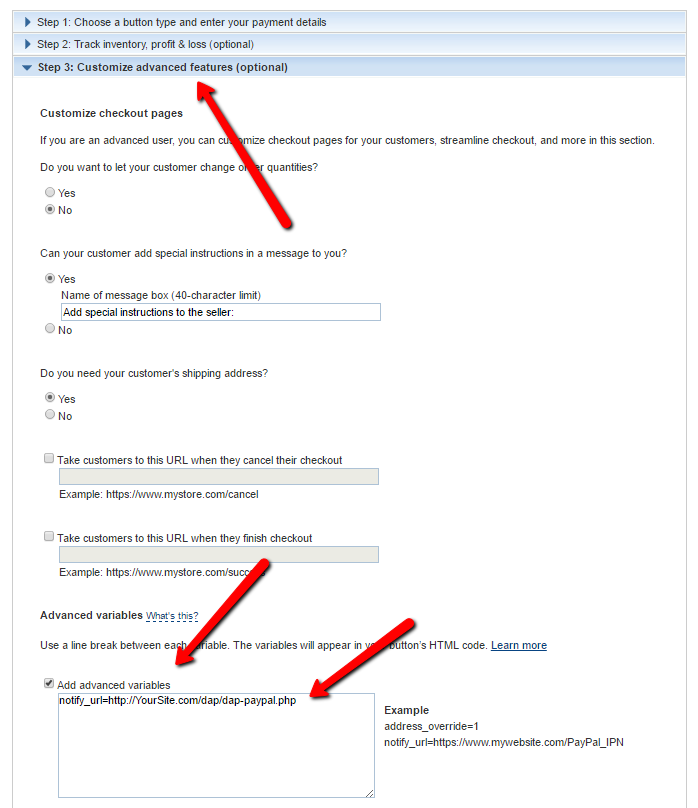
When you create your “subscribe” or “buy now” button, make sure the Paypal “Item Name” is the EXACT same spelling and case as the DAP “Product Name” that you created within DAP. In fact, login as DAP admin, edit the product, copy the text from the “Product name” field, then paste this into your Paypal “Item Name” field, so that there are no typos. If the product names don’t match, DAP will ignore any IPN posts coming in from Paypal. - Finally, when creating the button, just add a custom varible to the button as follows:Under “Step 3: Customize advanced features (optional)” tab, within the “Advanced Variables” text box, enter the following (change the text YourSite.com below to your domain name).
notify_url=http://YourSite.com/dap/dap-paypal.php
3. Save the button.
Copy the code for this button, and publish the code on your web site’s sales page, or WP page or post.
That’s it!
So when someone subscribes to, or purchases your product using this button, Paypal will send an IPN notification to your web site to the above link. DAP will then verify the product and payment status, and then will automatically add give the buyer/subscriber access to that product.
If the email id used in this purchase is not already associated with an account on your site, then DAP automatically creates a new account, and sends the buyer an “activation” email that requires them to click on a link to confirm and activate their account.
But If this email id belongs to someone who already has an account in DAP (existing buyer, purchased a different product this time), then DAP doesn’t create a new account for this user. It simply gives the existing account access to this new product.
So when the user logs in, they will see that they now have access to TWO products, with each product and the available URL’s listed separately.
Note: If you’re going to be using Paypal to process payments, then you don’t need to set up the Email Processing info in your DAP Admin > Config > Payment Processing screen. You don’t need to set up the DAP Email Order cron job either.
29 comments ↓
Paypal has some new features:
- upgrading subscriptions (button)
- cancel subscriptions (button)
when the paypal button is created from paypal, while logged in, there are additional features.
will these features interact with the DAP IPN file?
i.e. will the cancel subscription button pause their account?
will the upgrade subscription option send IPN data and change the users product inside of DAP ?
thanks
DAP has a very unique, pay-as-you-go model, where we deal with cancellations differently.
See http://www.digitalaccesspass.com/doc/cancellations-and-refunds/
- Ravi Jayagopal
Basically, yes, when someone cancels their account, by default, they can no longer access any content on your membership site.
However, if you want those who cancel to be able to access “previously paid for content” (and of course, not any future content), then you can do that too with DAP, by changing a config option.
- Ravi Jayagopal
ok.. thank you, so it sounds like if we create a “cancel subscription” button and the user cancels, the paypal IPN will send data back to DAP, and their DAP account will be cancelled/paused
sounds good, thank you
as far as upgrades are concerned, is the dap_paypal php file able to handle those request?
we need to allow users to upgrade from Free to Gold, or Gold to platinum… as easy as possible
paypal has a feature to do this, but will it sync with DAP?
(thank you for your patience Ravi)
>>so it sounds like if we create a “cancel subscription” button and the user cancels, the paypal IPN will send data back to DAP< <
No. DAP actually doesn't care about cancellations. It only cares about payments. So if no payments come in, then user's access automatically expires. So, the end result is the same, except we deal with it differently.
This actually helps with another Unique DAP feature, where a membership is essentially put "On Hold", so if the user comes back months after they cancel, they can pick up from where *they* left off.
>>as far as upgrades are concerned, is the dap_paypal php file able to handle those request?<<
Not yet. Support for automatic Payapl “upgrades” is coming soon.
- Ravi Jayagopal
When setting this up within PayPal, do we need to select the button that says, “Have PayPal create user names and passwords for customers” or will DAP automatically handle this?
Patrick,
No, don’t pick that option. It is DAP that creates the username (payer email) and password for the user.
- Ravi Jayagopal
Should ‘IPN messages’ be set to (Receive IPN messages) or (Do not receive IPN messages)?
Joseph,
>>Should ‘IPN messages’ be set to (Receive IPN messages) or (Do not receive IPN messages)?<<
What screen on Paypal are you on where you are seeing this?
- Ravi Jayagopal
Right within the “Instant Payment Notification (IPN) settings”. It is directly below the “Notification URL” field. It is a radio select for “IPN messages”.
ravi, i’m creating a pay button for a subscription in paypal, but it insists on having the price defined there
yet we are to put a price in the dap product, so does this mean if we change the price in dap, we need to alter the paypal button too?
some systems automatically pass the price set in the site admin, through to paypal.. am i missing something?
so which is the price, the dap one, or inside paypal button
or do both have to be set the same.. and how does one deal with trials, where there is more than one price involved
me confused!
Joseph,
>>Should ‘IPN messages’ be set to (Receive IPN messages)<<
Yes, enable that.
- Ravi Jayagopal
Paul,
The price field in DAP matters only if you’re using the Authorize.net or Paypal Payments Pro merchant accounts.
If you’re using Paypal standard, then only the price (both trial & recurring) that you set in Paypal matters – the DAP price doesn’t matter.
- Ravi Jayagopal
Ravi, do you have a write-up or tutorial for how to setup/use PayPal Payments Pro without the upsell options. I just upgraded from 3.5 to 3.6 and found where I enter my API keys, I just can’t figure out how the integration works.
Thanks
Julie,
Have you purchased the Paypal IPN Pro script (which is Upsell Tree for Paypal Pro)?
If not, then you can ignore those fields, and use just regular paypal buttons. See:
http://www.digitalaccesspass.com/doc/setting-up-your-paypal-button-and-paypal-ipn/
- Ravi Jayagopal
No, I have not purchased the PayPal IPN Pro Script – I am still evaluating DAP overall – I’ve been waiting for the PayPal Pro functionality to be released.
So, you’re saying that I need to purchase the Upsell Tree for any of the PayPal Pro functionality? Mmmhhh.
What I am trying to determine is what the customer payment experience would be? E.g. do they have to have a PayPal account? what is the payment flow?
Is there anyway I can test that out before I buy DAP?
Julie,
Customer doesn’t need Paypal account. They do need to have a credit card, however.
Payment flow will be:
1) Put special PPP (paypal payments pro) buy button (that DAP will provide you, from the Products page) on your sales page
2) Buyer clicks on buy button, goes to typical shopping cart page, where they see the entire form, asking for cc information, billing info, address, etc.
3) They fill it out and submit it. It connects via DAP to PPP. Then DAP does what it does best, to give user access to the product s/he just signed up for, sends out welcome email, etc.
That’s it.
Also, just fyi – I will be setting up a free trial of the Upsell Tree plugin. You can then try it out for yourself for $0.01.
Does that help?
- Ravi Jayagopal
Thank you – do you ever sleep or take time off?
That’s what I was hoping you would say – I assume then that the credit card information is stored within a profile on PayPal for subscription billing.
Thanks for the Upsell free trial option – I only have another week left in my DAP trial and was hoping to get this tested out before that ends, because setting up a Paypal account is not an option for our customers.
Julie,
>>I assume then that the credit card information is stored within a profile on PayPal for subscription billing< <
Yes, correct. DAP does not store any credit card information.
I have updated the sales page to reflect the Free 30-day trial. See http://DigitalAccessPass.com/buynow.php#upselltree
OK – I must be the densest person on the planet. I’ve downloaded the PPP trial (thank you!) and got it configured for my sandbox site. I’ve processed a successful payment for a subscription.
Now I am wondering how the renewal will be billed to the customer? It seems that your using the DirectPayment method and not the RecurringPaymentsMethod – how will the renewal be processed?
I guess I could wait until the test subscription I’ve set up matures, but just thought I’d ask.
Also, how does the customer cancel their subscription?
My apologies in advance for my continued questions on this topic. Trying to be not too much of a pest
Hi Ravi,
I’m using PayPal Website Payments Pro. Am I correct in assuming that I need to set up recurring billing on the PayPal side (which I think is an extra fee they charge)?
Thanks,
Fred
Julie,
>>Now I am wondering how the renewal will be billed to the customer? < <
When you set up your button within the DAP Products page, DAP already puts information in there that Paypal needs to create the "subscription" on Paypal's own site.
>>Also, how does the customer cancel their subscription?<<
Through their own Paypal account, or by sending you an email.
- Ravi Jayagopal
Fred,
>>I’m using PayPal Website Payments Pro. Am I correct in assuming that I need to set up recurring billing on the PayPal side (which I think is an extra fee they charge)?<<
To sell subscriptions using “PayPal Website Payments Pro”, you do have to sign-up for their “Recurring Billing” module, and they do charge extra ever month for that.
- Ravi Jayagopal
Ravi,
So, if I use PayPal I don’t have to set up a cron at all?
Thank you.
Kevin Collins
CreateOurOwn.com
Kevin,
You don’t have to set up the “Email Order Processing Cron” (dap-emailorder.php). You still need to set up the hourly cron (dap-cron.php) that sends out autoresponder and broadcast emails, etc.
- Ravi Jayagopal
Do we send the customer back to a certain page after the transaction?
You don’t have to, but if you do, send them to a page on your site that says something to the effect of “your membership details are being sent to you in an email. Pls check your email within the next few minutes….”.
- Ravi Jayagopal
Ravi,
You said :
To sell subscriptions using “PayPal Website Payments Pro”, you do have to sign-up for their “Recurring Billing” module, and they do charge extra ever month for that.
We have a PPP site and right now we are using 1SC to handle the recurring billing since PPP does not do that. I do know or have seen anything regarding a Recurring Billing Module in Paypal. Can you point me in the right direction?
Thanks,
Jim
Hi Ravi – hope you’re getting back to normal a bit now you’re back in the US.
A question regarding paypal:
There’s an option with Website Payments Standard to create an Installment Plan payment (e.g. 3 payments of $97 monthly for 3 months).
it’s mid way between a one-off buy button and a subscription. It needs a minor upgrade to your plan which costs $10 per month – but paypal aren’t charging for it until 20111.
i’d like to use this option to give customers the possibility of paying for things in three easy instalments. But it seems it doesn’t work with DAP. I tried it, but the notification didn’t seem to work to create a new user so I had to do it manually.
Any plans to include this option in future?
Ian
Leave a Comment