
vBulletin Setup
Starting DAP v3.9, DAP supports full fledged integration with vBulletin forum. You can limit access to specific forums based on the users membership level.
We also offer full vBulletin installation and DAP->vBulletin integration services. Contact Us for more details
You can download DAP 3.9 from your membership area.
Click here to download latest version of DAP
Here’s how you can enable DAP->vBulletin integration:
1. Install vB on your site per this documentation
Note: vBulletin 4.0 and higher requires PHP 5.2.0 or greater and MySQL 4.1.0 or greater
2. You can install VB in a completely new database, or it can be installed in your existing WP/DAP database.
3. Login to your VB admin panel
For Ex – http://www.yoursite.com/forum/admincp/index.php
Update the cookie domain setting under Setting Options => Cookie and HTTP Header Options
Use Custom setting and update the cookie domain to yoursite.com.
For ex – if the name of the site is contentresponder.com, then the cookie domain should be set to contentresponder.com
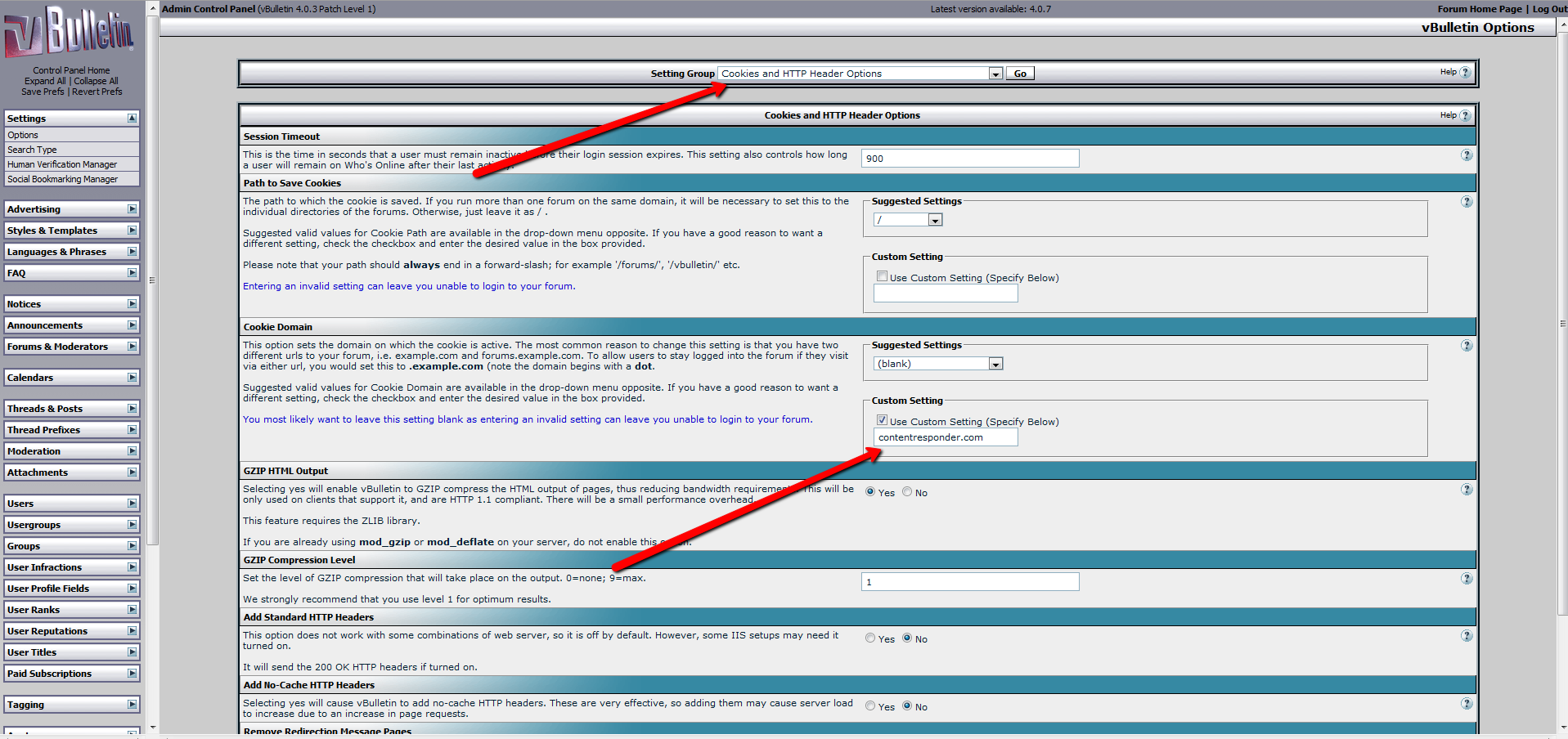
4. Update dap-config.php under the dap folder
Run the following command – http://www.yoursite.com/dap/getpath.php (replace yoursite.com with the name of your site)
Say that it returns – /home/crespond/contentresponder.com/dap
Just get rid of /dap and instead append your forum folder name – /home/crespond/contentresponder.com/forum
Now add the following lines to /dap/dap-config.php file
define(‘VBFORUMPATH’, ‘/home/crespond/contentresponder.com/forum’); // path to your forum
define (‘TABLE_PREFIX’, ‘vb_’); // vb table prefix in your database.
define (‘AUTO_CREATE_VB_ACCOUNT_UPON_DAP_REG’, ‘N’); //set value to ‘Y’ if you want DAP to auto-create user account in VB using firstname.lastname during DAP registration
Note:
1) add the VBFORUMPATH and TABLE_PREFIX just above this line require_once(“dap-settings.php”); That’s it.
2) In the TABLE_PREFIX above, use the VB table prefix that you set in your VB config file (/includes/config.php in your forum folder).
If you set it to ”, then set it to ” in dap-config.php above.
define (‘TABLE_PREFIX’, ”);
It you set it to ‘vb’ in config.php during VB installation, then set it to ‘vb’ in dap-config.php as well.
define (‘TABLE_PREFIX’, ‘vb’);
VERY IMPORTANT:
Also, replace all occurrences of backticks (`) with single quote (‘) in all the define statements above. Even when we save this doc with single quote, wordpress converts it to backticks(`). So pls make sure when you add the above define statements to dap-config.php, replace all ` with ‘.
Now go back to your DAP admin panel. You will find the vB forum option under Products/Levels.
BTW, there is a known vB issue that affects the running of command line cron stuff. Workaround for that is described here
Hope this helps.
For more details on vB, click here to see the video


