
Paypal Integration Summary

DAP supports 3 different types of Paypal Integration.

1) Paypal Hosted Buttons
2) DAP Generated Buttons For Paypal
3) DAP Shopping Cart with Upsells

Let’s get into more details about each one of them.

1) Paypal Hosted Buttons

You generate the button within your Paypal account.

Click Here to find instructions to integrate DAP and Paypal Hosted Buttons.

If the integration is not working, Click Here to find troubleshooting instructions.

Note: you only need to set the following config items for Paypal hosted buttons.

a) If you want to use Paypal Sandbox for testing, then set the following to “Y”.
DAP Setup -> Config -> Paypal -> Use Paypal Sandbox: For initial testing only

If you want to connect to your Paypal live account, then set it to “No”.

b) If your site has trouble connecting to Paypal via CURL and you see this error in DAP orders page => Check Product and Price(Reprocessible), then update the config below to FOPEN.

DAP Setup -> Config -> Paypal -> 4) Paypal Communication Protocol: How DAP connects to and communicates with Paypal on the back-end.

That’s it.

The following config items are NOT needed if you use the Paypal hosted buttons.

Paypal API Username - Only needed if you use the DAP upsell tree plugins for Paypal Payments Pro or Paypal Standard.
Paypal API Password - Only needed if you use the DAP upsell tree plugins for Paypal Payments Pro or Paypal Standard.
Paypal API Signature – Only needed if you use the DAP upsell tree plugins for Paypal Payments Pro or Paypal Standard.
Paypal API Endpoint - Only needed if you use the DAP upsell tree plugins for Paypal Payments Pro or Paypal Standard.

Paypal Business Email ID - Only needed if you use the DAP generated button for Paypal (DAP Payments/Coupons -> Generate paypal button)

Merchant Payment Gateway API Login ID
: Only needed if you use e-junkie or the DAP upsell tree plugin for Authorize.net
Merchant Payment Gateway Transaction Key: Only needed if you use e-junkie or the DAP upsell tree plugin for Authorize.net

The following fields in the DAP Products page ONLY need to be set if you use DAP upsell tree plugin or the DAP generated button for Paypal.

Recurring Count, Trial Amount and Product Price

If you are using regular paypal button, you can leave these empty. Even if these are not-empty, DAP will not use it for regular paypal hosted buttons.

2) DAP Generated Buttons For Paypal

With DAP 4.0, we have added support for DAP generated buttons for Paypal. You no longer have to generate buttons within Paypal.

You can generate the button for Paypal from within your DAP Admin Panel -> Payment Processing -> Generate Paypal Button page.
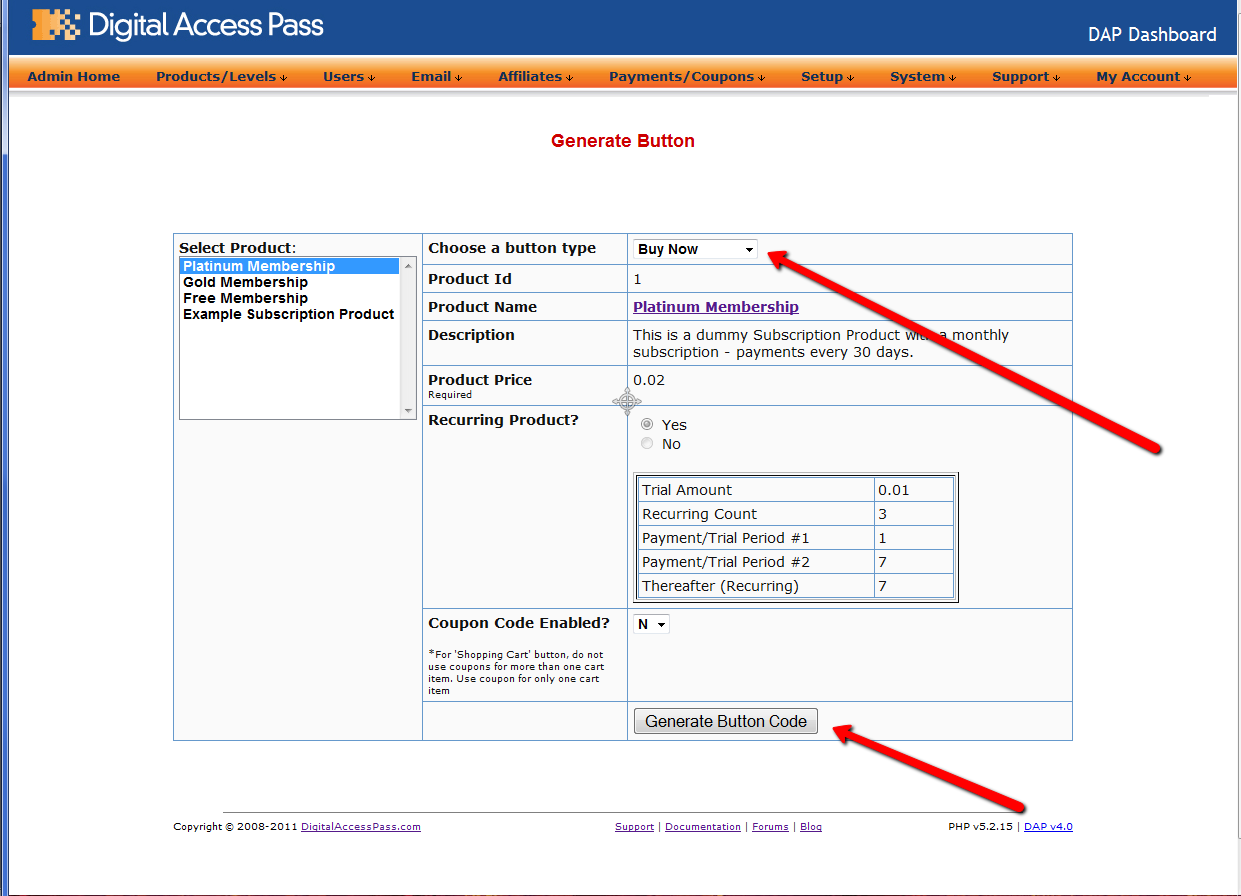


Click Here
to find instructions to integrate the DAP generated button with Paypal.

3) DAP Shopping Cart / DAP Upsell Tree Plugins

1) Paypal Standard Upsell Tree Plugin
2) Paypal Payments Pro Upsell Tree Plugin / DAP shopping cart

Click Here
for details.

17 comments ↓

#1 Mitch on 01.30.11 at 2:48 am

What is the best form of button to use?

#2 Veena Prashanth on 01.31.11 at 11:46 am

Depends on what you are looking to do.

The DAP Generated Buttons For Paypal accomplishes the same things as the Paypal hosted button but the advantage of using the DAP generated button is that your users will be automatically logged in to their membership area upon purchase and you can setup and offer coupons as part of special promotion/sale.

#3 Easy Fan Page Design on 03.12.11 at 7:39 am

If we use the DAP Generated button it looks as though it only works for one site…. as you cant return people back to different product sites when they buy unless I am missing something.

Can you confirm how we get theDAP Generated Button to work on multiple installs of DAP?

I am going temporarily for a paypal standard button and will try and figure out the Generated Button later.

#4 Veena Prashanth on 03.13.11 at 1:28 pm

When you hit the buy button, DAP dynamically figures out the ‘return’ URL for that site (based on the site the button is on) and sends it to Paypal.

Paypal requires that the global auto-return be set in the Paypal Profile -> Website Payment Preferences (to allow Paypal to return users back to your site upon purchase).

So you need to set it but you can point the auto-return to any URL. Does not matter. DAP sends the return URL at button level to paypal.

#5 Just me on 09.11.11 at 5:05 am

After the button code was generated, where should I use that script?

#6 Todd Wilson on 12.22.11 at 9:05 pm

I would like to know the answer to Just Me’s question as well. When I try to put it inside of the Add To Cart graphics buttons it doesn’t work. I would like to use those buttons rather then the little Buy Now button that is generated with the code. How do we insert the code to make the dap buttons work?

#7 Veena Prashanth on 12.23.11 at 12:44 am

Todd,
You will find the answer in this document on how to replace the DAP generated PP button with your own
image :

http://www.digitalaccesspass.com/doc/dap-generated-paypal-button-faqtroubleshooting/

#8 Todd Wilson on 12.24.11 at 7:13 pm

Veena, Thank you for the quick response. My dilemma was trying to get the optimize press short code to work with the dap generated paypal button. I never figured it out but finally just created a button from one of the optimize press buttons and inserted it in the code as the tutorial you gave me above instructs. Thanks again and I love the DAP system. Brilliant
Happy New Year

#9 Veena Prashanth on 12.24.11 at 7:56 pm

Thanks Todd.

Happy new year :-)

#10 Olivier on 01.04.12 at 4:45 am

Hi,

I’d like to offer a 1 time payment + a recurring membership fee. So 1 single buy button will trigger:
- Training videos (how to xyz): $27 (1 time payment)
- Membership program: $0 (free for the first month, than $27/mo)

I looks like Paypal wouldn’t process this on the same order. What do you suggest I do to make this work?
Also I need to accept coupons on the 1 time payment.

Thanks, Olivier

#11 Steve on 01.17.12 at 9:49 am

When you say people will be ‘automatically logged in to their membership area upon purchase’…what does that mean?

I thought DAP has to send the assigned password in the ‘instant’ email after Pmt has been approved?

What do most people do and why (ie- do a DAP generated button and change image)?

#12 Veena Prashanth on 01.17.12 at 10:04 am

Steve,

Pls see this on how dap generated button and paypal hosted buttons work:

http://www.digitalaccesspass.com/doc/user-flow/

#13 Veena Prashanth on 01.17.12 at 10:11 am

Oliver,

>>- Training videos (how to xyz): $27 (1 time payment)
- Membership program: $0 (free for the first month, than $27/mo) <<

Maybe you can manage this using one button to sell instead of 2 and then use dap product chaining to automatically give user access to one-time when the payment comes in for membership.

Steps:

1) Create membership product and one-time product in dap

2) Set the trial price = $27 and product price – $27 for the recurring product (instead of $0 trial).

3) You can setup a recurring/subscription payment button that charges the user $27 initially and then $27/mo.

4) In the product description for membership product, make it clear that the users will get access to one-time for free (the first month) when they signup for membership.

5) setup a product chaining rule that says when a user gets access to membership product, automatically give them access to one-time product.

5) Now when the buyer buys the subscription product, you will first receive an initial payment of $27 and the user will get access to one-time product.

Next month onwards, you will receive the recurring payment of $27/mo and the user’s access to the membership product will automatically get extended by 30 days each time and they can access the membership content based on your drip setting.

#14 Olivier on 01.18.12 at 8:42 am

Ah! This is brilliant -thanks!

#15 LeeAnn on 03.02.12 at 9:28 am

I have two coupons right now associated with a recurring product. I just want to make sure that (as long as the coupons are active and associated with the product), the same discount will be given every month when the payment recurs. In other words, my monthly membership fee is $14.97 and there is a coupon for $5.00 off – it worked perfectly for the first payment the discount was shown at checkout and the person was charged $9.97. I want to make sure that in 30 days when the payment recurs, the same discount will apply. Please advise. Thanks!

#16 Veena Prashanth on 03.02.12 at 9:50 am

LeeAnn,

What payment button are you using? Are you using the dap generated button for paypal ?

#17 LeeAnn on 03.02.12 at 9:53 am

yes – DAP generated button for PayPal

Leave a Comment