
Troubleshooting the Affiliate Program
The reason why your affiliate program may not be working as intended, is almost always because of incorrect setup and/or testing parameters.
Quick Troubleshooting Tips
- A good clean test was not carried out, allowing the proper cookies to be set
- You were already logged in as DAP admin, and did not log in correctly as your new buyer
- You were using the same browser to log in as DAP admin, DAP user, new buyer, etc, thus causing a problem for DAP to set and track the affiliate cookies.
- Affiliate commissions had not been set up in advance of the purchase
- You used an existing user in the system (who may or may not have been previously attached to an affiliate) to test, which is incorrect – you must create brand new user.
- Login Xpress was not setup for the payment integration – which means the buyer has to actually log in to the member’s area in order for the tracking to be completed
- The hourly Cron job hasn’t run twice yet (which is when the commissions are credited to the affiliate)
- Resulting affiliate commission is too low to be calculated (eg. when using a test purchase of a 1 penny product)
A Clean Test
- Make sure you have set up affiliate commissions for the Product on the “Affiliates > Commissions” page
- Delete the email id of the test user – with which you are going to make a purchase – from Users > Manage page.
- Log out of DAP admin, WordPress admin, clear your browser cookies, and restart your browser (unless you are going to use a completely different browser where you are not logged in as DAP admin or WordPress admin – double check that anyway).
- Click on an affiliate link (that you have previously sent yourself via email). Don’t manually type it in the browser window, lest you make an error in the affiliate id. Make sure you use a valid link.
- When you land at your web site, now make a real purchase as a new user. Don’t use email of existing user. If the email you wish to use is already used up by a test user in the system, then be sure to delete that user from your system before making the purchase. This is very critical, because an existing user who is currently not attached to an affiliate, cannot be made to get attached to another affiliate just because you clicked on that affiliate’s link before making a purchase (using existing user).
- If you haven’t already set up Login Xpress (where buyers are automatically logged in to member’s area), then you MUST log into the members’ area using the user id that you used to make the purchase (you DO NOT need to log in separately if Login Xpress is setup, because then you would get auto-logged in upon purchase).
- Now in a separate browser (like Chrome or Firefox), log in as DAP Admin, go to “Users > Manage” page to make user the new user account has been created, and that there is actually a transaction id listed under the Trans ID column of the user’s row.
- There should be one. Click on that transaction id, it will bring you to the transaction details page
- Look at the status of the transaction – it should say SUCCESS at this point.
- Now wait for the top of the hour, for the DAP hourly cron job to run. When the cron finishes running, refresh the transaction details page. The status of the transaction should have changed to Processed Affiliations Successfully. (If you don’t wish to wait for the top of the hour, you can always run the cron manually by going to http://YourSite.com/dap/dap-cron.php – remember that if you run it manually for this one time, then there will be no way to know if the cron has actually been set up correctly and running on it’s own. But that’s a whole another topic).
- Now when you log in as the affiliate in yet another browser, you will find the commissions credited for this buyer’s purchase.
Here are some more troubleshooting steps:
1A) Affiliate was not credited with a sale
There could be many reasons for why the affiliate was not credited to the sale.
a) Buyer didn’t click on any affiliate links before purchasing the product
b) Buyer did click on an affiliate link, but somehow (intentionally – or not) cleared her cookies before buying the product
c) If you haven’t set up Login Xpress, then buyer needs to log in to your membership site – which they probably haven’t done yet (if this is the case, see if DAP supports Login Xpress for your payment processor)
d) The hourly cron job on your DAP site hasn’t run yet (hourly cron has to have run *after* the buyer has logged in to their account)
e) You have not set up any affiliate commissions for the Product on the “Affiliates > Set Commissions” page
1B) Affiliate was credited with the “Lead”, but not the “Sale” (no commissions awarded)
Short answer: You’re not using “Login Xpress”. And you probably forgot to initially set up the affiliate commission for the Product in question, under “Affiliates > Commissions“, and only set up the commission record 7 days (or more) after the actual sale happened (the sale for which your affiliate got the “Lead”, but not the “Sale” (and in effect, no commissions). We call this the “7 Day Commission Cutoff Period”. So affiliate will not be awarded the commission. You just have to pay them offline.
Long answer: DAP has two ways of awarding commissions:
a) Using Login-Xpress, where affiliates are attached to buyers instantly after purchase, and when the cron job runs at the top of the next hour, the affiliate commissions are credited to the affiliate’s account.
b) In situations where Login-Xpress is not possible (due to restrictions with the specific payment processor), the affiliate is attached to the buyer only when the buyer actually logs in to your membership site. Believe it or not, not everyone logs in the same day (sometimes not even for a few days after) they’ve purchased your product. So it’s possible that the affiliate/buyer connection is not made by DAP until a couple of days later.
Now consider these scenarios…
Case X: Buyer clicked on affiliate link at work. They purchased the product at work. You don’t have Login-Xpress setup. So only way for affiliate/buyer connection to be made, is when your member logs in to your site for the first time. So they went home that evening, logged in for the first time from home, but there’s no affiliate cookie at home. Normally your affiliate is screwed. But DAP goes the extra mile to be fair to affiliates. If your buyer logs in to your membership site even a couple of days later from work, since the cookie is still on their work computer, the affiliate and buyer are now connected, and affiliate gets credit for the sale.
Case Y: Buyer never clicked on any affiliate link. They bought your product. You did not have Login-Xpress setup. So only way for affiliate/buyer connection to be made, is when your member logs in to your site for the first time. So since they never clicked on any affiliate link, there’s no affiliate cookie. They buy your product, log in to your site, and their account has no affiliate attached to it. Then a couple of days later, they’re surfing the web, and happen to read an article from one of your affiliates, and intentionally or not, click on that affiliate’s link. Now that affiliate’s cookie is stored on their computer. The next time they login, DAP thinks “Ah, this is the same as Case X (above): No affiliate attached already, but now finding affiliate cookie – same as the buy at work/login at home example. So DAP will go ahead and give that affiliate credit for the sale, even though the referral was not made prior to purchase. So to avoid awarding affiliates incorrectly (after the sale), DAP is deliberately programmed to look for transactions only for the last 7 days, every time the DAP hourly cron job runs.
2) Affiliate Program Life Cycle
- You have already set up a “Per Sale” commission for the Product being purchased.
- Visitor clicks on affiliate link and affiliate cookie is set on her computer
- Visitor goes on to buy the product
- a) If you HAVE setup Login Xpress, then member is logged right into the members’ area.
b) If your payment processor does not support (or you HAVE NOT setup) Login Xpress, then buyer gets welcome email and logs in to your member’s area: This is when the affiliate is actually credited with the referral. So it is critical that if you’re testing the affiliate program, make sure you log in to the new member’s account. - So regardless of whether they’re auto-logged in right after purchase, or whether they log in a few minutes after the purchase after they’ve received their log in information via email, the login action takes place at this point.
- At the time of this login, the only thing that happens is:
a) DAP records in the database that this buyer was referred by the affiliate set in the affiliate cookie.
b) If you have set up any “Per Lead” commission, then this lead commission amount is instantly credited to the affiliate’s account. So if the affiliate were to log in to his account exactly at this second, they would just see that they have gotten the “Per Lead” commission credited to their account. If there is no “Per Lead” commission, then nothing is credited to Affiliate account at this point. So the affiliate would see no “Sale” commissions yet. - At the top of the hour after the buyer has logged in to their member’s area, the DAP Hourly Cron (dap-cron.php) runs. It sees that Buyer X has been referred by Affiliate Y. It also sees that no “Sale” commissions have yet been credited to the affiliate for the purchase. It then looks up the Affiliate Commissions that you have previously set up at “Affiliates > Set Commissions”, calculates the commission to be credited (“Per Sale Fixed” or “Per Sale Percentage”), and then credits affiliate’s account with that amount.
- If the affiliate were to log in to his account at this point, they would just see that they have gotten the “Per Sale” commission credited to their account.
3) Affiliate is unable to access the Affiliate-Info page.
So you created an “Affiliate” product, created a free sign-up form, and an affiliate signed up to this product, and is trying to log in and access the page, but is unable to, and is getting the “Sorry, you don’t have access to this product” error.
There could be many reasons for that (main one is #1 below):
a) Anyone who signs up through the “Direct Signup HTML Form” is added as a “Free” user. Which means, they can only access content that has been marked as free. So if you have created an “Affiliate” Product, and have added the affiliate-info page to that product, make sure that page is accessible by free users too, by clicking on the “edit” link next to the page, and on the resulting popup, set “Accessible to
Free users too?” to “Y”.
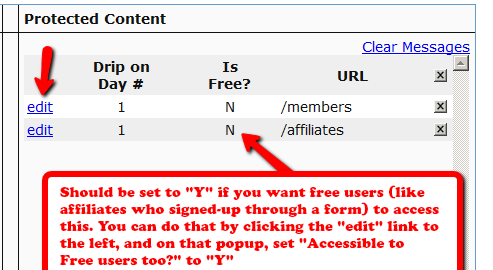
b) You have not even made the affiliate-info page protected under the “Affiliate” product
4) Double Credit of Affiliate Commissions for the same purchase
This is not really a double-credit for the same purchase, even though it appears to be so.
Sometimes you may enter a manual transaction for a purchase around the same time that DAP is processing an automated transaction for that purchase.
That means, there are now two transactions in DAP for the same purchase – one manual, and one automated – which can cause problems in accounting.
That’s usually how you end up crediting double commissions to the affiliate who referred the user, because all affiliate commissions are calculated from sales, and if you have two separate transactions for the same purchase, then the affiliate will get credited twice for the same referral.
So if you see two credits for the affiliate, you must first note that it is not for the same transaction, but for different transactions (note the different Trans Id‘s) on the Affiliates > Reports page.
So be careful when you’re entering Manual transactions. Those are meant only for when there is no way to automate the recording of a purchase (because they paid offline) and you’re unable to bring the transaction into DAP automatically.
If you see two affiliate commission credits (one for the automated transaction that DAP picked up, and one for the Manual transaction that you entered), then just refund the manual transaction in DAP. There will probably be a change to the user’s access because of the refund. So make a note of the current access of the user BEFORE you do the refund, and then AFTER you’ve processed the refund, go back to the User’s details on the Users > Manage page, and manually adjust their access to make sure it’s accurate.


