
DAP has “TruDrip”: Real Content Dripping

Many of our competitors who claim to have “Content Dripping”, don’t really have true content dripping.

That’s what we’re hearing from multiple users who have used our competitor’s product, and moved away from it because of this very reason.

For example, one of them (you could say they’re our main competition) has what they call “Sequential Content Delivery”. Though on the surface it does seem to be what you think of when you say “Content Dripping”, in reality, it’s not exactly that.

How THEIR “Dripping” works

Let’s say you have one Product – and wish to gradually deliver content over 12 months.

What you would have to do with their model, is you end up creating 12 different products (or membership levels) – one for each month.

And then set up their sequential upgrades to upgrade your member from…

Product 1 to Product 2 at the end of Month 1,

Product 2 to Product 3 at the end of Month 2, etc.

So if you have 12 months worth of content, you basically end up creating 12 different products (or levels, or whatever they call it).

Even though it’s just ONE product!

And once someone gets upgraded to Month 2′s content, ALL of that content is available to them on Day 1 of Month 2. Unless you set up the individual day’s worth of content also as separate products.

But with the above setup, within a month’s content, there is no “staggered” delivery. All of month 2 content is available on Day 1 of Month 2. No “dripping” there.

Which means, someone who just signed up, gets access to ALL of Month #1 content right on Day #1.

And if their recurring payment came in month 2, that means they get access to ALL of Month #2 content on Day #31 (or Day 1 of Month 2).

Not good.

Because this means they can download everything on Day #1 and simply ask for a refund. Which means the whole idea of “dripping” is defeated.

And here’s where it gets more hairy…

Let’s say you have 3 levels: Platinum, Gold and Silver.

So for the Platinum product, to drip content on your Platinum members for 12 months, you end up creating 12 Platinum products.

So, instead of just having one “Platinum” product, you now have 12 different products…

“Platinum 1″ with Month 1′s content

“Platinum 2″ with Month 2′s content

“Platinum 3″ with Month 3′s content

“Platinum 4″ with Month 4′s content

“Platinum 5″ with Month 5′s content

“Platinum 6″ with Month 6′s content

“Platinum 7″ with Month 7′s content

“Platinum 8″ with Month 8′s content

“Platinum 9″ with Month 9′s content

“Platinum 10″ with Month 10′s content

“Platinum 11″ with Month 11′s content

“Platinum 12″ with Month 12′s content

And that was just your ONE LEVEL.

You would also have to create the 12 “Gold” products:

“Gold 1″ with Month 1′s content

“Gold 2″ with Month 2′s content

“Gold 3″ with Month 3′s content

“Gold 4″ with Month 4′s content

“Gold 5″ with Month 5′s content

“Gold 6″ with Month 6′s content

“Gold 7″ with Month 7′s content

“Gold 8″ with Month 8′s content

“Gold 9″ with Month 9′s content

“Gold 10″ with Month 10′s content

“Gold 11″ with Month 11′s content

“Gold 12″ with Month 12′s content

Then you have the 12 “Silver” products.

“Silver 1″ with Month 1′s content

“Silver 2″ with Month 2′s content

“Silver 3″ with Month 3′s content

“Silver 4″ with Month 4′s content

“Silver 5″ with Month 5′s content

“Silver 6″ with Month 6′s content

“Silver 7″ with Month 7′s content

“Silver 8″ with Month 8′s content

“Silver 9″ with Month 9′s content

“Silver 10″ with Month 10′s content

“Silver 11″ with Month 11′s content

“Silver 12″ with Month 12′s content

So to basically have 3 membership levels, and drip content over a period of 12 months, you have to create, setup, and manage a whopping 36 different products.

True Story

<snip>….

We already had our website set up with other competition software but found out that it wouldn’t suit our needs for a true drip campaign product.  That’s when I came across Digitial Access Pass.

DAP makes it super easy to set up a simple content drip product even if you have different membership levels. No more having to make 36 products and put into sequential delivery just to get a one year 3 level drip campaign.  DAP is simple…just 3 products for the same content drip product.  Not only can you drip content like videos, pdfs, documents and audios but this fabulous software also gives you the option to drip emails into the product too…what a fantastic idea!

…</snip>

Tawnya Sutherland
VANetworking.com

read full testimonial

In fact, only after she told us about this, did we actually know that our “leading” competitor does not have true content dripping. That feature is only on their todo list <wink> <wink> :-) , and is not really what you think it is.

DAP has “TruDrip”

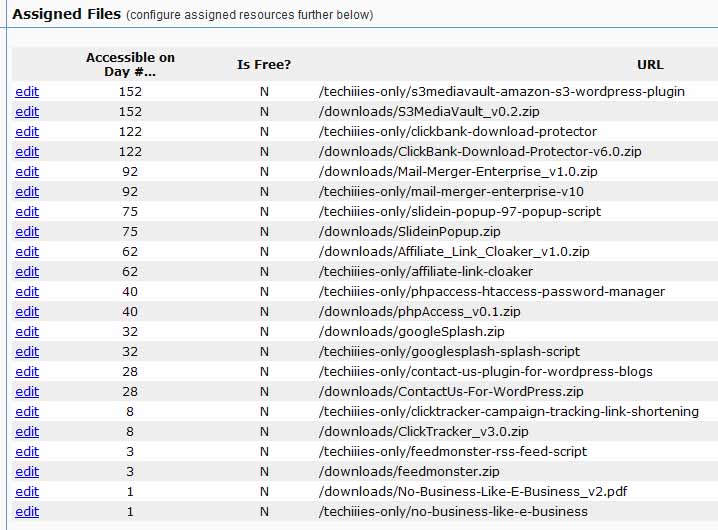
With DAP, you create just 3 products: Platinum, Gold, and Silver.

And within the Platinum product, you can set up your content to drip for not just a few days, or for a year, but for as long as you need to.

Which means, your content is available to your member exactly how you set it up.

Day 1: Blog post 1
Day 7
: Video 1
Day 14
: PDF 1
Day 21
: MP3 1
Day 28
: Article 1
Day 31 (Month 2): Video 2
Day 38: PDF 2…
dapdrip

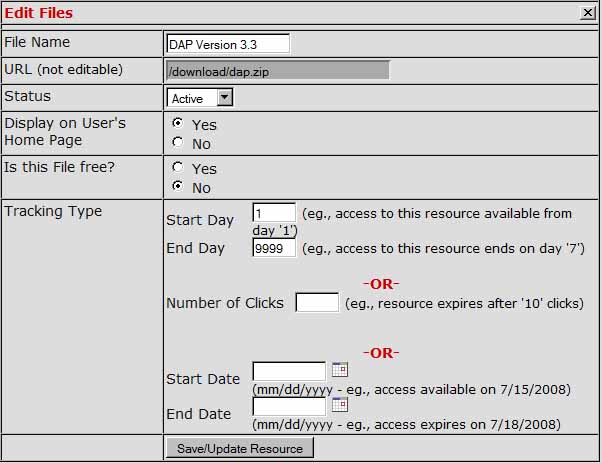
And if you want more advanced customization of this content, then you click on the “edit” link you see above (in the left-most corner of each row), and here’s what you would see.
dapdrip2

So would you be prefer to go crazy trying to set up crude hacks just to accomplish a simple content drip for several months?

Or would you rather set it all up intuitively, where the software works just the way you think?

If you want true “Content Drip”, and your content to be safe from unauthorized or rogue users, and want to set it all up easily, then DAP’s “ContentResponder” feature is the real deal.

DAP is legitimately superior software. But don’t take our word for it. We want you to experience it for yourself – which is why we offer a 30-day, unconditional, money-back guarantee.

We want to know what you think. So don’t forget to add your comments below.

Then you have “Gold 1″, “Gold 2″, …. “Gold 3″.

13 comments ↓

#1 Mark on 12.25.09 at 3:49 pm

Very informative post. In fact, as I delve deeper into using DAP, I’m finding that the software itself gives you ideas you would not have had when conceiving of content delivery or drip configurations; it presents possibilities for users they may not have considered due to its ease of use and its amazingly flexible interface. I could not have done what I’m doing at Life Story Workshop if it were not for DAP. I’m looking forward to my January 2010 grand opening site launch, and I know now that I can count on DAP to make it all possible in the smoothest, most professional way.

#2 Ravi Jayagopal on 12.25.09 at 4:12 pm

Mark,

Thank you for your kind words. Do you mind if we use it as a testimonial on the site? Do send me your picture to use with it, if that’s ok.

- Ravi

#3 Brett on 12.27.09 at 9:04 am

Ravi,

Yes, this is exactly right. One of the main reasons I am switching over to DAP is that I have weekly course content that I want to deliver (over 6 months), with the ‘competitor’ I had to setup 24 courses for each level!

It quickly became apparent that this is not an easy task, and one that would be a nightmare to manage. That’s why I know that DAP will solve the problem for me.

One question though. I noticed with your own eBook delivered over time, the ‘Post Date’ is always the original ‘Post Date’, is that right? I would prefer that the ‘Post Date’ change with the number of days the user has been a member for each user. That way it will look like the new content is being posted live, instead of it looking like old content is there being release to them.

Do you see my point? If the ‘post date’ never changes, some day (a few months, or even next year) , it will seem like the user is getting new content that is several years old!

It looks better, and more natural to the user if the ‘post date’ would change, and look like they are getting new ‘posted content’.

Can this be done with DAP, or can you tell me how the calculation would be made based on user signup date, so I can put it in myself?

Thank you,
-Brett

#4 Mark on 12.27.09 at 9:49 am

Brett, as Posts themselves are a WordPress function, I believe it may be possible to turn the dating function off (or to mask it with customization) in your WP settings, though this may vary from theme to theme.

#5 Dr. Patrick MacNamara on 12.27.09 at 2:39 pm

Ravi,

You are absolutely correct and dead-on with this post!

I purchased the competitor product believing I’d be able to “DRIP” the content however I pleased. But, instead was shocked to find out that their product couldn’t handle it. Just like you wrote, I’d need to create an individual product for EACH blog post dripped! How insane is that?!!!!!

Thanks again for such a stellar product! DAP is the BEST and offers “TRUE DRIP”!

Happy Holidays!

#6 Ravi Jayagopal on 12.27.09 at 3:28 pm

Brett,

Mark is right about that. You will have to customize your theme in order to not show the date.

There is no way in DAP right now to “alter” the actual WP post date on-the-fly. It is better you don’t show it at all.

But that’s a great idea, and I’ve noted it down for a future version.

- Ravi Jayagopal

#7 TheNightOwl on 12.27.09 at 6:53 pm

Yes, indeedy… I’ve considered the competitor product in the past, too. But the “clunkiness” of the drip feature wasn’t really attractive to me, either.

And the fact that DAP has an affiliate prog built in (as well as all sorts of other cool stuff)…

OMG! I think I’m in love! =)

I’m currently reading your WSO thread and I’ll be a customer before you know it!

[Thanks VERY much to Dennis Gaskill for pointing me in this direction!]

=======================

@Mark… re: the date

I agree. You want to keep it looking fresh. Some content can be fresh for many years and you don’t want people to be put off by thinking that it “might” be out of date.

A possible solution, therefore, is hacking your WP template files to include a php-snippet that showed the current date.

Codes here:
http://www.w3schools.com/PHP/php_date.asp

Or a javascript to show “date minus 2″, even. (I don’t know if you can do that with php; I’m not a coder. But I don’t think you can.) Try this:

http://ajaxweb.wikidot.com/java-how-to-add-substract-date-day-month-or-year

Just look in your theme’s page and post template files for where it inserts “postdate” – which it sounds like is calling the date on which the post was uploaded to the WP Admin – and replace that code with the php date echo for the current date.

Adding the javascript at this location might be trickier.

@ Ravi: Would that work as a temporary hack until you’ve made a workaround?

#8 uberVU - social comments on 12.30.09 at 5:49 pm

Social comments and analytics for this post…

This post was mentioned on Twitter by RaviJayagopal: What is “True Content Dripping”? http://www.digitalaccesspass.com/blog/2009/12/true-content-dripping/ #in…

#9 Alex on 07.15.10 at 12:57 pm

Can I set up content dripping so it’s done based on specific members? For example, if member #2 registers when member #1 is on Day 7, will member #2 see 7 days worth of content or 1 day? What I want to do is have content “drip” per member, not per month or week. Is this possible?

#10 TheNightOwl on 07.17.10 at 9:36 pm

Hi, Alex

I’m obviously not Ravi. Nor do I work for him. I understand he’s actually in transit back to the States from India at the moment.

The short answer to your question, though, is “Yes.”

These two links should clarify most things for you:

http://www.digitalaccesspass.com/features.php

http://www.digitalaccesspass.com/documentation

Hope that helps, and all the best with it! :)

#11 Mark on 07.18.10 at 11:20 am

Alex,

DAP functions exactly as you had hoped. While dripping is not actually based on Members per se, it drips based on the Product which specific people are members of, and so, given your example, if Member #2 starts a membership, he/she sees only information that a new member is programmed to see in week 1, no matter how far into the cycle Member #1 is…in fact, there is little/no correlation between Members #1 and #2 in terms of access (unless of course you open access up across the board for certain items). Also, another thing that makes DAP powerful is that if a Member wants to pause a membership for a given number of weeks –say 3 weeks–(for financial reasons, leaving on a trip, etc), you can pause that person’s membership spot for 3 weeks and if/when they come back, they pick up where they left off, NOT where they would have been had they stayed in without interruption. That’s a great sell-feature because you show customers you respect their specific situations and are willing to work with them within reason, but that they cannot swindle you or take advantage of access that others have paid for over time. Hope that helps.

#12 Eric on 02.13.12 at 11:59 am

I already have a website with a members area, but I need to drip feed them content. Can I add DAP to manage the drip feeding? Will it know how long my current members have been members?

Thanks for your help,
Eric

#13 Veena Prashanth on 02.13.12 at 9:41 pm

>>Can I add DAP to manage the drip feeding? Will it know how long my current members have been members? <<

Sure. As long as you have imported all existing members to a dap product, dap will know how long the users have been members and drip feed accordingly.

Leave a Comment