
How Do Members Get Added To Your Membership Site

(OR) How do members get access to the content

(OR) How does someone become a member?

With DAP, you can add users to your membership site in 3 different ways.

1.  PURCHASE: Someone buys your product or subscribes (“Paid” member with access to both free and paid content)

2.  FORM SIGNUP: Someone signs up through a signup form (“Free” members with access to only free content)

3. ADMIN ADDED: You add them as a member directly through the DAP Admin Control Panel (you can mark them as either “free” or “paid”)

All three are explained in detail below.

1. PURCHASE

*You first create a “Sales Page”.

On your sales page, depending on which payment processor you use, you go to Paypal/1ShoppingCart/ClickBank and create a new product with the EXACT same name as the product you created within DAP, and get the ‘Buy Button’ link from your Payment Processor. Publish this “Buy Button” on your sales page.

* Your visitor goes to your sales page

* They purchase your product

* Your payment process (Paypal/1ShoppingCart/ClickBank) notifies DAP that you have a new purchase.

* If the product names match, DAP automatically creates an account for them, generates a random password, and sends them an email with their email/password. You can customize the contents of this email on the “Templates” screen in your DAP Admin Control Panel. Integration with your shopping cart explained elsewhere (see documentation for setup).

That’s it!

That’s how “buyers” get added to your membership site and get access to the product they just purchased.

2.  FORM SIGNUP:

You wish to give someone a “Free” membership.

NOTE: “Free” members who do not have a payment associated in DAP (which means they have not purchased anything) will have access only to content that you have marked as “Free”.

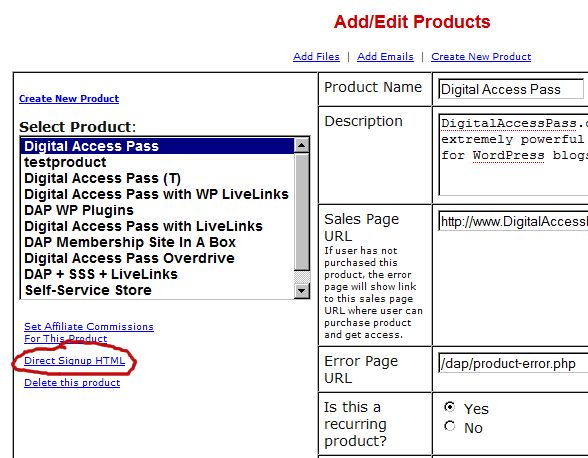
Once you have created a Product in DAP, and have added content (blog post/page links, links to files, etc), and have saved it, on the Product page, below the Product name list, you will see a link called “Direct Signup HTML”. (See image below). You must first select a Product before you can copy the correct form HTML.

Fig 1. Direct Signup Link on Products page
dap-direct-signup

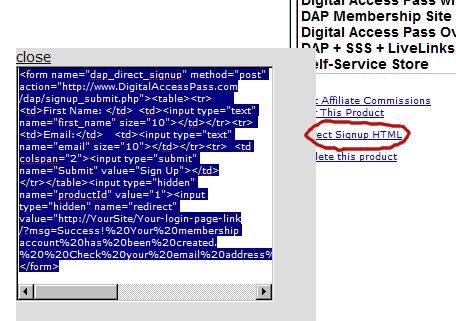
Fig 2. Form HTML that you get on clicking the Direct Signup Link

dap-direct-signup-onclick

This HTML gives you the full HTML form code that you can publish on any page of your web site. This form only collects an email address and a first name.

Take this HTML code and publish it on page of your web site where you want sign up users. This could be a WP page or post too.

Note: When you see the above HTML code, there’s a field in there that looks like this:

<input type=”hidden” name=”redirect” value=”http://YourSite/Your-login-page-link/?msg=Success!%20Your%20membership account%20has%20been%20created.%20%20Check%20your%20email%20address%20in%20a%20few%20minutes%20for%20your%20password“>

Don’t forget to change the text above, where it says “http://YourSite/Your-login-page-link/?…” to point to your actual domain name and to your actual login page (if you have customized it).

Then, when someone enters their email address and first name and signs up through the signup form, DAP creates an account for them using that email address, creates a random password, and sends them an email with their email/password.

After that, you can drip any content or emails on them that are marked as “Free” (when adding content or emails).

At some later point, if they purchase any of your “Paid” products (see the “1. Purchase” section above), then as long as they use the same email id during purchase, DAP will automatically give them access to all of the “Paid” content in the Product that they just purchased.

3. ADMIN ADDED:

If you wish to directly give someone access to a Product and all its content and emails, you can add them directly from the DAP Admin screen (Users > Add/Edit).

You just need their email id and their first name (both of which they can change subsequently) to add them to a Product.

While adding them, you have the option of marking them as a “Paid” user by checking the “Mark as Paid” checkbox.

If you don’t check this check box, then they will be added as a “Free” user and get access only to “Free” resources (content/emails).

But if you check the “Mark as Paid” checkbox, then they will get access to all “Paid” content and emails, just like someone who is actually a “Paid” member.

16 comments ↓

#1 Adding a User to a Product — DAP Documentation on 01.22.10 at 3:34 pm

[...] More about how Users get added [...]

#2 Ray Lance on 01.25.10 at 3:02 pm

How do I get the wp users to sync into the dap database?

I tried deactivitating, activating, saving permalinks again, but still no sync.

#3 Ray Lance on 01.31.10 at 8:01 pm

How is the affiliate identified to the system when using the http://YourSite.com/dap/e/?e=EMAILID form of invitation? Don’t you need the &a= parameter to make the connection to the referring affiliate?

#4 Ravi Jayagopal on 01.31.10 at 8:23 pm

Ray,

The link http://YourSite.com/dap/e/?e=EMAILID is primarily used to create a new affiliate in the system.

But if the email address specified in EMAILID already exists, then DAP looks up the “user id” of the user who has that email address, creates their affiliate link on the fly (which looks like http://YourSite.com/dap/a/?a=1234 = where 1234 is the affiliate id) and then forwards the visitor who clicked on that link, to the correct affiliate link.

Hope this helps.

Thanks,

- Ravi Jayagopal

#5 Tom Hanson on 02.11.10 at 4:02 pm

Hi:

I’m loving DAP. Looking forward to getting my program up and getting you another great testimonial.

Question: I created a FREE product and got the HTML code for the opt in form. I tested it on my site and the integration with aweber worked great (very cool) but right after I clicked submit I was sent to an error page; the page didn’t exist. How can I control where they are send after they opt in?

Thank you.
Tom

#6 Zack on 02.18.10 at 5:39 pm

Is it possible to add form fields to a registration form? For a membership site I have, I need to track a referral code for offline affiliate offers.

#7 Ravi Jayagopal on 02.19.10 at 1:06 am

Sure, you can. But for now, you would have to do custom changes to add the form fields.

- Ravi Jayagopal

#8 Gavin Mountford on 03.02.10 at 4:52 pm

Hi Ravi,

Thanks for a great site. Is there a way to integrate the free (form signup) with Aweber, so when my user submits their name and email, it goes to DAP and adds them to Aweber? I was looking for the tutorial but couldn’t find it as yet.

Many Thanks
Gavin

#9 Ravi Jayagopal on 03.03.10 at 12:47 am

Gavin,

Yes, there is a way. See:
http://DigitalAccessPass.com/documentation/?page=/doc/aweber-integration/

- Ravi Jayagopal

#10 Mark on 03.22.10 at 2:42 pm

Can I add additional input variables (such as name, address, phone) to the direct sign-up html form that would transfer directly to the User Profile area other than just First Name and Email? For some b-to-b products it would be useful for me to allow buyers to complete such information requests all on one form.

#11 j on 03.27.10 at 9:05 am

Does owning one DAP allow me to use it on my main site and multiply sub-domains?

#12 Ravi Jayagopal on 04.12.10 at 9:01 am

J,

You need 1 license for every new installation of DAP. If you install it on a sub-domain, then you will need a fresh installation, because technically, a sub-domain is a separate site, and you won’t be able to protect files on a sub-domain with the DAP installation on the main domain.

So for every sub-domain, you will need a separate license.

- Ravi Jayagopal

#13 Julie on 05.01.10 at 3:18 pm

I have a wordpress site with several hundred existing members. I would like to roll out DAP and make all existing members “free” DAP members for my membership product. Any suggestings for integrating existing users during DAP rollout?

#14 Nirav Mehta on 07.31.10 at 11:43 am

Can members purchase multiple products? What happens if the member purchases a product and DAP receives IPN with an email address that’s already a member?

#15 Veena Prashanth on 07.31.10 at 12:56 pm

Nirav,
Yes, members can purchase multiple products. Everytime they purchase a product, DAP associates the user account (emailID) to the purchased product. In Manage Users page, you will notice one user account but there could be multiple rows per user account… depending on the number of products the user has.

#16 Nirav Mehta on 08.13.10 at 4:39 pm

Thanks for that Veena. I read on some documentation page, that you can only use Paypal’s Buy Now button and not Add to Cart button with DAP. Is that true? We want people to add multiple products to their cart and checkout in one go.

Leave a Comment