Subscriber Flow
The flow of subscriber in this model, is “FROM Aweber TO DAP“. User gets added to Aweber first, then arrives at DAP via Aweber “thank you page”, at which point she gets added to DAP.
Now, if the flow is from DAP-to-Aweber, and are using email parsing to integrate DAP and Aweber, then your Aweber list will always be double-opt-in (as per Aweber policy, nothing to do with DAP).
But if you want your Aweber list to be single-opt-in, then you can use an Aweber signup form on your squeeze page (instead of the DAP sign-up form) and then have Aweber add users to DAP.
Please note that you cannot use this flow for Paid members – because paid members will need to have paid first, which means DAP needs to process their payment first, and if successful, it can add them to Aweber. So for paid members and paid content, always use the other DAP-to-Aweber flow.
But for free signups (say, like when you’re trying to build a list), you can add them to Aweber first using the flow explained below, just so you can take advantage of making your Aweber list single-optin, and then have Aweber add the subscriber to DAP on the other end. So this way, DAP can then create a free account for them, email them their login/password, and give them access to the “Free” content (that is, content available only to “Registered” users, so to speak), etc.
So here are the steps…
Aweber To DAP Integration
1. Go to DAP Dashboard > Products > Manage page.
2. Note down the Product Id of the product to which you want to sign-up the users (after adding them Aweber first, of course)
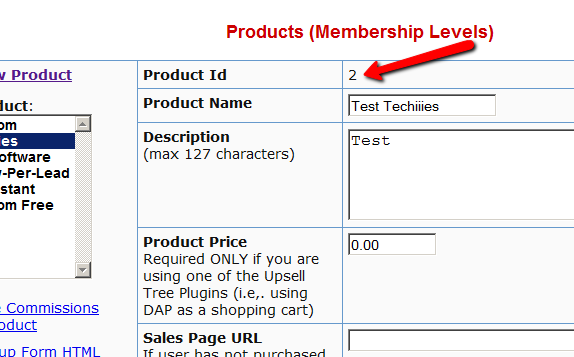
3. There is a file called dap-aweber.php in the dap folder. Make a copy of that file and call it dap-aweber-PRODUCTID.php.
Replace with the text PRODUCTID with the actual Product Id you noted in the previous step.
So in the example above, Product Id is 2. So the name of the file copy should be dap-aweber-2.php.
4. Open this file (dap-aweber-2.php).
The first line of code in this file looks like this:
$default_product_id = 1; //Change this to any product id from DAP
Change the part shown in bold below:
$default_product_id = 2; //Change this to any product id from DAP
Upload this file back to /dap folder on your site.
5. Now login to your AWeber account.
5A) Select the list that you wish to sign up users to.
5B) Click on Webforms.
5C) Edit existing form by clicking on the name of the list.
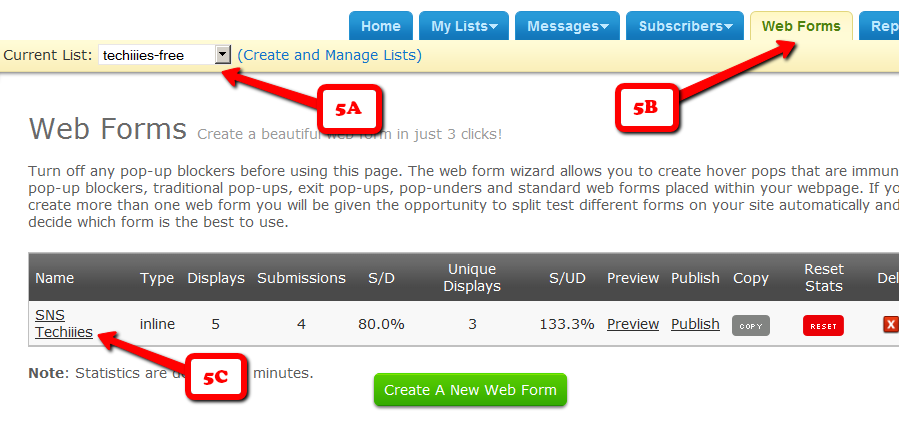
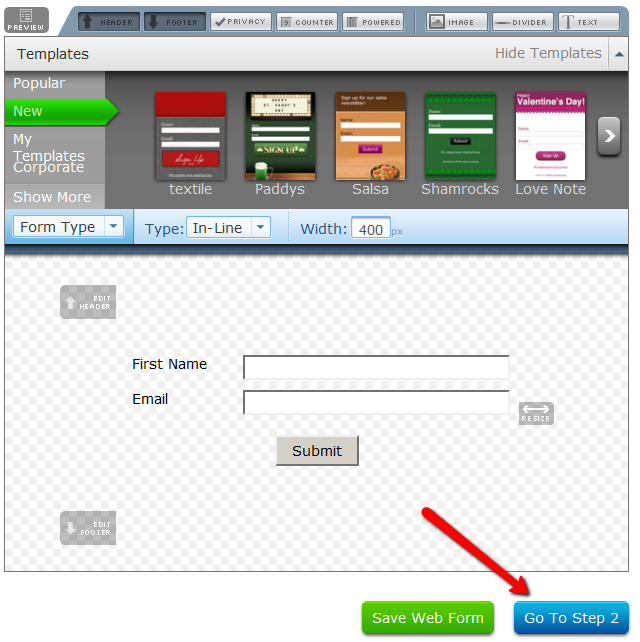
6. On the next page – the list form generator page – click on ‘Go to Step 2′ towards the bottom of the page.

7. On the next, page….
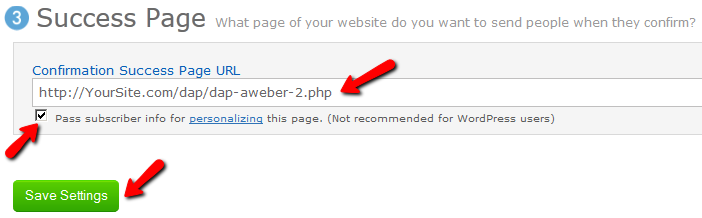
7A) Click on the thankyou page dropdown and select ‘Custom’.
7B) Set the thank you Page URL to http://YourSite.com/dap/dap-aweber-PRODUCTID.php
Replace YourSite.com with the name of your site.
Replace PRODUCTID with the ProductId of the product you noted in step 2.
So, if the productId of the product in DAP is 2, then the thankyou page URL will be – http://yoursite.com/dap/dap-aweber-2.php
7C) Where it says “Pass Form Data”, check the check box so that Aweber can “Forward subscriber information to your thank you page” – which essentially is DAP, so that DAP can add the subscriber to your membership site.
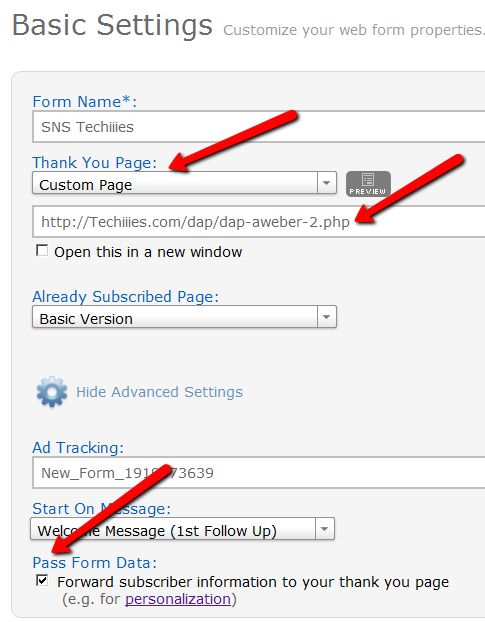
That’s it!
Now you may use the Aweber web form directly on your squeeze page for signing up subscribers (instead of DAP’s “Direct Signup Form”).
Then, every time a subscriber signs up via the Aweber form, they will automatically be added to DAP.
NOTE:
You may configure the Thank-You message in DAP to send out the dap login id and password via DAP.
-OR-
You can leave the Thank-you message in DAP Product page empty. Then configure DAP to generate a default password (DAP Admin -> Setup -> Config -> Advanced) as shown below, and then enter that same pre-chosen password in to your very first Aweber follow up email that goes out to your subscribers, so that they can receive their dap id/password details directly from your Aweber list.
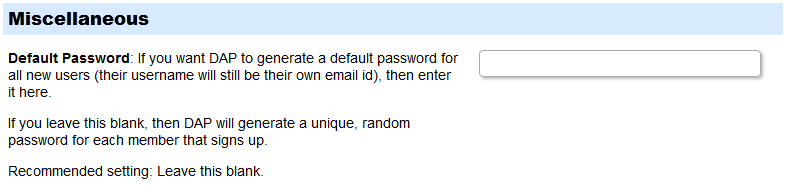
For more details about this default password, please see this post.
NOTE: If you want to send users upon signup to a different page instead of the login page, then do this:
Open dap-aweber-5.php
Look for this line :
$redirect = Dap_Config::get(“LOGIN_URL”);
Update it to point to any URL of your choice.
For ex -
$redirect = “http://yoursite.com/thankyou”;
This way you can redirect users after they signup (in aweber / dap) to the welcome /thankyou page or any page of your choice.


31 comments ↓
Will this way work if I do not want to assign log in and passwords to customers receiving free blog content? I only want the customers who have signed up for a product purchase off of the blog to be assigned passwords.
This method will not work if you want to add paid members to your aweber list.
It will work only when you use Aweber sign-up form and give away free (but protected) content to those that sign-up. You protect the free content in dap so it’s not publicly available and you setup Aweber to redirect to DAP upon successful sign-up. This way DAP can create the membership account and the users get access to the free content.
If you have paid products and want to add paid members to your Aweber list, then you cannot use the Aweber signup form. You need to then have DAP notify Aweber via 3rd party notification (in DAP products page).
http://www.digitalaccesspass.com/doc/aweber-integration/
Veena i understand that removing the double optin email message from the product will make my product single optin so if i’ll use the direct form signup and aweber email parser i’ll have a single optin for sign up users.
Am i wrong?
[...] If you are looking for the other way, i.e, “FROM Aweber TO DAP”, then click here. [...]
Hi,
I`m considering to purchase DAP. Do you have the same integration sample for Get Response as for Aweber
http://www.digitalaccesspass.com/doc/aweber-integration/
We do not have the integration sample but we can help out with the integration after you purchase DAP.
Cool !
Thank You Veena
I very appreciate it your prompt answer
I have been using the DAP form and forwarding sign ups to Aweber, but the double opt in was a problem. A lot of sign ups just miss the confirmation e-mail. I am going to try the Aweber form and forward to DAP instead. This should avoid the confirmation e-mails, and members will still get added to Aweber and Dap with one form. Thanks for the post.
Could DAP work with another outside autoresponder system like autoresponseplus.com
Paul,
As long as they have a “subscribe by email” feature and provide your list with a subscribable email id – like yourlist@icontact.com (say)-
then DAP can easily integrate with autoresponseplus.com. Just put that list email id
into the “3rd Party Notification” field on the DAP Product page, that’s all.
Thats great! Thanks Veena!
Hi guys
Just setting up Aweber with Dap and inserting a password so that DAP will generate a default password for all new users as per the final point on the above blog.
Can someone share this password around since it is not automatically generated?
In my Aweber login form i am asking for just the first name and email, does the first name become the user name and therefore make it easy to share the password if you had the same first name?
Cheers,
Matt
Cheers,
Matt
What if the the list doesnt have subscribe by email option…
Nirav,
To integrate the list with DAP, that’s the only way currently. If subscribe by email is not supported, then custom coding would be required to call the 3rd party APIs that we do not support it currently.
Is there a way to send a notification to Aweber once the person has paid so their membership goes from Free to Paid, and then DAP notifies Aweber to take that person off the Free email list (the promotion list) and puts them on the customer list (for updates and news etc) ?
Using the rules in Aweber I can create a rule that when someone gets added to one list they are removed from another list, so there just needs to be a way to notify aweber one more time once someone has gone from Free to Paid. Any ideas?
Thanks again – this is a fantastic product!
Hi Mitch,
Please see – http://www.digitalaccesspass.com/doc/dap-startup-questions/
Thanks Veena. I see my problem is that I’m trying to do something impossible
When using Aweber – > Dap, need to create 2 products, one is free and one is paid, and each product works with a different email list. Thanks for the help
[...] Click here for Aweber single-opt-in list => DAP integration steps [...]
Hey Veena, I think Mitch should still be able to setup a “remove” in Aweber even when using the Aweber to DAP technique. This is possible if he is hosting both the PROMOTION list and the CUSTOMER list (DAP to Aweber) in the same Aweber account. All Mitch needs to do is set a rule in aweber to say if a name appers in the Customer list, Aweber must remove it from the Promotion list of the same account. Or am i as lost?
I`m new to Aweber. Today I tried to set up Aweber to DAP, but it doesn`t work. After initial setting following above I`m added to AW, but not to DAP. Instead, I got following error:
============
Warning: include_once(dap-config.php) [function.include-once]: failed to open stream: No such file or directory in /home/ma4/public_html/MYURL/dap/dap-aweber-1.php on line 3
Warning: include_once() [function.include]: Failed opening ‘dap-config.php’ for inclusion (include_path=’.:/usr/lib/php:/usr/local/lib/php’) in /home/ma4/public_html/MYURL/dap/dap-aweber-1.php on line 3
Fatal error: Class ‘Dap_Config’ not found in /home/ma4/public_html/MYURL/dap/dap-aweber-1.php on line 6
=============
I want my Thank You page after form submission. What I did was:
1. in dap-aweber-1.php file (1 is product) I added my custom Thank You URL.
$redirect = “http://MyDomain/thank-you”;
2. In AW web form Thank you page I inserted:
http://mydomain/dap/dap-aweber-1.php
When I submitted details in web form I was showed AW confirmation page instead of my custom.
By the way, new AW (in your blog is a little bit different) have now email parser including DAP. Do I have to use it or just leave it?
Make sure dap-config.php is included at the top (right after the php start tag)
include_once (“dap-config.php”);
If that does not work, add the full path to config…
If you visit this url in a browser (http://mydomain/dap/getpath.php), it will return the path to dap on your site.
Say it returns:
/home/cr/mydomain.com/dap
Then change the include statement in dap-aweber.php script to this:
include_once (“/home/cr/mydomain.com/dap/dap-config.php”);
See if that helps.
Thanks Veena,
I have DAP in my main website and sub-website installed:
First is: my_domain
Another: my_domain/ai (here with optimize press
I realized that in order to run it I have to have both enabled. When I installed OP long time ago I deactivated DAP in main website, because I installed on OP. However, it didn`t want to work, so I had to reactivate it on main one, even though I don`t use there. Today I found that one of them did not have dap-config.php in it. No reason why. I pulled out from DAP which had it and added to the one whcih didn`t have it. Still no success.
Here is my dap-aweber-1.php
“include_once (“/home/ma4/public_html/my_URL/dap/dap-config.php”);
$default_product_id = 1; //Change this to any product id from DAP
$redirect = “http://my_URL/Thank-you”;
I added in AW Web Form Thank You Page:
http://my_URL/dap/dap-aweber-1.php
Now when I tested Preview in AW I get:
“Oops!
An error has occurred!
Error: Sorry, all fields are mandatory. Please go ‘back’ and fill up the missing information.
Click here to go back.”
Should I open a ticket? I will keep trying yet
That error message in Preview is probably because it`s just Preview. I tested web form with above configuration and it worked. However, DAP did not receive anything. I couldn`t log in using manual password I gave in first follow up welcome email. Password is set up correctly in DAP admin config
Veena, Thank You a lot.
Everything works perfect
I`m set.
Love you guys for prompt responses
Can you delete the latest post above?
Thanks Adam
.
Hi Veena,
Is there any way to remove the “Powered by DigitalAccessPass.com” within the “Thank You” welcome email?
Apart from that, all set up – cheers!
Hi Mick,
Yes, you can remove it in DAP setup – > Templates -> Email: Footer.
In the discussion of how to “Use Aweber Webform to Sign-up Users” you say the following:
—start excerpt—
But if you want your Aweber list to be single-opt-in, then you can use an Aweber signup form on your squeeze page (instead of the DAP sign-up form) and then have Aweber add users to DAP.
—end excerpt—
To my knowledge, Aweber signups are always double opt-in, meaning I fill out the Aweber signup form, and then check my email to click a confirmation link. So I’m not sure what you mean by single opt-in using Aweber to DAP work flow.
Are you saying that a double opt-in is still expected from the Aweber part of the sign up, but DAP will not require an additional confirmation step?
Please clarify. Thank you!
>>To my knowledge, Aweber signups are always double opt-in, meaning I fill out the Aweber signup form, and then check my email to click a confirmation link. So I’m not sure what you mean by single opt-in using Aweber to DAP work flow. < <
You can remove the 'double-opt' from aweber list.
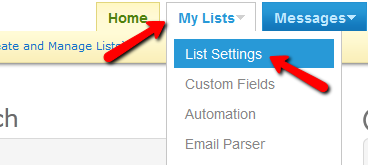
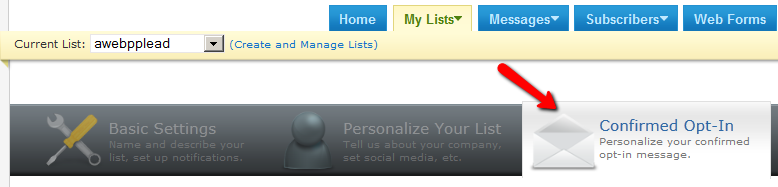
Go to Aweber My List -> List Settings -> Under the Confirmed Opt-in tab there is an option to turn off opt-in for webform.
Look for this: Require Opt-In on Web Forms
And turn if off.
Opt-in will not be expected from the Aweber part of the sign up if you turn off “Require Opt-In on Web Forms”.
Hi,
I have a situation where once in my membership area I am running an omnovia chat room. We have an API built for it that when the javascript link is clicked it opens the conference room in a new window. Everything is working alright however I am running into a small problem.
I am using the Aweber=>DAP configuration. That is working fine.
My problem is that when someone submits information via aweber it is merging their First Name and Last Name into the Firstname field once they become a member.
There for it leaves the last name field blank when they are a member in our dap system.
So even if I use the merge tags %%First Name%% I still end up with their full name.
However the main reason I need to see if I can find a solution is that the omnovia conference room requires a first and last name.
there for in order to get it to work I have to go into the users profile and copy and past there last name down into the last name field and save.
Is there a way to get DAP to recognize First name and Last Name separately?
If I need to open a support ticket I can just let me know.
Thanks in advance,
Matt
Matt,
I dont think it’s dap merging the firstname.lastname.
If you are using dap-aweber.php script for aweber->dap integration, you will notice in that script that dap uses the “name” parameter in the request header to retrieve name from aweber and aweber is probably sending firstname.lastname in that field.
You can write custom php code to extract just the firstname in dap-aweber-productId.php script.
Something like this:
$name= explode(” “, $_GET['name']);
$first_name = $name[0];
$last_name = $name[1];
Leave a Comment